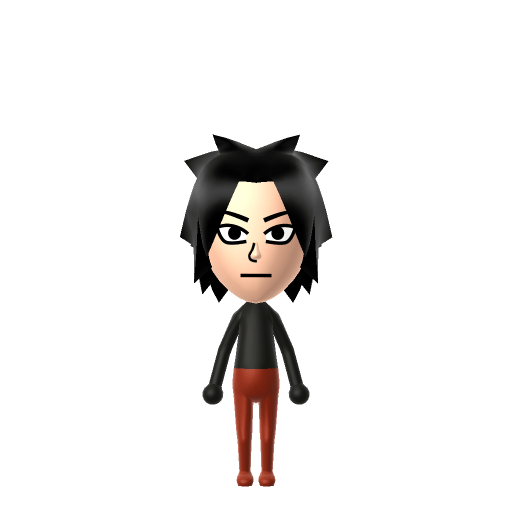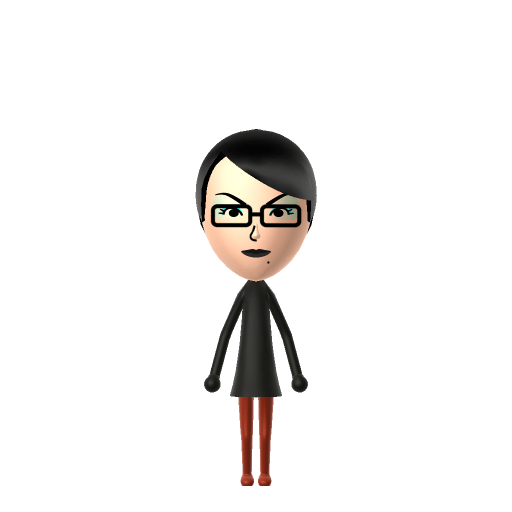
Bayonetta, born Cereza, is the titular protagonist of the Bayonetta video game series developed by PlatinumGames and owned by Sega. Created by Hideki Kamiya and designed by Mari Shimazaki, she has been voiced in English by Hellena Taylor across the first two games and by Jennifer Hale in Bayonetta 3.


Bayonetta Mii for Tomodachi Life
The stylish Umbra Witch from Sega and PlatinumGames' Bayonetta franchise.
About the Bayonetta Mii
Bayonetta Mii Quick Facts
Bayonetta Mii — cast at a glance
- Voiced by
- Hellena Taylor (Bayonetta 1 & 2); Jennifer Hale (Bayonetta 3)
Bayonetta is all confident swagger — after importing her Mii into Tomodachi Life: Living the Dream, push the voice toward a slow, low, self-assured delivery on LTD's voice sliders for that purring Umbra Witch attitude.
Recommended personality for your Bayonetta Mii: Visionary
A bold risk-taker full of energy and new ideas. Ambitious, forward-thinking, and always looking at the big picture.In Tomodachi Life, set this Mii's sliders so Speech + Movement totals 12–15 and Thinking + Energy totals 4–7. See the full Visionary guide →
Why this fitsBayonetta storms heaven and earth on a long-term plan to reclaim her sister and confront divine forces, monologuing confidently the whole way. That command-the-future profile fits Visionary (high Speech + Movement, low Thinking + Energy).
How to Make a Bayonetta Mii in Tomodachi Life
To make a Bayonetta Mii in Tomodachi Life: Living the Dream, open Mii Maker and pick long black hair styled with side bangs, large eyes behind rectangular glasses, a beauty mark beside her mouth, and bright red lipstick. The picker-by-picker walkthrough below works for both Nintendo Switch (LTD) and 3DS (original Tomodachi Life).
Use the system Mii Maker, then bring the Mii into Tomodachi Life: Living the Dream.
Body & Build
- 1Set gender to "Female".
- 2Set favorite color to black.
- 3Set height to 100%.
- 4Set weight to 7%.
Face Shape & Skin
- 5Set makeup.
Hair
- 6Set hair style.⋯⋯Row 19 · Column 3
- 7Press the button to flip the hair.
- 8Set hair color in the expanded colors menu.
Eyes
- 9Set eyes.⋯Row 2 · Column 6
- 10Make eyes 2 smaller.
- 11Squash the eyes 2 to the left.
- 12Rotate outer edge of the eyes all the way down, then rotate it 4 ticks back up.
- 13Move eyes 2 further apart.
Eyebrows
- 14Set eyebrows.⋯Row 1 · Column 6
- 15Set eyebrows color in the expanded colors menu.
- 16Make eyebrows 1 smaller.
- 17Rotate outer edge of the eyebrows 1 ticks up.
- 18Move eyebrows 1 further apart.
- 19Move eyebrows 2 ticks down.
Nose
- 20Make nose 2 smaller
- 21Move nose 1 ticks down.
Mouth
- 22Set mouth.⋯⋯Row 5 · Column 1
- 23Set mouth color in the expanded colors menu.
- 24Make mouth 1 smaller
- 25Squash the mouth 3 to the left.
Glasses
- 26Set glasses type.⋯Row 1 · Column 4
- 27Make glasses 1 smaller
- 28Move glasses 1 ticks down.
Beauty Mark
- 29Turn mole on.
- 30Make mole 4 smaller
- 31Move mole 8 ticks to the right.
- 32Move mole 6 ticks down.
Diagrams show where the option sits in the Mii Maker picker (4 columns, scroll to reach later rows). Editor menus differ slightly between regions and console revisions — if an exact option is missing, pick the closest one.
Mii Studio data code
Bayonetta's full appearance as a Mii Studio data string. Drop it into Mii rendering tools or community Mii editors that accept Studio codes (it's not a console import — for the game itself use the steps above).
0800090108040214040c0308070313030c000300000b010803020b08016d7f00010a1a0000031b0d04000a02010a
Scan this Bayonetta Mii QR code
This is a 3DS-format Mii QR code generated from Bayonetta's Mii data. On a Nintendo 3DS, open Mii Maker → QR Code / Image Options → Scan QR Code and point the camera at it, then bring the Mii into the original Tomodachi Life. The Switch / Switch 2 has no camera, so it can't scan Mii QR codes — for Tomodachi Life: Living the Dream use the step-by-step instructions above (or the online Mii creator).
Download QR codeGet the Bayonetta Mii look
Build cheat-sheet
Feature → the move to make in Mii Maker
- Hair
Long jet-black hair with a swept side-fringe framing one eye — pick a long dark hairstyle with side bangs.
- Glasses & beauty mark
Her rectangular glasses and the beauty mark beside her mouth are key tells — add the glasses part and a small mole/freckle if available.
- Make-up
Bold red lipstick and sharp, confident eyes complete the look — choose striking eyes and red lip make-up.
- Colour
Her palette is black with grey accents — set a dark favourite colour and dress the Mii in black.
What Mii Maker can't do for your Bayonetta Mii
- Mii Maker can’t
Hair-made bodysuit
Closest you can getBayonetta's skintight outfit is literally made of her own magical hair, which recedes when she summons demons — Mii Maker can't reproduce that, so dress the Mii in a plain black outfit and let the hair, glasses and beauty mark carry the look.
- Mii Maker can’t
Scarborough Fair guns
Closest you can getShe fights with four pistols (two in her hands, two on her heels), but Miis can't hold or mount weapons, so the guns can't be added — lean on her face and hair instead.
Bayonetta Mii on your island
A Visionary-type Bayonetta carries herself like she's three steps ahead of everyone — poised, theatrical and utterly self-assured, the same energy she brings to storming Paradiso and Inferno. Visionaries set the tone of the Apartments, and LTD grows their friendships through proximity and repeated conversations rather than personality scores. Don't assume her grand schemes pick her partner, though: romance in Tomodachi Life: Living the Dream runs on dating preferences, random crushes and birthday/zodiac compatibility — so give your Bayonetta Mii a birthday and let Love Pondering decide who the Umbra Witch falls for.
Did you know? — Bayonetta Mii
Bayonetta is an Umbra Witch whose hair is both her clothing and her weapon — she channels it into 'Wicked Weaves' to summon Infernal Demons, so her outfit recedes as she attacks.
Her four guns are collectively named Scarborough Fair, each pistol called Parsley, Sage, Rosemary and Thyme after the folk song.
Her signature 'Witch Time' ability slows down time whenever she dodges an attack at the last possible moment — the mechanic that defined the series' combat.
Born Cereza, she was created by Hideki Kamiya and designed by Mari Shimazaki for the 2009 game, developed by PlatinumGames and published by Sega.
Bayonetta Mii — FAQ
How do you make a Bayonetta Mii in Tomodachi Life?
Use long black hair with a side fringe, rectangular glasses, a beauty mark by the mouth, bold red lipstick and sharp eyes, then dress the Mii in black. Mii Maker can't make her hair-bodysuit or guns, so follow the picker-by-picker steps above for Switch (LTD) or 3DS.
Why can't a Mii wear Bayonetta's actual outfit?
Because her skintight suit is literally made of her own magical hair, which recedes when she summons demons — Mii Maker has no way to reproduce that. Dress the Mii in plain black and let the hair, glasses and beauty mark sell the look.
Who voices Bayonetta?
Hellena Taylor voiced her in Bayonetta 1 and 2, and Jennifer Hale took over for Bayonetta 3. Push your Bayonetta Mii's LTD voice toward a slow, confident delivery to match.
What personality should a Bayonetta Mii have?
Visionary fits best — set high Speech + Movement with low Thinking + Energy in the panel above. It matches her confident, command-the-room, always-scheming presence on your island.
Sources: WikipediaBayonetta WikiBayonetta WikiBayonetta WikiCharacter facts are grounded in the source(s) above; Mii-Maker mapping is our own craft guidance.
Have your own Mii?
Paste a Mii Studio code or upload a Mii QR image into the QR code Mii decoder to get this same step-by-step recreation guide for it.
Want to design your own?
Build a Mii from scratch in the online Mii creator, then bring its code here for rebuild steps.