All Mii ideas
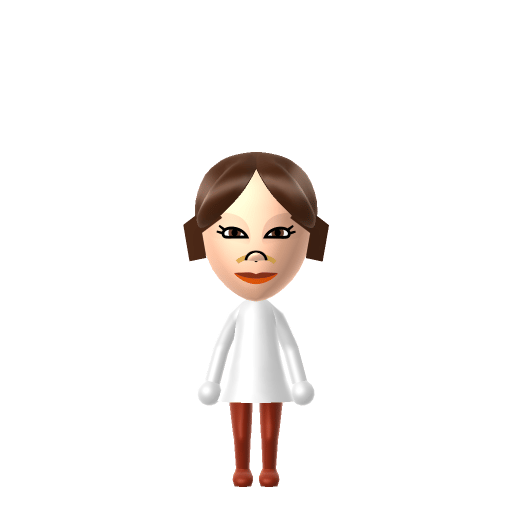
Princess Leia Mii for Tomodachi Life
Movie & TV Mii Idea

Princess Leia Mii for Tomodachi Life

Rebel leader, royalty, and a sharp wit — from the Star Wars saga.

#movie#star-wars#rebel#female

Princess Leia Mii Quick Facts

Princess Leia Mii — cast at a glance

Portrayed by
Carrie Fisher
In Tomodachi Life

Leia is all steel and sharp wit — give your Princess Leia Mii a clear, confident voice on LTD's sliders so she sounds like she's the one giving the orders on your island.

About the Princess Leia Mii

Character File

Princess Leia Organa is a character in the Star Wars franchise, introduced in the original 1977 film. She is a princess of the planet Alderaan, a member of the Imperial Senate, and an agent of the Rebel Alliance who helps bring about the destruction of the Empire's Death Star.

01 — Personality

Recommended personality for your Princess Leia Mii: Visionary

A bold risk-taker full of energy and new ideas. Ambitious, forward-thinking, and always looking at the big picture.In Tomodachi Life, set this Mii's sliders so Speech + Movement totals 12–15 and Thinking + Energy totals 4–7. See the full Visionary guide →

Why this fitsLeia leads the Rebel Alliance with a long-horizon plan to overthrow the Empire, speaking decisively in war rooms and on the field. That command-the-future profile fits Visionary (high Speech + Movement, low Thinking + Energy).

02 — How to Make This Mii

How to Make a Princess Leia Mii in Tomodachi Life

To make a Princess Leia Mii in Tomodachi Life: Living the Dream, open Mii Maker and pick her signature long brown hair coiled into two large side buns, bright brown eyes, and a determined mouth, then dress her in long white robes. The picker-by-picker walkthrough below works for both Nintendo Switch (LTD) and 3DS (original Tomodachi Life).

Use the system Mii Maker, then bring the Mii into Tomodachi Life: Living the Dream.

Body & Build

  1. 1
    Set gender to "Female".
  2. 2
    Set favorite color to white.
  3. 3
    Set height to 78%.
  4. 4
    Set weight to 61%.

Face Shape & Skin

  1. 5
    Set facial features/wrinkles.

Hair

  1. 6
    Set hair style.
    ⋯
    Row 2 · Column 5
  2. 7
    Press the button to flip the hair.

Eyes

  1. 8
    Set eyes.
    ⋯
    ⋯
    Row 6 · Column 1
  2. 9
    Set eye color in the expanded colors menu.
  3. 10
    Make eyes 1 smaller.
  4. 11
    Rotate outer edge of the eyes all the way down, then rotate it 3 ticks back up.

Eyebrows

  1. 12
    Set eyebrows.
    ⋯
    Row 2 · Column 5
  2. 13
    Make eyebrows 4 larger.
  3. 14
    Rotate outer edge of the eyebrows 5 ticks down.
  4. 15
    Move eyebrows 10 further apart.
  5. 16
    Move eyebrows 4 ticks up.

Nose

  1. 17
    Set nose.
    ⋯
    Row 2 · Column 2
  2. 18
    Make nose 1 smaller
  3. 19
    Move nose 1 ticks down.

Mouth

  1. 20
    Set mouth.
    ⋯
    Row 1 · Column 2
  2. 21
    Make mouth 1 larger.
  3. 22
    Move mouth 1 ticks down.

Facial Hair

  1. 23
    Set mustache type.
    ⋯
    Row 1 · Column 3
  2. 24
    Move mustache 3 ticks up.
  3. 25
    Set beard color in the expanded colors menu.

Beauty Mark

  1. 26
    Turn mole on.
  2. 27
    Make mole 3 smaller
  3. 28
    Move mole 6 ticks to the right.

Diagrams show where the option sits in the Mii Maker picker (4 columns, scroll to reach later rows). Editor menus differ slightly between regions and console revisions — if an exact option is missing, pick the closest one.

Mii Studio data code

Princess Leia's full appearance as a Mii Studio data string. Drop it into Mii rendering tools or community Mii editors that accept Studio codes (it's not a console import — for the game itself use the steps above).

07004d030a030318020c03010108050c06000000080a010804000a01012c6301010814031305010e04020703040a
03 — QR Code
Princess Leia Mii QR code for the Nintendo 3DS

Scan this Princess Leia Mii QR code

This is a 3DS-format Mii QR code generated from Princess Leia's Mii data. On a Nintendo 3DS, open Mii Maker → QR Code / Image Options → Scan QR Code and point the camera at it, then bring the Mii into the original Tomodachi Life. The Switch / Switch 2 has no camera, so it can't scan Mii QR codes — for Tomodachi Life: Living the Dream use the step-by-step instructions above (or the online Mii creator).

Download QR code

Get the Princess Leia Mii look

Build cheat-sheet

Feature → the move to make in Mii Maker

  1. Hair

    The twin side-buns are the whole signature — pick the closest long brown style and read the buns through silhouette; the editor has no exact cinnamon-bun option, so coiled or pinned-back brown hair is the nearest match.

  2. Eyes & expression

    Give her bright brown eyes and a firm, determined mouth — she leads a rebellion, so no soft smile.

  3. Robe

    Dress her in long white robes using LTD's in-game clothing, and set a clean neutral favourite colour so the white reads at a glance.

  4. Build

    Keep an average adult build — Leia's recognition rides on the hair and the white robe, both of which a Mii can carry well since she's fully human.

Pair your Princess Leia Mii with

In Tomodachi Life

Recreate Han Solo, Darth Vader and Luke Skywalker as their own Miis and house them near your Princess Leia Mii to assemble the saga — but Tomodachi Life: Living the Dream won't make sparks fly or stage the family reveal for you. Romance there runs on dating preferences, random crushes and birthday/zodiac compatibility, never on who's canon, so whether Leia and Han become Sweethearts is down to how you play.

Did you know? — Princess Leia Mii

  1. Carrie Fisher was 19 when she filmed the original 1977 Star Wars; she went on to become a celebrated author and one of Hollywood's most sought-after script doctors.

  2. George Lucas has said Leia's side-bun hairstyle was inspired by women of the early-20th-century Mexican Revolution.

  3. She is Luke Skywalker's twin sister and the daughter of Darth Vader — both reveals that land across the original trilogy.

  4. Her hologram plea "Help me, Obi-Wan Kenobi. You're my only hope," carried by R2-D2, is the message that sets the whole original film in motion.

Princess Leia Mii on your island

Picture it

A Visionary-type Princess Leia is the island's natural leader — decisive, sharp-tongued and always three moves ahead, the resident others fall in behind. Visionaries room comfortably with similar big personalities, which is what LTD's roommate harmony rewards, so pair her with another strong-willed Mii. Her heart, though, isn't something rank can command: who a Mii falls for in Tomodachi Life: Living the Dream runs on dating preferences, random crushes and birthday/zodiac compatibility — never personality — so give your Leia a birthday, recreate Han nearby, and let the island decide whether that romance takes.

Life on your island

Princess Leia Mii — FAQ

How do you make a Princess Leia Mii in Tomodachi Life?

Use long brown hair styled as close to the twin side-buns as the editor allows, bright brown eyes and a determined mouth, then dress her in long white robes with LTD's in-game clothing. She's fully human, so the face builds easily — follow the picker-by-picker steps above for Switch (LTD) or 3DS.

Can you make Leia's bun hairstyle on a Mii?

Only approximately. Mii Maker has no exact cinnamon-bun option, so the nearest match is a long brown style coiled or pinned back to read as buns in silhouette. The white robe and her firm expression do most of the recognising.

Who should I pair a Leia Mii with?

Han Solo for the romance and Darth Vader for the family twist — build them as their own Miis and house them nearby. LTD won't recreate the canon, since relationships form from time spent together, but having the trio on one island sets the stage.

What personality should a Princess Leia Mii have?

Visionary fits best — set high Speech + Movement with low-to-mid Thinking + Energy in the panel above. It matches her decisive, command-the-future leadership of the Rebel Alliance.

Sources: WikipediaWikipediaCharacter facts are grounded in the source(s) above; Mii-Maker mapping is our own craft guidance.

More Miis like Princess Leia

Have your own Mii?

Paste a Mii Studio code or upload a Mii QR image into the QR code Mii decoder to get this same step-by-step recreation guide for it.

Want to design your own?

Build a Mii from scratch in the online Mii creator, then bring its code here for rebuild steps.