All Mii ideas
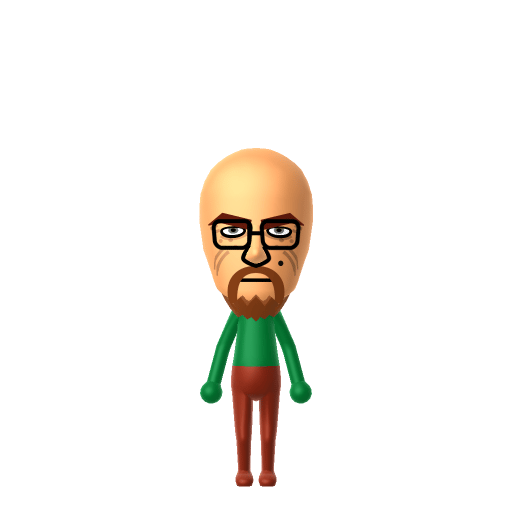
Walter White Mii for Tomodachi Life
Movie & TV Mii Idea

Walter White Mii for Tomodachi Life

The high-school chemistry teacher turned ruthless meth kingpin Heisenberg from AMC's Breaking Bad.

#tv#breaking-bad#antihero

About the Walter White Mii

Character File

Walter Hartwell White, also known by his criminal alias Heisenberg, is the central character of the AMC drama Breaking Bad, played by Bryan Cranston. A terminally ill high-school chemistry teacher in Albuquerque, he partners with former student Jesse Pinkman to manufacture and sell crystal methamphetamine, and over five seasons transforms from a meek family man into a feared crime lord.

Walter White Mii Quick Facts

Walter White Mii — birthday, age & cast at a glance

Birthday
September 7, 1958
Age
50–52 (Breaking Bad seasons 1–5)
Portrayed by
Bryan Cranston
In Tomodachi Life

Set Walt's Mii birthday to September 7 in Mii Maker — Tomodachi Life: Living the Dream treats birthdays as a first-class input, feeding the compatibility meter and zodiac interactions on your island.

01 — Personality

Recommended personality for your Walter White Mii: Visionary

A bold risk-taker full of energy and new ideas. Ambitious, forward-thinking, and always looking at the big picture.In Tomodachi Life, set this Mii's sliders so Speech + Movement totals 1215 and Thinking + Energy totals 47. See the full Visionary guide →

Why this fitsWalt's whole arc is a quiet, single-minded climb toward an empire he tells himself only he is smart enough to build — he plans for moves ahead, then justifies the cost after the fact. That low-noise, high-ambition profile fits Visionary (low Speech + Movement, high Thinking + Energy).

02 — How to Make This Mii

How to Make a Walter White Mii in Tomodachi Life

To make a Walter White Mii in Tomodachi Life: Living the Dream, open Mii Maker and shape a middle-aged face with a shaved head, a thick goatee, square wire-frame glasses, and a hardened set mouth, then add a pork-pie hat colour scheme for the Heisenberg look. The picker-by-picker walkthrough below works for both Nintendo Switch (LTD) and 3DS (original Tomodachi Life).

Use the system Mii Maker, then bring the Mii into Tomodachi Life: Living the Dream.

Body & Build

  1. 1
    Set gender to "Male".
  2. 2
    Set favorite color to green.
  3. 3
    Set height to 81%.
  4. 4
    Set weight to 43%.

Face Shape & Skin

  1. 5
    Set face/skin color.
  2. 6
    Set face type.
  3. 7
    Set makeup.
  4. 8
    Set facial features/wrinkles.

Hair

  1. 9
    Set hair style.
    Row 9 · Column 6
  2. 10
    Set hair color in the expanded colors menu.

Eyes

  1. 11
    Set eyes.
    Row 7 · Column 2
  2. 12
    Set eye color in the expanded colors menu.
  3. 13
    Make eyes 1 smaller.
  4. 14
    Squash the eyes 3 to the left.
  5. 15
    Rotate outer edge of the eyes all the way down, then rotate it 3 ticks back up.
  6. 16
    Move eyes 1 further apart.
  7. 17
    Move eyes 2 ticks down.

Eyebrows

  1. 18
    Set eyebrows.
    Row 1 · Column 3
  2. 19
    Set eyebrows color in the expanded colors menu.
  3. 20
    Make eyebrows 1 larger.
  4. 21
    Squash the eyebrows 1 to the left.
  5. 22
    Rotate outer edge of the eyebrows 1 ticks down.
  6. 23
    Move eyebrows 1 closer.
  7. 24
    Move eyebrows 4 ticks down.

Nose

  1. 25
    Set nose.
    Row 1 · Column 5
  2. 26
    Make nose 2 larger.
  3. 27
    Move nose 1 ticks down.

Mouth

  1. 28
    Make mouth 1 larger.
  2. 29
    Squash the mouth 1 to the left.
  3. 30
    Move mouth 4 ticks down.

Facial Hair

  1. 31
    Set mustache type.
    Row 2 · Column 1
  2. 32
    Make mustache 2 larger.
  3. 33
    Move mustache 4 ticks down.
  4. 34
    Set beard type.
    Row 1 · Column 3
  5. 35
    Set beard color in the expanded colors menu.

Glasses

  1. 36
    Set glasses type.
    Row 2 · Column 4
  2. 37
    Make glasses 1 smaller
  3. 38
    Move glasses 3 ticks down.

Beauty Mark

  1. 39
    Turn mole on.
  2. 40
    Make mole 1 smaller
  3. 41
    Move mole 10 ticks to the right.
  4. 42
    Move mole 3 ticks down.

Diagrams show where the option sits in the Mii Maker picker (4 columns, scroll to reach later rows). Editor menus differ slightly between regions and console revisions — if an exact option is missing, pick the closest one.

Mii Studio data code

Walter White's full appearance as a Mii Studio data string. Drop it into Mii rendering tools or community Mii editors that accept Studio codes (it's not a console import — for the game itself use the steps above).

030237000903032c030e020205050c010e01090b0b04000803010d03001e6703010c17021305171106030e06060a
03 — QR Code
Walter White Mii QR code for the Nintendo 3DS

Scan this Walter White Mii QR code

This is a 3DS-format Mii QR code generated from Walter White's Mii data. On a Nintendo 3DS, open Mii Maker → QR Code / Image Options → Scan QR Code and point the camera at it, then bring the Mii into the original Tomodachi Life. The Switch / Switch 2 has no camera, so it can't scan Mii QR codes — for Tomodachi Life: Living the Dream use the step-by-step instructions above (or the online Mii creator).

Download QR code

Get the Walter White Mii look

Build cheat-sheet

Feature → the move to make in Mii Maker

  1. Head

    For the Heisenberg era, pick the clean-shaven bald / no-hair option; for early teacher Walt, use short receding brown hair instead.

  2. Facial hair

    A full, close-cropped goatee flecked with grey — choose a goatee or Vandyke style in a dark-grey shade.

  3. Glasses

    Square wire-frame glasses — add the closest rectangular frames the editor offers.

  4. Colour

    Dress the finished Mii in muted browns, tans and olive greens after import to match Walt's wardrobe.

Pair your Walter White Mii with

In Tomodachi Life

Recreate Jesse as a neighbour and you have the show's central pair on your island — but Tomodachi Life: Living the Dream writes its own story. Friendships grow from proximity and time spent together, and its romance system runs on dating preferences, random crushes and zodiac/birthday compatibility, so the game never auto-links the partnership; you set the stage by housing them close and steering their conversations.

Did you know? — Walter White Mii

  1. Walt's criminal alias "Heisenberg" is a reference to the theoretical physicist Werner Heisenberg.

  2. Bryan Cranston won four Primetime Emmy Awards for Outstanding Lead Actor in a Drama Series for the role, three of them consecutive.

  3. The actual porkpie "Heisenberg" hat was donated to the Smithsonian's National Museum of American History in 2015.

  4. Before Breaking Bad, audiences knew Cranston mainly as the over-the-top dad Hal on the sitcom Malcolm in the Middle, which made his casting a gamble.

Walter White Mii on your island

Picture it

A Visionary Walt is the low-noise, high-ambition resident — he keeps his own counsel and moves with quiet purpose rather than mingling loudly. LTD grows friendships through proximity and repeated conversations rather than personality scores, so an Apartment with a same-personality roommate suits him, since the game notes that Miis with similar personalities get along more easily. For the full Heisenberg effect, drop his pitch on LTD's exclusive voice pitch/speed/tone sliders — an in-game Mii Maker option that doesn't exist in the Switch system editor — for that low, deliberate growl.

Life on your island

Walter White Mii — FAQ

Do I need the porkpie hat to make Walter White?

No — Mii Maker has no hats, so build the bald head, grey goatee and square glasses first. That silhouette already reads as Heisenberg; add the porkpie hat as an in-game accessory once he's imported into LTD.

Should I build teacher Walt or Heisenberg?

Either works from the same face — give him short receding brown hair and glasses for the meek season-one teacher, or shave the head and add the goatee for the Heisenberg kingpin. The glasses and set mouth carry both looks.

What personality should I give a Walter White Mii?

Visionary fits him best — set low Speech + Movement with high Thinking + Energy in the panel above. It matches the quiet, single-minded mastermind who plans several moves ahead and justifies the cost later.

Should I add Jesse Pinkman to my island too?

Yes — recreate Jesse and house him near Walt to rebuild the show's central duo. Remember LTD bonds form from time spent together rather than canon, so whether they become Best Friends (or clash) is up to how you play matchmaker.

Sources: WikipediaSmithsonian MagazineCharacter facts are grounded in the source(s) above; Mii-Maker mapping is our own craft guidance.

More Miis like Walter White

Have your own Mii?

Paste a Mii Studio code or upload a Mii QR image into the QR code Mii decoder to get this same step-by-step recreation guide for it.

Want to design your own?

Build a Mii from scratch in the online Mii creator, then bring its code here for rebuild steps.