Jesus was a first-century Jewish preacher and religious leader who is the central figure of Christianity, the world's largest religion. Traditionally held to have been born in Bethlehem and raised in Nazareth, he is estimated by scholars to have lived from around 6–4 BC to AD 30 or 33. Over the centuries he has become one of the most widely depicted figures in art, portrayed differently by cultures around the world.


Jesus Mii for Tomodachi Life
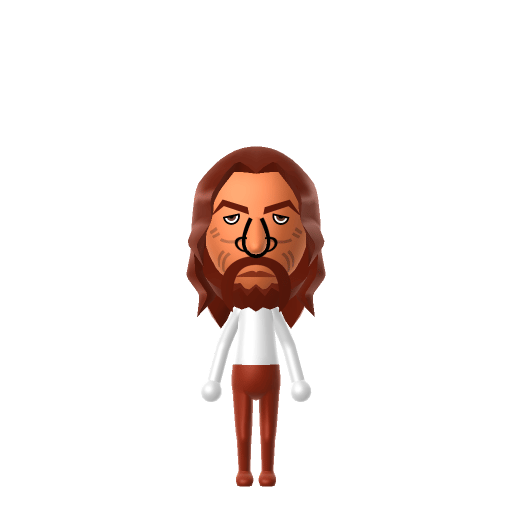
A Mii based on the common Western artistic depiction of Jesus — long centre-parted hair and a full beard.
About the Jesus Mii
Jesus Mii Quick Facts
Jesus Mii — age at a glance
- Age
- Scholarly estimate: c. 6–4 BC to AD 30 or 33
Because his appearance is unrecorded, treat this as an art-history costume rather than a portrait — pair the long hair and beard with a simple robe-coloured outfit once you import him into Tomodachi Life: Living the Dream.
Recommended personality for your Jesus Mii: Visionary
A bold risk-taker full of energy and new ideas. Ambitious, forward-thinking, and always looking at the big picture.In Tomodachi Life, set this Mii's sliders so Speech + Movement totals 12–15 and Thinking + Energy totals 4–7. See the full Visionary guide →
Why this fitsHistorians describe Jesus as a first-century preacher and religious leader who taught and gathered a following — a role built on conviction and drawing people toward a shared vision. On the Tomodachi Life chart that reads closest to the Visionary (Leader) type in the Ambitious group.
How to Make a Jesus Mii in Tomodachi Life
This Jesus Mii is based on the common Western artistic depiction rather than any historical record — his actual appearance is unknown. To make the Jesus Mii in Tomodachi Life: Living the Dream, choose long, centre-parted brown hair, a full brown beard and moustache, a calm expression and a robe-coloured outfit. The walkthrough below works for both Switch (LTD) and 3DS.
Use the system Mii Maker, then bring the Mii into Tomodachi Life: Living the Dream.
Body & Build
- 1Set gender to "Male".
- 2Set favorite color to white.
- 3Set height to 83%.
- 4Set weight to 39%.
Face Shape & Skin
- 5Set face/skin color.
- 6Set facial features/wrinkles.
Hair
- 7Set hair style.⋯⋯Row 18 · Column 5
- 8Set hair color in the expanded colors menu.
Eyes
- 9Set eyes.⋯⋯Row 8 · Column 2
- 10Set eye color in the expanded colors menu.
- 11Make eyes 3 smaller.
- 12Rotate outer edge of the eyes all the way down, then rotate it 2 ticks back up.
- 13Move eyes 3 further apart.
- 14Move eyes 3 ticks up.
Eyebrows
- 15Set eyebrows.⋯Row 2 · Column 2
- 16Set eyebrows color in the expanded colors menu.
- 17Rotate outer edge of the eyebrows 1 ticks down.
- 18Move eyebrows 1 ticks up.
Nose
- 19Set nose.⋯Row 2 · Column 3
- 20Make nose 2 larger.
- 21Move nose 3 ticks up.
Mouth
- 22Set mouth.⋯⋯Row 3 · Column 1
- 23Move mouth 2 ticks down.
Facial Hair
- 24Set mustache type.⋯Row 2 · Column 1
- 25Make mustache 4 larger.
- 26Move mustache 1 ticks down.
- 27Set beard type.⋯Row 2 · Column 1
- 28Set beard color in the expanded colors menu.
Glasses
- 29Set glasses type.⋯Row 2 · Column 3
- 30Make glasses 4 smaller
- 31Move glasses 5 ticks down.
Beauty Mark
- 32Make mole 2 larger.
- 33Move mole 5 ticks to the right.
- 34Move mole 12 ticks up.
Diagrams show where the option sits in the Mii Maker picker (4 columns, scroll to reach later rows). Editor menus differ slightly between regions and console revisions — if an exact option is missing, pick the closest one.
Mii Studio data code
Jesus's full appearance as a Mii Studio data string. Drop it into Mii rendering tools or community Mii editors that accept Studio codes (it's not a console import — for the game itself use the steps above).
020332030a02012b0509030205041502090200000b0a000800050f02000f6a06000708031304070f08030b060806
Scan this Jesus Mii QR code
This is a 3DS-format Mii QR code generated from Jesus's Mii data. On a Nintendo 3DS, open Mii Maker → QR Code / Image Options → Scan QR Code and point the camera at it, then bring the Mii into the original Tomodachi Life. The Switch / Switch 2 has no camera, so it can't scan Mii QR codes — for Tomodachi Life: Living the Dream use the step-by-step instructions above (or the online Mii creator).
Download QR codeGet the Jesus Mii look
Build cheat-sheet
Feature → the move to make in Mii Maker
- Hair
Long, straight, centre-parted brown hair is the signature of the Western depiction — pick the longest centre-parted style in a mid-brown swatch.
- Beard
A full, medium-length brown beard with a moustache, matching the hair colour.
- Face
A longish, calm face with almond-shaped eyes — keep the expression neutral and gentle.
- Outfit
Add a plain robe-coloured top (often white or red) as in-game clothing after import — Mii Maker itself has no robe.
What Mii Maker can't do for your Jesus Mii
- Mii Maker can’t
Flowing robe and halo
Closest you can getMii Maker has no robe garment or halo/nimbus — add a simple long top as in-game clothing; the halo is purely an art convention with no Mii equivalent.
- Mii Maker can’t
The full length of the classic long hair
Closest you can getMii long-hair options are shorter and more stylised than the flowing hair of classical paintings, so the length is only approximated.
Did you know? — Jesus Mii
There is no physical description of Jesus in any of the canonical Gospels — the familiar bearded, long-haired look is an artistic convention, not a record.
That standard image emerged around AD 300 but did not become established until the 6th century.
Depictions of Jesus tend to take on the ethnic characteristics of the culture that made them, so his appearance in art varies around the world.
Jesus Mii — FAQ
Is this what Jesus really looked like?
No — his actual appearance is unrecorded, and there is no physical description of him in the Gospels. This Jesus Mii follows the common Western artistic depiction (long centre-parted hair and a full beard), a convention that developed centuries later.
Can Mii Maker make a robe and halo?
No. Mii Maker has no robe garment or halo. Build the hair and beard in the editor, then add a plain long top as in-game clothing after importing into LTD.
What hair and beard should I use?
Long, straight, centre-parted brown hair with a matching full brown beard and moustache — the signatures of the classic depiction.
Have your own Mii?
Paste a Mii Studio code or upload a Mii QR image into the QR code Mii decoder to get this same step-by-step recreation guide for it.
Want to design your own?
Build a Mii from scratch in the online Mii creator, then bring its code here for rebuild steps.