All Mii ideas
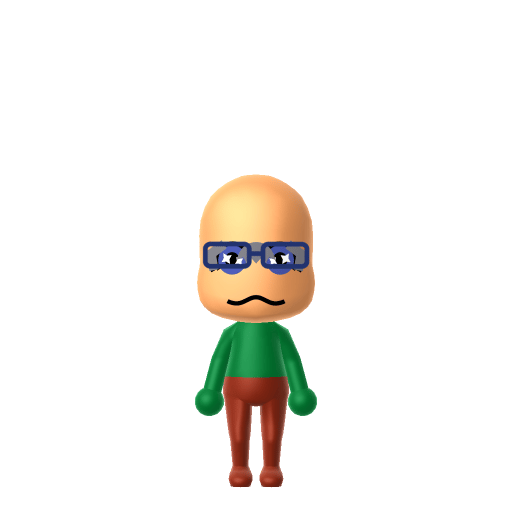
Donatello Mii for Tomodachi Life
Movie & TV Mii Idea

Donatello Mii for Tomodachi Life

The genius gadgeteer of the Teenage Mutant Ninja Turtles.

#tv#tmnt#ninja

About the Donatello Mii

Character File

Donatello, nicknamed Donnie or Don, is one of the four main characters of the Teenage Mutant Ninja Turtles. He is described as the smartest and often gentlest of his brothers, wearing a purple mask and wielding a bō as his signature weapon.

01 — Personality

Recommended personality for your Donatello Mii: Thinker

Analyzes every angle before acting, never rushing to conclusions. Deeply analytical and reflective by nature.In Tomodachi Life, set this Mii's sliders so Speech + Movement totals 4–7 and Thinking + Energy totals 0–3. See the full Thinker guide →

Why this fitsWikipedia describes him as "the smartest and often gentlest" of the brothers — typically the one inventing tools rather than fronting the action. That quiet-and-cerebral profile fits Thinker (low Speech + Movement, low Thinking + Energy).

02 — How to Make This Mii

How to Make a Donatello Mii in Tomodachi Life

To make a Donatello Mii in Tomodachi Life: Living the Dream, open Mii Maker and pick a green skin tone, a slim taller frame, and Donatello's signature purple bandana mask styled as a head accessory. The picker-by-picker walkthrough below works for both Nintendo Switch (LTD) and 3DS (original Tomodachi Life).

Use the system Mii Maker, then bring the Mii into Tomodachi Life: Living the Dream.

Body & Build

  1. 1
    Set gender to "Male".
  2. 2
    Set birth month to 9.
  3. 3
    Set birthday to 25.
  4. 4
    Set favorite color to green.
  5. 5
    Set height to 60%.
  6. 6
    Set weight to 100%.

Face Shape & Skin

  1. 7
    Set face/skin color.
  2. 8
    Set face type.

Hair

  1. 9
    Set hair style.
    ⋯
    ⋯
    Row 9 · Column 6

Eyes

  1. 10
    Set eyes.
    ⋯
    ⋯
    Row 8 · Column 4
  2. 11
    Set eye color in the expanded colors menu.
  3. 12
    Make eyes 1 larger.
  4. 13
    Rotate outer edge of the eyes all the way down, then rotate it 1 ticks back up.
  5. 14
    Move eyes 1 further apart.
  6. 15
    Move eyes 1 ticks up.

Eyebrows

  1. 16
    Set eyebrows.
    ⋯
    Row 2 · Column 5
  2. 17
    Set eyebrows color in the expanded colors menu.
  3. 18
    Make eyebrows 1 smaller.
  4. 19
    Rotate outer edge of the eyebrows 5 ticks down.
  5. 20
    Move eyebrows 8 further apart.
  6. 21
    Move eyebrows 1 ticks down.

Nose

  1. 22
    Set nose.
    ⋯
    Row 1 · Column 6
  2. 23
    Make nose 4 smaller
  3. 24
    Move nose 5 ticks up.

Mouth

  1. 25
    Set mouth.
    ⋯
    Row 2 · Column 2
  2. 26
    Make mouth 2 larger.
  3. 27
    Move mouth 2 ticks down.

Facial Hair

  1. 28
    Set mustache type.
    ⋯
    Row 1 · Column 2
  2. 29
    Make mustache 1 larger.
  3. 30
    Move mustache 10 ticks up.
  4. 31
    Set beard color in the expanded colors menu.

Glasses

  1. 32
    Set glasses type.
    ⋯
    Row 1 · Column 4
  2. 33
    Set glasses color in the expanded colors menu.
  3. 34
    Move glasses 1 ticks down.

Diagrams show where the option sits in the Mii Maker picker (4 columns, scroll to reach later rows). Editor menus differ slightly between regions and console revisions — if an exact option is missing, pick the closest one.

Mii Studio data code

Donatello's full appearance as a Mii Studio data string. Drop it into Mii rendering tools or community Mii editors that accept Studio codes (it's not a console import — for the game itself use the steps above).

04007f030c01050a030b03040103050a0b0100030004001004020b01001e4c04000214031306080f050100000004
03 — QR Code
Donatello Mii QR code for the Nintendo 3DS

Scan this Donatello Mii QR code

This is a 3DS-format Mii QR code generated from Donatello's Mii data. On a Nintendo 3DS, open Mii Maker → QR Code / Image Options → Scan QR Code and point the camera at it, then bring the Mii into the original Tomodachi Life. The Switch / Switch 2 has no camera, so it can't scan Mii QR codes — for Tomodachi Life: Living the Dream use the step-by-step instructions above (or the online Mii creator).

Download QR code

Get the Donatello Mii look

Build cheat-sheet

Feature → the move to make in Mii Maker

  1. Skin & colour

    Pick the closest green skin tone for the turtle, and set purple as the favourite colour — purple is the bandana shade that tells Donnie apart from his brothers.

  2. Bandana

    His mask is purple — choose a purple headband/bandana accessory, the single most recognisable part of the look.

  3. Eyes & expression

    He's the brainy, gentle one, so give him calm, focused eyes and a soft, thoughtful mouth rather than a fighter's scowl.

  4. Build

    Keep a lean teenage build — the turtles are teenagers.

What Mii Maker can't do for your Donatello Mii

  • Mii Maker can’t

    Turtle anatomy (shell, beak, three-fingered hands)

    Closest you can get

    Mii Maker only builds humanoid faces, so the shell, snout and three-fingered hands can't be made — a green skin tone plus the purple bandana is what reads as "Donnie."

  • Mii Maker can’t

    His bō staff

    Closest you can get

    Mii Maker can't hold weapons, so his signature bō staff can't be added; lean on the purple colour and the brainy expression to carry the character instead.

Did you know? — Donatello Mii

  1. Donatello is named after the Italian Renaissance sculptor Donatello — all four turtles take their names from Renaissance artists, names Peter Laird called "just quirky enough to fit the concept."

  2. In the original 1984 black-and-white Mirage comics all four turtles wore red bandanas; the colour code that puts Donnie in purple was introduced for the Playmates toys and the 1987 cartoon — and Laird has said the colours were assigned at random.

  3. The 1987 cartoon theme song sums him up in one line — "Donatello does machines" — the brainy inventor who'd rather build a gadget than throw a punch.

  4. His signature weapon across every version is the bō staff.

Pair your Donatello Mii with

In Tomodachi Life

Build Splinter and Casey Jones as their own Miis and house them near your Donatello Mii to assemble the team — but Tomodachi Life: Living the Dream won't recreate their bond for you. Friendships there grow from proximity and shared time, and romance runs on dating preferences, random crushes and birthday/zodiac compatibility, so how they get on is down to how you play.

Donatello Mii on your island

Picture it

A Thinker-type Donatello is the island's quiet tinkerer — low on Speech and Movement but high on Thinking, he hangs back, observes, and would rather solve a problem than start one. Thinkers room comfortably with similar personalities, which is exactly what LTD's roommate harmony rewards, so pair him with another calm resident in the Apartments. His love life, though, isn't something he can engineer: crushes in Tomodachi Life: Living the Dream run on dating preferences, random chance and birthday/zodiac compatibility — never personality — so give your Donnie a birthday and let the island surprise him.

Life on your island

Donatello Mii — FAQ

How do you make a Donatello Mii in Tomodachi Life?

Use a green skin tone, a purple bandana accessory, calm thoughtful eyes and a lean teenage build, then set purple as the favourite colour. Mii Maker can't build the shell or his bō staff, so the green skin and purple mask do the work — follow the picker-by-picker steps above for Switch (LTD) or 3DS.

Why is Donatello purple?

Purple is his colour in the toys, cartoons and films, used to tell the four near-identical turtles apart. In the original 1984 black-and-white comics all four actually wore red — the colour code was added later, and Peter Laird has said the colours were assigned at random.

Can you give a Mii Donatello's shell or bō staff?

No — Mii Maker only makes humanoid faces and can't hold weapons, so there's no turtle shell and no bō staff. A green skin tone plus the purple bandana and his calm, brainy expression is the closest the editor gets.

What personality should a Donatello Mii have?

Thinker fits best — set low Speech + Movement with low-to-mid Thinking + Energy in the panel above. It matches his profile as the smartest, gentlest turtle who invents tools rather than fronting the fight.

Sources: WikipediaScreen RantTurtlepediaCharacter facts are grounded in the source(s) above; Mii-Maker mapping is our own craft guidance.

More Miis like Donatello

Have your own Mii?

Paste a Mii Studio code or upload a Mii QR image into the QR code Mii decoder to get this same step-by-step recreation guide for it.

Want to design your own?

Build a Mii from scratch in the online Mii creator, then bring its code here for rebuild steps.