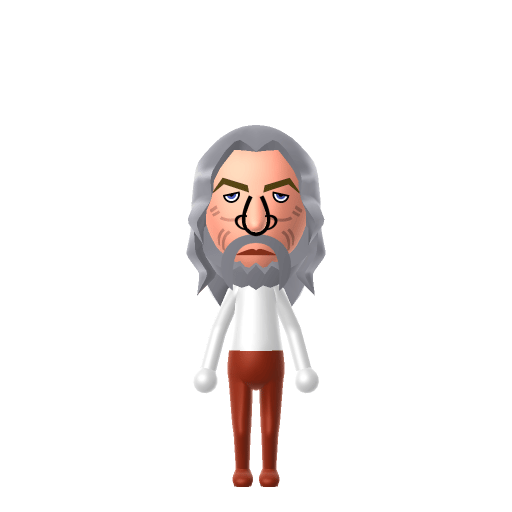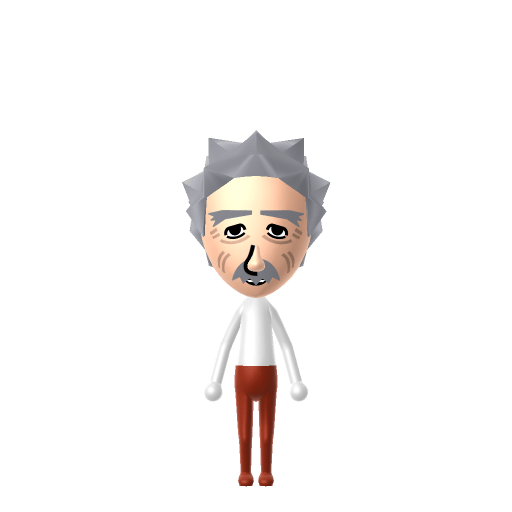
Albert Einstein was a German-born theoretical physicist best known for developing the theory of relativity. He also made important contributions to quantum theory and received the 1921 Nobel Prize in Physics. His mass–energy equivalence formula E = mc² has been called "the world's most famous equation."


Albert Einstein Mii for Tomodachi Life
The genius physicist, pondering relativity on your island.
Albert Einstein Mii Quick Facts
Albert Einstein Mii — birthday & age at a glance
- Birthday
- March 14, 1879
- Age
- 76 (at death, 1955)
Set Einstein's Mii birthday to March 14 in Mii Maker — Tomodachi Life: Living the Dream treats birthdays as a first-class input, feeding the compatibility meter and zodiac interactions on your island.
About the Albert Einstein Mii
Recommended personality for your Albert Einstein Mii: Thinker
Analyzes every angle before acting, never rushing to conclusions. Deeply analytical and reflective by nature.In Tomodachi Life, set this Mii's sliders so Speech + Movement totals 4–7 and Thinking + Energy totals 0–3. See the full Thinker guide →
Why this fitsEinstein spent decades in quiet thought experiments and was known for deep solitary work before publishing breakthrough papers. That contemplative profile fits Thinker (low Speech + Movement, low Thinking + Energy).
How to Make a Albert Einstein Mii in Tomodachi Life
To make an Albert Einstein Mii in Tomodachi Life: Living the Dream, open Mii Maker and pick wild white frizzy hair, a thick white mustache, deep-set eyes, and an older lined face. The picker-by-picker walkthrough below works for both Nintendo Switch (LTD) and 3DS (original Tomodachi Life).
Use the system Mii Maker, then bring the Mii into Tomodachi Life: Living the Dream.
Body & Build
- 1Set gender to "Male".
- 2Set birth month to 3.
- 3Set birthday to 14.
- 4Set favorite color to white.
- 5Set height to 84%.
- 6Set weight to 25%.
Face Shape & Skin
- 7Set facial features/wrinkles.
Hair
- 8Set hair style.⋯⋯Row 3 · Column 6
- 9Set hair color in the expanded colors menu.
Eyes
- 10Set eyes.⋯Row 1 · Column 6
- 11Make eyes 2 smaller.
- 12Rotate outer edge of the eyes all the way down, then rotate it 3 ticks back up.
- 13Move eyes 1 further apart.
Eyebrows
- 14Set eyebrows.⋯⋯Row 4 · Column 4
- 15Set eyebrows color in the expanded colors menu.
- 16Make eyebrows 1 larger.
- 17Move eyebrows 1 closer.
Nose
- 18Make nose 2 larger.
- 19Move nose 4 ticks down.
Mouth
- 20Set mouth.⋯Row 1 · Column 5
- 21Make mouth 3 smaller
- 22Move mouth 3 ticks down.
Facial Hair
- 23Set mustache type.⋯Row 1 · Column 2
- 24Make mustache 3 larger.
- 25Move mustache 1 ticks down.
- 26Set beard color in the expanded colors menu.
Diagrams show where the option sits in the Mii Maker picker (4 columns, scroll to reach later rows). Editor menus differ slightly between regions and console revisions — if an exact option is missing, pick the closest one.
Mii Studio data code
Albert Einstein's full appearance as a Mii Studio data string. Drop it into Mii rendering tools or community Mii editors that accept Studio codes (it's not a console import — for the game itself use the steps above).
0400200308030211030c0304060512010a0000000b0a000804000a04001f6b04000214031301161007010b06010d
Scan this Albert Einstein Mii QR code
This is a 3DS-format Mii QR code generated from Albert Einstein's Mii data. On a Nintendo 3DS, open Mii Maker → QR Code / Image Options → Scan QR Code and point the camera at it, then bring the Mii into the original Tomodachi Life. The Switch / Switch 2 has no camera, so it can't scan Mii QR codes — for Tomodachi Life: Living the Dream use the step-by-step instructions above (or the online Mii creator).
Download QR codeDid you know? — Albert Einstein Mii
His 1921 Nobel Prize in Physics was awarded for his discovery of the law of the photoelectric effect — not for relativity, which the Nobel committee left unmentioned.
In 1952 he was offered the presidency of Israel and turned it down, saying he lacked both the natural aptitude and the experience to deal properly with people.
His mass–energy equivalence formula, E = mc², has been described as 'the world's most famous equation.'
Get the Albert Einstein Mii look
Build cheat-sheet
Feature → the move to make in Mii Maker
- Hair
The whole likeness is the hair: a wild, frizzy, electrified halo of white — pick the bushiest, most voluminous light/grey style your editor has.
- Mustache
A thick, bushy white/grey mustache that covers the upper lip — add the fullest mustache available in a matching pale tone.
- Face
An older, lined face with deep-set, slightly drooping eyes — push the age up and the eyes toward soft and tired.
- Expression
Thoughtful with a hint of mischief — a gentle, slightly amused mouth rather than a broad grin.
Albert Einstein Mii on your island
A Thinker Einstein keeps to himself — Thinkers are quiet, inward residents who'd rather ponder than party, so on an island of up to 70 he'll be off in his own world more often than not. That suits the man who did his best work in solitary thought experiments. And no, you can't pair him off by intellect: Tomodachi Life: Living the Dream forms crushes from dating preferences, chance and birthday/zodiac compatibility, never personality — so your resident genius's love life is as unpredictable as anyone's.
Albert Einstein Mii — FAQ
Why is an Einstein Mii so easy to recognise?
Because his look is almost all hair and mustache. The wild white frizzy halo and the thick white mustache are instantly readable, and both are exactly the kind of features Mii Maker does well — pick the bushiest options and add an older, lined face.
What expression should I use?
Keep it thoughtful with a touch of mischief — a soft, slightly amused mouth and gentle deep-set eyes. Avoid a big toothy grin; the famous playful tongue photo aside, his usual look is the contemplative one.
What personality fits an Einstein Mii?
Thinker fits best — set Speech and Movement low with Thinking and Energy low too in the personality panel above. It matches the quiet, solitary, deep-in-thought profile of a man who reasoned through the universe in his own head.
Sources: WikipediaCharacter facts are grounded in the source(s) above; Mii-Maker mapping is our own craft guidance.
Have your own Mii?
Paste a Mii Studio code or upload a Mii QR image into the QR code Mii decoder to get this same step-by-step recreation guide for it.
Want to design your own?
Build a Mii from scratch in the online Mii creator, then bring its code here for rebuild steps.