All Mii ideas
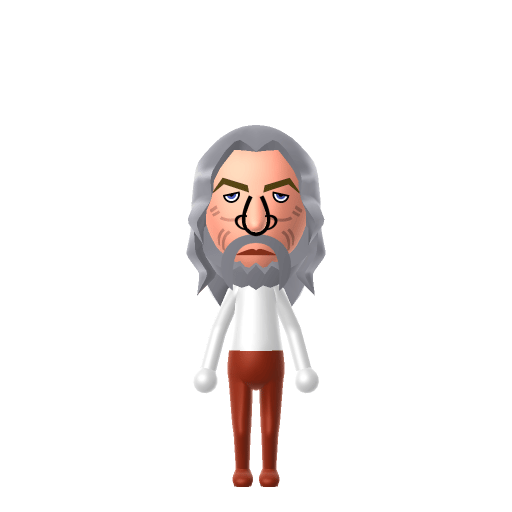
Gandalf Mii for Tomodachi Life
Movie & TV Mii Idea

Gandalf Mii for Tomodachi Life

The wise wizard who always arrives precisely when needed.

#movie#lotr#wizard

About the Gandalf Mii

Character File

Gandalf, in longer form Gandalf the Grey and later Gandalf the White, is a protagonist in J. R. R. Tolkien's novels The Hobbit and The Lord of the Rings. He is a wizard, one of the Istari order, and the leader of the Company of the Ring.

01 — Personality

Recommended personality for your Gandalf Mii: Thinker

Analyzes every angle before acting, never rushing to conclusions. Deeply analytical and reflective by nature.In Tomodachi Life, set this Mii's sliders so Speech + Movement totals 4–7 and Thinking + Energy totals 0–3. See the full Thinker guide →

Why this fitsGandalf is measured and quiet for a leader — most of his power is research, counsel, and patient nudges rather than direct combat. That contemplative profile fits Thinker (low Speech + Movement, low Thinking + Energy).

02 — How to Make This Mii

How to Make a Gandalf Mii in Tomodachi Life

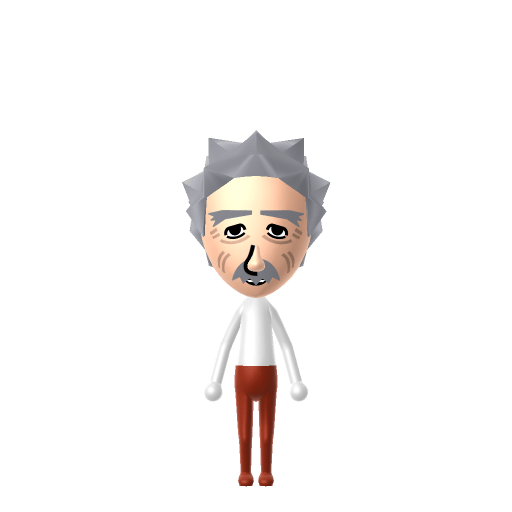
To make a Gandalf Mii in Tomodachi Life: Living the Dream, open Mii Maker and pick long flowing white hair, a long full white beard, deep wise eyes, and an older lined face, then dress him in his signature grey-or-white wizard robes. The picker-by-picker walkthrough below works for both Nintendo Switch (LTD) and 3DS (original Tomodachi Life).

Use the system Mii Maker, then bring the Mii into Tomodachi Life: Living the Dream.

Body & Build

  1. 1
    Set gender to "Male".
  2. 2
    Set favorite color to white.
  3. 3
    Set height to 100%.
  4. 4
    Set weight to 49%.

Face Shape & Skin

  1. 5
    Set face/skin color.
  2. 6
    Set facial features/wrinkles.

Hair

  1. 7
    Set hair style.
    ⋯
    ⋯
    Row 18 · Column 5
  2. 8
    Set hair color in the expanded colors menu.

Eyes

  1. 9
    Set eyes.
    ⋯
    ⋯
    Row 8 · Column 2
  2. 10
    Set eye color in the expanded colors menu.
  3. 11
    Make eyes 3 smaller.
  4. 12
    Rotate outer edge of the eyes all the way down, then rotate it 2 ticks back up.
  5. 13
    Move eyes 3 further apart.
  6. 14
    Move eyes 3 ticks up.

Eyebrows

  1. 15
    Set eyebrows.
    ⋯
    Row 2 · Column 2
  2. 16
    Set eyebrows color in the expanded colors menu.
  3. 17
    Rotate outer edge of the eyebrows 1 ticks down.
  4. 18
    Move eyebrows 1 ticks up.

Nose

  1. 19
    Set nose.
    ⋯
    Row 2 · Column 3
  2. 20
    Make nose 2 larger.
  3. 21
    Move nose 3 ticks up.

Mouth

  1. 22
    Set mouth.
    ⋯
    ⋯
    Row 3 · Column 1
  2. 23
    Move mouth 2 ticks down.

Facial Hair

  1. 24
    Set mustache type.
    ⋯
    Row 2 · Column 1
  2. 25
    Make mustache 4 larger.
  3. 26
    Move mustache 1 ticks down.
  4. 27
    Set beard type.
    ⋯
    Row 2 · Column 1
  5. 28
    Set beard color in the expanded colors menu.

Glasses

  1. 29
    Set glasses type.
    ⋯
    Row 2 · Column 3
  2. 30
    Make glasses 4 smaller
  3. 31
    Move glasses 5 ticks down.

Beauty Mark

  1. 32
    Make mole 2 larger.
  2. 33
    Move mole 5 ticks to the right.
  3. 34
    Move mole 12 ticks up.

Diagrams show where the option sits in the Mii Maker picker (4 columns, scroll to reach later rows). Editor menus differ slightly between regions and console revisions — if an exact option is missing, pick the closest one.

Mii Studio data code

Gandalf's full appearance as a Mii Studio data string. Drop it into Mii rendering tools or community Mii editors that accept Studio codes (it's not a console import — for the game itself use the steps above).

04033e030c02012b0509030505041502090300000b0a000800050f04000f7f06000708031304070f08030b060806
03 — QR Code
Gandalf Mii QR code for the Nintendo 3DS

Scan this Gandalf Mii QR code

This is a 3DS-format Mii QR code generated from Gandalf's Mii data. On a Nintendo 3DS, open Mii Maker → QR Code / Image Options → Scan QR Code and point the camera at it, then bring the Mii into the original Tomodachi Life. The Switch / Switch 2 has no camera, so it can't scan Mii QR codes — for Tomodachi Life: Living the Dream use the step-by-step instructions above (or the online Mii creator).

Download QR code

Get the Gandalf Mii look

Build cheat-sheet

Feature → the move to make in Mii Maker

  1. Hair & beard

    The long white hair and full white beard are the whole silhouette — pick the longest white beard and flowing white hair the editor offers.

  2. Face & age

    Give him a deeply lined older face with bushy brows and deep, wise eyes — Gandalf reads as ancient and thoughtful.

  3. Robe & hat

    Dress him in grey (or white, for Gandalf the White) wizard robes and his tall pointed hat using LTD's in-game clothing — both are clothing, not editor parts.

  4. Build

    Keep an average human build — Gandalf is humanoid, so a Mii captures him well; the beard and robes carry the recognition.

Did you know? — Gandalf Mii

  1. In Peter Jackson's film trilogies Gandalf is played by Ian McKellen, whose performance earned an Academy Award nomination for The Fellowship of the Ring.

  2. He is one of the Istari — wizards sent to Middle-earth — but is in truth an immortal Maia spirit, not a mortal man.

  3. He falls battling the Balrog at the Bridge of Khazad-dûm — the "You shall not pass!" moment — and returns reborn as the more powerful Gandalf the White.

  4. Tolkien adapted the name "Gandalf" from a list of dwarf-names in the Old Norse poem Völuspá, where it means something like "wand-elf."

Pair your Gandalf Mii with

Frodo Baggins

The hobbit he guides and mentors through the quest to destroy the One Ring — Gandalf's closest charge.

The Fellowship of the Ring

The nine companions he leads out of Rivendell — hobbits, men, an elf, a dwarf and the wizard himself.

In Tomodachi Life

Recreate Frodo and the rest of the Fellowship as their own Miis and house them near your Gandalf Mii to gather the company — but Tomodachi Life: Living the Dream won't recreate the quest for you. Friendships there grow from proximity and shared time, and romance runs on dating preferences and zodiac compatibility, so who bonds with whom is down to how you play.

Gandalf Mii on your island

Picture it

A Thinker-type Gandalf is the island's quiet sage — low on noise and bustle but deep on counsel, the resident others come to when they need a steady head. Thinkers room comfortably with similar calm personalities, exactly what LTD's roommate harmony rewards, so settle him with another contemplative Mii. Even a wizard can't script romance, though: who a Mii bonds with in Tomodachi Life: Living the Dream runs on proximity, dating preferences and birthday/zodiac compatibility — never personality — so give your Gandalf a birthday and let the island, not prophecy, decide.

Life on your island

Gandalf Mii — FAQ

How do you make a Gandalf Mii in Tomodachi Life?

Use long flowing white hair, a long full white beard, a lined older face and deep wise eyes, then dress him in grey or white wizard robes and his pointed hat with LTD's in-game clothing. He's humanoid, so a Mii captures him well — follow the picker-by-picker steps above for Switch (LTD) or 3DS.

Should it be Gandalf the Grey or Gandalf the White?

Either works — it's just a colour swap. Use grey robes for Gandalf the Grey (most of The Hobbit and Fellowship) or white robes for the reborn Gandalf the White from The Two Towers onward. The hair, beard and face stay the same.

Is Gandalf a human?

In appearance, yes — which is why he builds cleanly as a Mii. In the lore he's actually an immortal Maia spirit in the form of an old man, one of the Istari wizards sent to Middle-earth.

What personality should a Gandalf Mii have?

Thinker fits best — set low Speech + Movement with low-to-mid Thinking + Energy in the panel above. It matches his measured, counsel-and-patience style of leadership rather than direct action.

Sources: WikipediaCharacter facts are grounded in the source(s) above; Mii-Maker mapping is our own craft guidance.

More Miis like Gandalf

Have your own Mii?

Paste a Mii Studio code or upload a Mii QR image into the QR code Mii decoder to get this same step-by-step recreation guide for it.

Want to design your own?

Build a Mii from scratch in the online Mii creator, then bring its code here for rebuild steps.