All Mii ideas
Harry Potter Mii for Tomodachi Life
Movie & TV Mii Idea

Harry Potter Mii for Tomodachi Life

The Boy Who Lived, now living on your island.

#movie#wizard#magic

Harry Potter Mii Quick Facts

Harry Potter Mii — birthday, age & cast at a glance

Birthday
July 31, 1980
Age
11–17 (across the seven novels)
Portrayed by
Daniel Radcliffe (all eight films)
In Tomodachi Life

Set Harry's Mii birthday to July 31 in Mii Maker — Tomodachi Life: Living the Dream treats birthdays as a first-class input, feeding the compatibility meter and zodiac interactions on your island.

About the Harry Potter Mii

Character File

Harry Potter is the protagonist of J. K. Rowling's seven-book novel series of the same name. The plot chronicles seven years in the life of an orphan who, on his eleventh birthday, learns he is a wizard and attends Hogwarts School of Witchcraft and Wizardry.

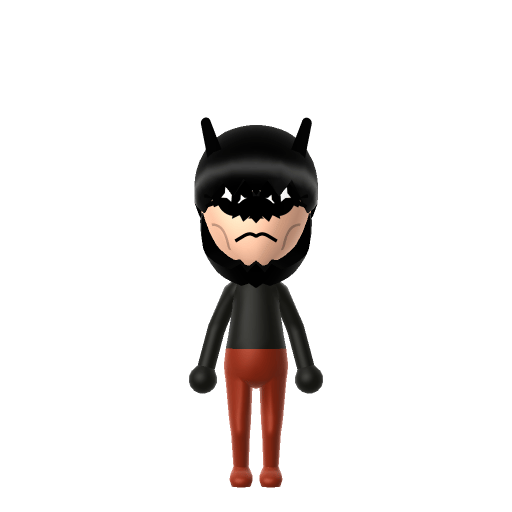
01 — Personality

Recommended personality for your Harry Potter Mii: Strategist

Calm and quietly supportive, avoiding conflict wherever possible. Self-reliant introverts who plan carefully.In Tomodachi Life, set this Mii's sliders so Speech + Movement totals 0–3 and Thinking + Energy totals 4–7. See the full Strategist guide →

Why this fitsHarry is consistently reluctant, observant, and prefers reading the situation before acting — usually nudged into action by friends or circumstance. That measured profile fits Strategist (low Speech + Movement, low-to-mid Thinking + Energy).

02 — How to Make This Mii

How to Make a Harry Potter Mii in Tomodachi Life

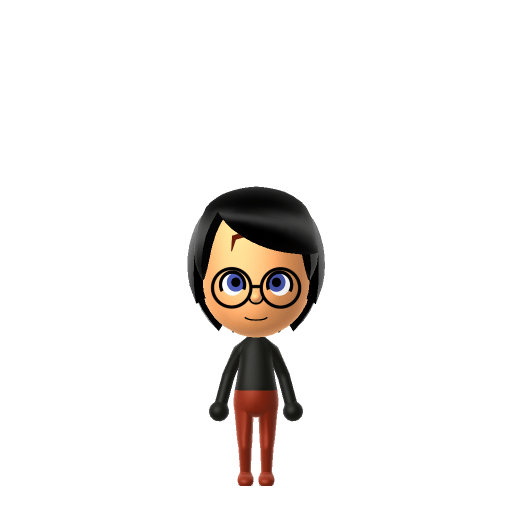
To make a Harry Potter Mii in Tomodachi Life: Living the Dream, open Mii Maker and pick messy black hair, bright green eyes, his iconic round wire-rimmed glasses, and the lightning-bolt scar on his forehead. The picker-by-picker walkthrough below works for both Nintendo Switch (LTD) and 3DS (original Tomodachi Life).

Use the system Mii Maker, then bring the Mii into Tomodachi Life: Living the Dream.

Body & Build

  1. 1
    Set gender to "Male".
  2. 2
    Set favorite color to black.
  3. 3
    Set height to 49%.

Face Shape & Skin

  1. 4
    Set face/skin color.
  2. 5
    Set face type.

Hair

  1. 6
    Set hair style.
    ⋯
    ⋯
    Row 15 · Column 1
  2. 7
    Press the button to flip the hair.
  3. 8
    Set hair color in the expanded colors menu.

Eyes

  1. 9
    Set eyes.
    ⋯
    ⋯
    Row 3 · Column 1
  2. 10
    Set eye color in the expanded colors menu.
  3. 11
    Rotate outer edge of the eyes all the way down, then rotate it 5 ticks back up.
  4. 12
    Move eyes 1 further apart.
  5. 13
    Move eyes 5 ticks down.

Eyebrows

  1. 14
    Set eyebrows.
    ⋯
    Row 2 · Column 2
  2. 15
    Set eyebrows color in the expanded colors menu.
  3. 16
    Make eyebrows 1 smaller.
  4. 17
    Rotate outer edge of the eyebrows 4 ticks down.
  5. 18
    Move eyebrows 2 closer.
  6. 19
    Move eyebrows 7 ticks up.

Nose

  1. 20
    Set nose.
    ⋯
    ⋯
    Row 3 · Column 2
  2. 21
    Make nose 2 smaller
  3. 22
    Move nose 2 ticks down.

Mouth

  1. 23
    Set mouth.
    ⋯
    ⋯
    Row 4 · Column 4
  2. 24
    Make mouth 3 smaller
  3. 25
    Squash the mouth 2 to the left.
  4. 26
    Move mouth 2 ticks down.

Glasses

  1. 27
    Set glasses type.
    ⋯
    Row 2 · Column 1
  2. 28
    Move glasses 5 ticks down.

Diagrams show where the option sits in the Mii Maker picker (4 columns, scroll to reach later rows). Editor menus differ slightly between regions and console revisions — if an exact option is missing, pick the closest one.

Mii Studio data code

Harry Potter's full appearance as a Mii Studio data string. Drop it into Mii rendering tools or community Mii editors that accept Studio codes (it's not a console import — for the game itself use the steps above).

080040030c050421031103020203150003010001000b000804030f0801053e04000214011301130f04000a020e0b
03 — QR Code
Harry Potter Mii QR code for the Nintendo 3DS

Scan this Harry Potter Mii QR code

This is a 3DS-format Mii QR code generated from Harry Potter's Mii data. On a Nintendo 3DS, open Mii Maker → QR Code / Image Options → Scan QR Code and point the camera at it, then bring the Mii into the original Tomodachi Life. The Switch / Switch 2 has no camera, so it can't scan Mii QR codes — for Tomodachi Life: Living the Dream use the step-by-step instructions above (or the online Mii creator).

Download QR code

Get the Harry Potter Mii look

Build cheat-sheet

Feature → the move to make in Mii Maker

  1. Hair

    Messy black hair — pick a tousled dark style; tidiness is not the goal.

  2. Eyes

    Bright green eyes, inherited from his mother Lily — choose the greenest eye colour.

  3. Glasses

    His round wire-rimmed glasses are essential — add the closest round frames in the glasses picker.

  4. Scar

    The lightning-bolt scar can't be done in the base editor — add it with LTD's in-game face paint after import.

Did you know? — Harry Potter Mii

  1. Harry was born on July 31, 1980 — the same calendar birthday as author J. K. Rowling.

  2. His lightning-bolt scar came from Voldemort's killing curse rebounding off him as a baby.

  3. His holly wand shares a phoenix-feather core with Voldemort's wand — both feathers came from Dumbledore's phoenix, Fawkes — making them "brother wands."

  4. Daniel Radcliffe played Harry in all eight films.

Pair your Harry Potter Mii with

In Tomodachi Life

Harry and Voldemort are bound by Sybill Trelawney's prophecy — "neither can live while the other survives" — making them fiction's definitive nemeses (Harry is even an accidental Horcrux). It's a rivalry, not a romance: recreate both and you've got a built-in hero-and-villain drama for your island. In Tomodachi Life: Living the Dream you can't script a feud directly — relationships emerge from proximity, dating preferences, random crushes, and zodiac/birthday compatibility — so house them apart and let the island's chaos write its own version.

Harry Potter Mii — FAQ

How do I add Harry's lightning scar in Mii Maker?

You can't in the base Switch system editor — there's no facial-mark option. LTD's in-game Mii Maker adds custom face paint, so apply the lightning bolt there after importing him. Until then the glasses and green eyes carry the likeness.

What makes a Mii instantly read as Harry Potter?

The trio of cues: messy black hair, round wire-rimmed glasses, and bright green eyes. Get those three and most people recognise him before you even mention the scar.

What personality should I give a Harry Potter Mii?

Strategist fits him — set low Speech + Movement with high Thinking + Energy above. It matches the reluctant, observant hero who reads a situation before acting, usually nudged in by his friends.

Should I make Voldemort too?

If you want the drama, yes — they're canonical archenemies tied by prophecy. Build both and keep them on opposite ends of your island; LTD won't stage a feud for you, but its unpredictable relationships will improvise something.

Sources: WikipediaCharacter facts are grounded in the source(s) above; Mii-Maker mapping is our own craft guidance.

More Miis like Harry Potter

Have your own Mii?

Paste a Mii Studio code or upload a Mii QR image into the QR code Mii decoder to get this same step-by-step recreation guide for it.

Want to design your own?

Build a Mii from scratch in the online Mii creator, then bring its code here for rebuild steps.