Character File
Iron Man is a superhero appearing in Marvel Comics, co-created by Stan Lee, Larry Lieber, Don Heck, and Jack Kirby. The character first appeared in Tales of Suspense #39 in 1962 and received his own title in 1968.
Genius, billionaire, philanthropist — on your island.
Iron Man is a superhero appearing in Marvel Comics, co-created by Stan Lee, Larry Lieber, Don Heck, and Jack Kirby. The character first appeared in Tales of Suspense #39 in 1962 and received his own title in 1968.
After importing Tony into Tomodachi Life: Living the Dream, nudge the voice pitch and speed up the cadence on LTD's new voice sliders to land Robert Downey Jr.'s motor-mouth delivery — those sliders are an LTD-exclusive Mii Maker option that doesn't exist in the Switch system Mii Maker.
Diligent and productive, turning every plan into action. Results-focused and efficient in everything they do.In Tomodachi Life, set this Mii's sliders so Speech + Movement totals 8–11 and Thinking + Energy totals 4–7. See the full Achiever guide →
Why this fitsTony Stark's alter ego is engineered around outcomes — he builds, ships, and iterates with a public confidence that doubles as branding. That decisive, results-driven profile fits Achiever (high Speech + Movement, low Thinking + Energy).
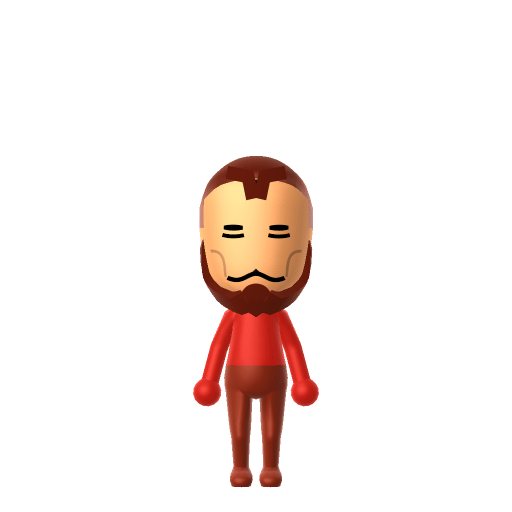
To make an Iron Man Mii in Tomodachi Life: Living the Dream, open Mii Maker and recreate Tony Stark's face — dark slicked-back hair, a neatly trimmed goatee, and confident eyes — since Mii Maker doesn't render the iconic red-and-gold armour itself. The picker-by-picker walkthrough below works for both Nintendo Switch (LTD) and 3DS (original Tomodachi Life).
Use the system Mii Maker, then bring the Mii into Tomodachi Life: Living the Dream.
Diagrams show where the option sits in the Mii Maker picker (4 columns, scroll to reach later rows). Editor menus differ slightly between regions and console revisions — if an exact option is missing, pick the closest one.
Iron Man's full appearance as a Mii Studio data string. Drop it into Mii rendering tools or community Mii editors that accept Studio codes (it's not a console import — for the game itself use the steps above).
020363030c040515030c03020b050500060100040200001002000c02002d6208010800031306080e04011004000f
This is a 3DS-format Mii QR code generated from Iron Man's Mii data. On a Nintendo 3DS, open Mii Maker → QR Code / Image Options → Scan QR Code and point the camera at it, then bring the Mii into the original Tomodachi Life. The Switch / Switch 2 has no camera, so it can't scan Mii QR codes — for Tomodachi Life: Living the Dream use the step-by-step instructions above (or the online Mii creator).
Download QR codeBuild cheat-sheet
Feature → the move to make in Mii Maker
Dark, short, slicked-back hair — pick a tidy dark style.
His signature is the precise goatee / Van Dyke — choose the closest chin-and-moustache facial-hair option, kept neat.
Confident, sharp eyes — go for a self-assured look that fits the showman.
The red-and-gold Iron Man armour and helmet
Mii Maker has no metal-suit or faceplate parts, so build Tony's human face and add a red/gold colour theme to his clothes in LTD to nod at the armour.
The glowing chest arc reactor
There's no chest-light part in the editor (it's an MCU-film device anyway), so this one stays in the lore; let the goatee and confident face carry the likeness.
Tony Stark is a natural headliner on your island in Tomodachi Life: Living the Dream — give him an Achiever-leaning personality and he'll act like he runs the place. LTD's Mii Maker adds voice pitch, speed, and tone sliders the old Switch system editor never had, so you can dial in Robert Downey Jr.'s fast, motor-mouth cadence after import. Relationships still aren't decided by personality, though: romance runs on dating preferences, random crushes, and zodiac/birthday compatibility, so any island love life is yours to stage.
Iron Man first appeared in Tales of Suspense #39 (cover-dated 1963), co-created by Stan Lee, Larry Lieber, Don Heck, and Jack Kirby.
Artist Steve Ditko redesigned the suit from all-gold to the red-and-gold colour scheme that became Iron Man's defining image.
Robert Downey Jr. played Tony Stark across the Marvel Cinematic Universe from Iron Man (2008) to Avengers: Endgame (2019).
No — Mii Maker has no metal-suit, helmet, or chest-light parts, so you build Tony Stark's human face instead. Add a red-and-gold colour theme to his clothes after importing into LTD to suggest the armour.
The goatee. His precisely trimmed Van Dyke plus dark slicked hair and a confident expression read as Tony instantly, even without the suit.
Achiever fits him — set high Speech + Movement with low Thinking + Energy above. It matches the decisive, results-driven showman who builds, ships, and brands himself as the hero.
Partly — LTD's Mii Maker adds voice pitch, speed, and tone sliders that the Switch system editor lacks, so nudge the speed up and the pitch to taste after import to approximate his fast, quippy delivery.
Sources: WikipediaCharacter facts are grounded in the source(s) above; Mii-Maker mapping is our own craft guidance.
Paste a Mii Studio code or upload a Mii QR image into the QR code Mii decoder to get this same step-by-step recreation guide for it.
Build a Mii from scratch in the online Mii creator, then bring its code here for rebuild steps.