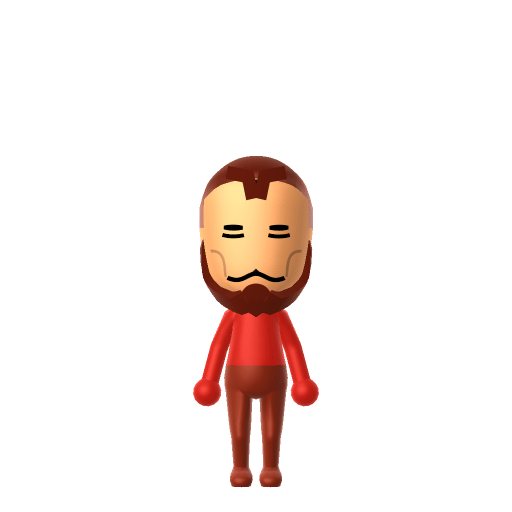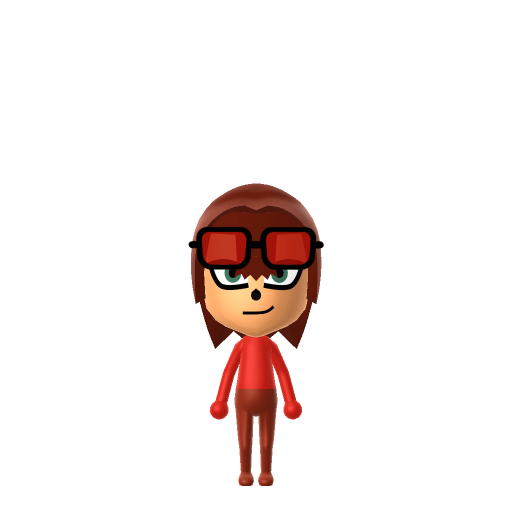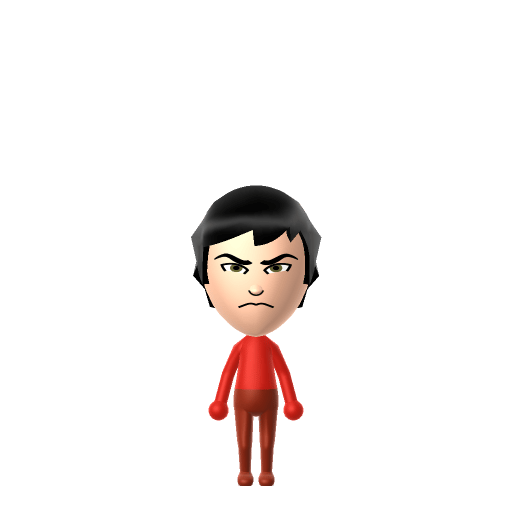
Zuko is the exiled crown prince of the Fire Nation in Nickelodeon's Avatar: The Last Airbender (2005–2008), created by Michael Dante DiMartino and Bryan Konietzko. Scarred and banished by his own father, Fire Lord Ozai, he spends the series hunting the Avatar to reclaim his lost honour — before slowly turning against the war and joining Aang's group. He's one of animation's most celebrated redemption arcs.

Zuko Mii for Tomodachi Life
The scarred, honour-obsessed Fire Nation prince whose redemption arc anchors Avatar: The Last Airbender.
Zuko Mii Quick Facts
Zuko Mii — age & cast at a glance
- Age
- 16 (original series)
- Voiced by
- Dante Basco
Zuko runs hot — quick to anger, slow to trust. After importing your Zuko Mii into Tomodachi Life: Living the Dream, drop the pitch and keep the tone tense on LTD's Mii Maker voice sliders (an LTD-exclusive option the Switch system Mii Maker lacks) to catch that brooding, short-fused delivery.
About the Zuko Mii
Recommended personality for your Zuko Mii: Achiever
Diligent and productive, turning every plan into action. Results-focused and efficient in everything they do.In Tomodachi Life, set this Mii's sliders so Speech + Movement totals 8–11 and Thinking + Energy totals 4–7. See the full Achiever guide →
Why this fitsZuko is defined by relentless drive — he chases the Avatar across the world, refuses to quit, and measures himself against his prodigy sister Azula at every turn. That proud, competitive, honour-obsessed intensity fits the Achiever profile (high Thinking + Energy) far better than any easygoing type.
How to Make a Zuko Mii in Tomodachi Life
To make a Zuko Mii in Tomodachi Life: Living the Dream, open Mii Maker and build a lean teenage boy with pale skin, black hair (a shaved topknot early on, or shaggy short hair later), sharp downturned eyebrows and narrow gold eyes — then use Pro Mode face paint to add his signature scar over the left eye, since the editor has no scar part. The picker-by-picker walkthrough below works for both Nintendo Switch (LTD) and 3DS (original Tomodachi Life).
Use the system Mii Maker, then bring the Mii into Tomodachi Life: Living the Dream.
Body & Build
- 1Set gender to "Male".
Hair
- 2Set hair style.⋯⋯Row 4 · Column 3
- 3Set hair color in the expanded colors menu.
Eyes
- 4Set eyes.⋯⋯Row 5 · Column 5
- 5Set eye color in the expanded colors menu.
- 6Make eyes 1 smaller.
- 7Squash the eyes 3 to the left.
- 8Rotate outer edge of the eyes all the way down, then rotate it 4 ticks back up.
Eyebrows
- 9Set eyebrows.⋯⋯Row 4 · Column 1
- 10Set eyebrows color in the expanded colors menu.
- 11Move eyebrows 1 closer.
- 12Move eyebrows 2 ticks down.
Nose
- 13Set nose.⋯Row 1 · Column 2
- 14Make nose 3 smaller
- 15Move nose 1 ticks down.
Mouth
- 16Set mouth.⋯Row 2 · Column 3
- 17Make mouth 1 smaller
- 18Squash the mouth 3 to the left.
- 19Move mouth 1 ticks up.
Glasses
- 20Set glasses color in the expanded colors menu.
Diagrams show where the option sits in the Mii Maker picker (4 columns, scroll to reach later rows). Editor menus differ slightly between regions and console revisions — if an exact option is missing, pick the closest one.
Mii Studio data code
Zuko's full appearance as a Mii Studio data string. Drop it into Mii rendering tools or community Mii editors that accept Studio codes (it's not a console import — for the game itself use the steps above).
080040000b040325020c030806040f010c0000000000000f04000a08003e40040002140013030a0c04000a010a0a
Scan this Zuko Mii QR code
This is a 3DS-format Mii QR code generated from Zuko's Mii data. On a Nintendo 3DS, open Mii Maker → QR Code / Image Options → Scan QR Code and point the camera at it, then bring the Mii into the original Tomodachi Life. The Switch / Switch 2 has no camera, so it can't scan Mii QR codes — for Tomodachi Life: Living the Dream use the step-by-step instructions above (or the online Mii creator).
Download QR codeWhat Mii Maker can't do for your Zuko Mii
- Mii Maker can’t
His signature burn scar over the left eye
Closest you can getMii Maker has no scar part, so the single most recognisable Zuko feature has to be painted on: switch to Pro Mode, enable Paint Behind so it sits under his eye and brow, and layer light and dark red face paint over the left side to shape the scar.
- Mii Maker can’t
His gold Fire Nation eye colour
Closest you can getThe editor's eye palette is mostly natural human tones with no true gold, so use the warmest brown available — the scar and angry brows do most of the work of reading as Zuko anyway.
- Mii Maker can’t
His Fire Nation robes and armour
Closest you can getOutfits aren't part of Mii Maker's face editor; set his favourite colour to red and dress the imported Mii in dark red clothing in Tomodachi Life to echo the Fire Nation palette.
Get the Zuko Mii look
Build cheat-sheet
Feature → the move to make in Mii Maker
- Hair
Black hair is essential to the Zuko Mii look — early in the series he shaves his head with a single phoenix-tail topknot, and after his exile he wears shaggy short black hair. Pick either a topknot/ponytail or a short tousled style in black.
- Eyebrows
Sharp, downturned, angry eyebrows carry his permanent scowl — choose an angled brow shape and slant it downward toward the nose.
- Eyes
Narrow gold/amber eyes — pick a slim, intense eye shape and the closest warm brown-gold colour the editor offers.
- Build
A lean, athletic teenager — keep the frame slim and set the height on the taller side of the slider without going full adult.
Did you know? — Zuko Mii
Zuko's scar was a deliberate story device — co-creator Bryan Konietzko pushed for a permanently scarred hero, and the burn is the mark of his father Ozai humiliating and banishing him in an Agni Kai duel.
He was voiced by Dante Basco, best known as Rufio in the film Hook — fans have long noted the two hot-headed characters share a temper.
Zuko fights masked as the 'Blue Spirit', a stealthy vigilante armed with dual broadswords rather than firebending — a rare non-bender skill set for a Fire Nation prince.
His mentor is his uncle Iroh, while his prodigy younger sister Azula is his lifelong rival — recreate the pair as neighbours and you have the core of his family drama on one island.
Zuko Mii on your island
An Achiever like Zuko throws himself into island life the way he throws himself at every goal — competitive, proud, and quietly desperate to prove himself. Tomodachi Life: Living the Dream grows bonds through proximity and repeated conversations rather than personality scores, so house your Zuko Mii near an Iroh-calm neighbour to mellow him out, or an Azula-style rival to keep him fired up. Just remember LTD writes its own story — your brooding Zuko Mii might end up Best Friends (or even Sweethearts) with someone from a completely different world.
Zuko Mii — FAQ
Can Mii Maker make an accurate Zuko Mii?
Mostly — his black hair, angry downturned brows, narrow eyes and lean teenage build all reproduce well. The one feature the editor can't build is his burn scar, so you paint it on in Pro Mode. That single step is what turns a generic dark-haired Mii into an unmistakable Zuko Mii.
How do I add Zuko's scar to a Mii?
Use Pro Mode face paint. Enable Paint Behind so the paint sits under his eye and eyebrow, then layer light and dark red over the left side of the face to shape the scar. Mii Maker has no scar part, so face paint is the only way to get it.
What personality should I give a Zuko Mii?
Achiever fits him best — set high Thinking + Energy in the panel above. It matches his relentless, honour-driven, endlessly competitive character across Avatar: The Last Airbender.
Who is Zuko in Avatar: The Last Airbender?
Zuko is the exiled crown prince of the Fire Nation, scarred and banished by his father Fire Lord Ozai. He begins as the show's antagonist, hunting the Avatar to restore his honour, and gradually becomes one of Team Avatar's most important allies — a redemption arc fans regularly rank among animation's best.
Sources: WikipediaAvatar WikiWikipediaCharacter facts are grounded in the source(s) above; Mii-Maker mapping is our own craft guidance.
Have your own Mii?
Paste a Mii Studio code or upload a Mii QR image into the QR code Mii decoder to get this same step-by-step recreation guide for it.
Want to design your own?
Build a Mii from scratch in the online Mii creator, then bring its code here for rebuild steps.