All Mii ideas
Matt Mii for Tomodachi Life
Video Game Mii Idea

Matt Mii for Tomodachi Life

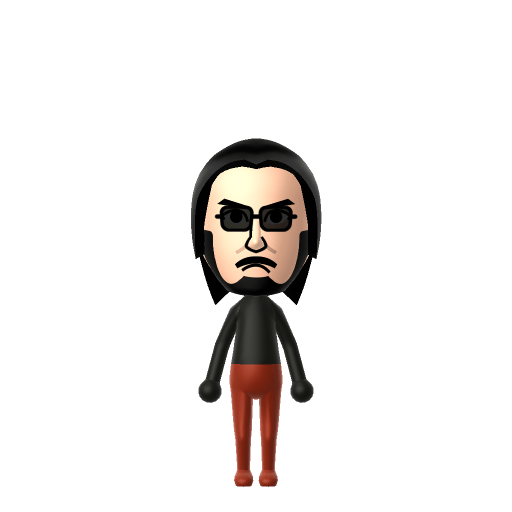
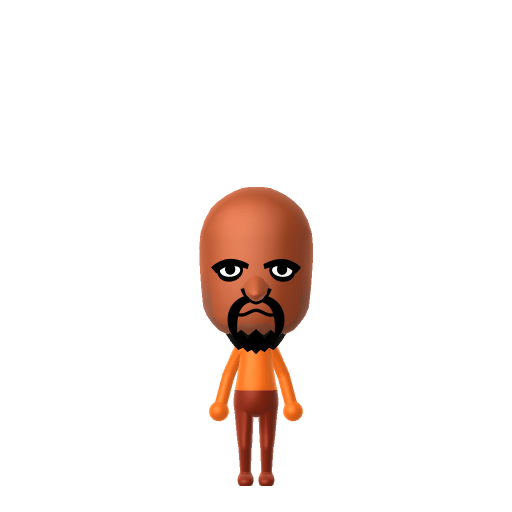
The bald, goateed Wii Sports boxing champion — the toughest CPU Mii Nintendo ever shipped.

#nintendo#wii-sports#mii#boxing
01 — Personality

Recommended personality for your Matt Mii: Achiever

Diligent and productive, turning every plan into action. Results-focused and efficient in everything they do.In Tomodachi Life, set this Mii's sliders so Speech + Movement totals 8–11 and Thinking + Energy totals 4–7. See the full Achiever guide →

Why this fitsMatt is the only CPU in Wii Sports history to hold championship status in two disciplines — Boxing and Swordplay — the single hardest opponent in both. That relentless, top-of-the-ladder dominance reads as pure Achiever, so that's the personality this Matt Mii ships with above.

02 — How to Make This Mii

How to Make a Matt Mii in Tomodachi Life

A Matt Mii is the rare recreation you can build exactly, because Matt is already an official Nintendo Mii. In Mii Maker, build a bald man with light skin, a black goatee and moustache, thick dark eyebrows and a stern stare, then set his favourite colour to red. The picker-by-picker walkthrough below matches him on both Nintendo Switch (LTD) and 3DS.

Use the system Mii Maker, then bring the Mii into Tomodachi Life: Living the Dream.

Body & Build

  1. 1
    Set gender to "Male".
  2. 2
    Set favorite color to orange.
  3. 3
    Set height to 49%.

Face Shape & Skin

  1. 4
    Set face/skin color.
  2. 5
    Set face type.
  3. 6
    Set makeup.

Hair

  1. 7
    Set hair style.
    ⋯
    ⋯
    Row 9 · Column 6
  2. 8
    Set hair color in the expanded colors menu.

Eyes

  1. 9
    Set eyes.
    ⋯
    ⋯
    Row 7 · Column 2
  2. 10
    Make eyes 1 smaller.
  3. 11
    Rotate outer edge of the eyes all the way down, then rotate it 3 ticks back up.
  4. 12
    Move eyes 2 further apart.
  5. 13
    Move eyes 2 ticks down.

Eyebrows

  1. 14
    Set eyebrows.
    ⋯
    Row 1 · Column 5
  2. 15
    Set eyebrows color in the expanded colors menu.
  3. 16
    Rotate outer edge of the eyebrows 1 ticks down.
  4. 17
    Move eyebrows 4 ticks down.

Nose

  1. 18
    Set nose.
    ⋯
    Row 1 · Column 4
  2. 19
    Make nose 1 larger.
  3. 20
    Move nose 2 ticks down.

Mouth

  1. 21
    Set mouth.
    ⋯
    Row 2 · Column 2
  2. 22
    Set mouth color in the expanded colors menu.
  3. 23
    Move mouth 2 ticks down.

Facial Hair

  1. 24
    Set mustache type.
    ⋯
    Row 2 · Column 1
  2. 25
    Make mustache 2 larger.
  3. 26
    Move mustache 1 ticks down.
  4. 27
    Set beard type.
    ⋯
    Row 1 · Column 3

Diagrams show where the option sits in the Mii Maker picker (4 columns, scroll to reach later rows). Editor menus differ slightly between regions and console revisions — if an exact option is missing, pick the closest one.

Mii Studio data code

Matt's full appearance as a Mii Studio data string. Drop it into Mii rendering tools or community Mii editors that accept Studio codes (it's not a console import — for the game itself use the steps above).

080240030803032c040e0308050409020e040a070001000804000a08001e3e04000214031404080f06030b05030b
03 — QR Code
Matt Mii QR code for the Nintendo 3DS

Scan this Matt Mii QR code

This is a 3DS-format Mii QR code generated from Matt's Mii data. On a Nintendo 3DS, open Mii Maker → QR Code / Image Options → Scan QR Code and point the camera at it, then bring the Mii into the original Tomodachi Life. The Switch / Switch 2 has no camera, so it can't scan Mii QR codes — for Tomodachi Life: Living the Dream use the step-by-step instructions above (or the online Mii creator).

Download QR code

Get the Matt Mii look

Build cheat-sheet

Feature → the move to make in Mii Maker

  1. Head

    Bald — Matt is famously the only bald Mii in the Wii line-up, so pick the bald/no-hair option; that clean dome is half the Matt Mii silhouette.

  2. Facial hair

    A black goatee and moustache — add the closest chin-beard-plus-moustache combo Mii Maker offers, in black.

  3. Brows & eyes

    Thick dark eyebrows over a hard, level stare — go heavy on the brows and narrow, steady eyes for his champion's game face.

  4. Colour scheme

    Set his favourite colour to red to match his official Nintendo data — that's the canon Matt palette, not a guess.
Did you know? — Matt Mii

  1. Matt "is the only CPU to have championship status in more than one discipline, being the hardest NPC to beat both in Boxing and Swordplay" — no other Wii Sports Mii holds two titles.

  2. Matt appears across Wii Sports, Wii Sports Resort and Wii Party, where he's classed as a "Master Mii" — one of Nintendo's built-in high-skill opponents.

  3. Matt became an internet phenomenon in 2018: the first known meme featuring him was posted to Reddit's r/dankmemes on May 20th, 2018, and a surge followed in January 2019.

Matt Mii on your island

Picture it

An Achiever like Matt brings championship energy to island life — competitive, self-assured, quietly certain he's the toughest resident on the block, and he's not wrong. Tomodachi Life: Living the Dream grows bonds through proximity and repeated conversations rather than Wii Sports rankings, so a Matt Mii will happily mingle across an island of residents who have no idea they're living next to a two-time champion. Pair him with other official Miis for a Wii-Sports-reunion vibe, or drop him among cartoon characters and enjoy the mismatch — the ant-farm chaos is part of the charm.

Life on your island

Matt Mii — FAQ

Is Matt an official Nintendo Mii?

Yes — and that's what makes a Matt Mii special. Matt is a pre-made "Master Mii" that Nintendo shipped inside Wii Sports, Wii Sports Resort and Wii Party. You're not approximating a cartoon character in Mii Maker; you're rebuilding an official Nintendo Mii, so a well-made Matt Mii is essentially the genuine article.

Why is Matt so hard to beat in Wii Sports?

Matt is the champion — the final opponent — in Wii Sports Boxing, and separately the Swordplay champion in Wii Sports Resort. He's the only CPU with two championship titles, which is exactly why he became a meme as the near-unbeatable everyman. Building a Matt Mii is a small tribute to that reputation.

Can Mii Maker recreate Matt exactly?

Essentially, yes — unlike most characters on this site, there's nothing Mii Maker "can't do" for Matt, because he was designed as a Mii in the first place. A bald head, black goatee, heavy brows and a red favourite colour get you the real thing, no Pro Mode paint or workarounds required.

What is Matt's favourite colour for the Mii colour scheme?

Red. Per Matt's official Nintendo data his favourite colour is red, so set your Matt Mii's favourite colour to red — it matches canon and drives his room and outfit palette in Tomodachi Life.

Sources: Know Your MemeCharacter facts are grounded in the source(s) above; Mii-Maker mapping is our own craft guidance.

More Miis like Matt

Have your own Mii?

Paste a Mii Studio code or upload a Mii QR image into the QR code Mii decoder to get this same step-by-step recreation guide for it.

Want to design your own?

Build a Mii from scratch in the online Mii creator, then bring its code here for rebuild steps.