All Mii ideas
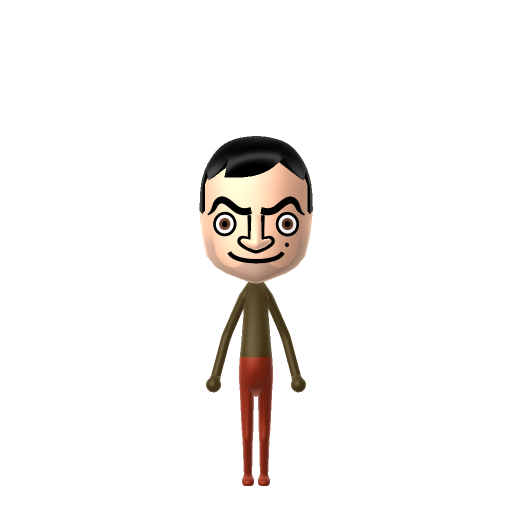
Mr. Bean Mii for Tomodachi Life
Celebrity Mii Idea

Mr. Bean Mii for Tomodachi Life

The hilariously clumsy British icon, always causing chaos.

#celebrity#comedy#british

About the Mr. Bean Mii

Character File

Mr. Bean is the title character of the British sitcom of the same name, created by Rowan Atkinson and Richard Curtis. The sitcom ran for 15 episodes on ITV beginning in 1990, with Atkinson playing the largely silent, peculiar protagonist.

01 — Personality

Recommended personality for your Mr. Bean Mii: Daydreamer

Idealistic and romantic, always finding inspiration in the small details around them. Creative and imaginative in nature.In Tomodachi Life, set this Mii's sliders so Speech + Movement totals 4–7 and Thinking + Energy totals 8–11. See the full Daydreamer guide →

Why this fitsMr. Bean barely speaks across the whole series — episodes work because he loses himself in his own peculiar logic. That quiet, in-his-own-world profile fits Daydreamer (low Speech + Movement, mid-to-high Thinking + Energy).

02 — How to Make This Mii

How to Make a Mr. Bean Mii in Tomodachi Life

To make a Mr. Bean Mii in Tomodachi Life: Living the Dream, open Mii Maker and shape a neutral oval face with dark short hair, raised expressive eyebrows, and a prominent nose, then dress him in his signature brown tweed jacket and red tie. The picker-by-picker walkthrough below works for both Nintendo Switch (LTD) and 3DS (original Tomodachi Life).

Use the system Mii Maker, then bring the Mii into Tomodachi Life: Living the Dream.

Body & Build

  1. 1
    Set gender to "Male".
  2. 2
    Set favorite color to brown.
  3. 3
    Set height to 100%.
  4. 4
    Set weight to 0%.

Face Shape & Skin

  1. 5
    Set face type.
  2. 6
    Set makeup.

Hair

  1. 7
    Set hair style.
    ⋯
    Row 2 · Column 2
  2. 8
    Set hair color in the expanded colors menu.

Eyes

  1. 9
    Set eyes.
    ⋯
    ⋯
    Row 8 · Column 1
  2. 10
    Set eye color in the expanded colors menu.
  3. 11
    Make eyes 1 smaller.
  4. 12
    Rotate outer edge of the eyes all the way down, then rotate it 4 ticks back up.
  5. 13
    Move eyes 4 further apart.
  6. 14
    Move eyes 3 ticks down.

Eyebrows

  1. 15
    Set eyebrows.
    ⋯
    ⋯
    Row 4 · Column 3
  2. 16
    Set eyebrows color in the expanded colors menu.
  3. 17
    Make eyebrows 2 larger.
  4. 18
    Move eyebrows 1 closer.
  5. 19
    Move eyebrows 3 ticks down.

Nose

  1. 20
    Set nose.
    ⋯
    Row 2 · Column 4
  2. 21
    Make nose 1 larger.
  3. 22
    Move nose 1 ticks down.

Mouth

  1. 23
    Set mouth.
    ⋯
    ⋯
    Row 4 · Column 4
  2. 24
    Make mouth 2 larger.
  3. 25
    Move mouth 1 ticks down.

Facial Hair

  1. 26
    Move mustache 10 ticks up.

Beauty Mark

  1. 27
    Turn mole on.
  2. 28
    Make mole 2 smaller
  3. 29
    Move mole 11 ticks to the right.
  4. 30
    Move mole 1 ticks down.

Diagrams show where the option sits in the Mii Maker picker (4 columns, scroll to reach later rows). Editor menus differ slightly between regions and console revisions — if an exact option is missing, pick the closest one.

Mii Studio data code

Mr. Bean's full appearance as a Mii Studio data string. Drop it into Mii rendering tools or community Mii editors that accept Studio codes (it's not a console import — for the game itself use the steps above).

080000030a040303060f0308060616010d000a040009000804000a0800337f02010d15031306130e04000005090a
03 — QR Code
Mr. Bean Mii QR code for the Nintendo 3DS

Scan this Mr. Bean Mii QR code

This is a 3DS-format Mii QR code generated from Mr. Bean's Mii data. On a Nintendo 3DS, open Mii Maker → QR Code / Image Options → Scan QR Code and point the camera at it, then bring the Mii into the original Tomodachi Life. The Switch / Switch 2 has no camera, so it can't scan Mii QR codes — for Tomodachi Life: Living the Dream use the step-by-step instructions above (or the online Mii creator).

Download QR code

Get the Mr. Bean Mii look

Build cheat-sheet

Feature → the move to make in Mii Maker

  1. Outfit

    His trademark is a brown tweed jacket over a shirt and a skinny red tie — dress the Mii in the closest brown jacket and red-tie combination Mii Maker offers.

  2. Eyebrows

    His rubber-faced mugging lives in the brows — pick expressive brows you can read as raised, since they carry most of his comedy.

  3. Face

    A neutral oval face with short dark hair and a prominent nose; keep the default expression slightly bemused rather than smiley.

  4. Build

    An ordinary adult build — nothing exaggerated; the humour is all in the face.

What Mii Maker can't do for your Mr. Bean Mii

  • Mii Maker can’t

    His inseparable props — the teddy bear Teddy, the green Mini, and his calculator watch

    Closest you can get

    A Mii is just a character, not a scene, so none of his props can appear. Lean on the tweed-and-red-tie outfit plus a Daydreamer personality to capture him; the props live only in your head-canon on the island.

Mr. Bean Mii on your island

Picture it

A Daydreamer Mr. Bean is the island's quietly baffling loner — Daydreamers sit low on Speech and Movement but high on inner Thinking, which is Bean exactly: lost in his own peculiar logic, turning the simplest task into a silent saga. He won't be the one starting conversations across your island, and that's the charm. And since he barely communicates, leave his love life to the game: Tomodachi Life: Living the Dream decides crushes through dating preferences, random chance and birthday/zodiac compatibility — never personality — so a Bean romance would be all the funnier for being entirely out of your hands.

Life on your island

Did you know? — Mr. Bean Mii

  1. The original live-action series ran just 15 episodes on ITV between 1990 and 1995 — a tiny run for so globally famous a character.

  2. Mr. Bean is almost entirely non-verbal by design, which let the show be sold around the world with no dialogue changes needed.

  3. Rowan Atkinson developed the character while studying for a master's degree in electrical engineering at Oxford.

  4. Atkinson reprised Mr. Bean at the 2012 London Olympics opening ceremony, miming a single repeated synth note alongside the London Symphony Orchestra during "Chariots of Fire."

Mr. Bean Mii — FAQ

Who plays Mr. Bean?

Rowan Atkinson, who co-created the character with writer Richard Curtis. He has played Bean across the live-action series, an animated spin-off and two feature films — and even reprised the role at the 2012 London Olympics opening ceremony.

What personality should a Mr. Bean Mii have?

Daydreamer fits best — low Speech + Movement with high Thinking + Energy in the personality panel above. Bean barely speaks across the whole series; the episodes work because he disappears into his own peculiar inner logic, which is exactly the Daydreamer profile.

How do I get his silent, bemused look right?

Skip the big smile. Mr. Bean's comedy is in the eyebrows and a slightly puzzled set mouth, so pick expressive brows and keep the expression neutral-to-bemused. The tweed jacket and red tie finish the read, and the personality does the rest on your island.

Sources: WikipediaWikipediaCharacter facts are grounded in the source(s) above; Mii-Maker mapping is our own craft guidance.

More Miis like Mr. Bean

Have your own Mii?

Paste a Mii Studio code or upload a Mii QR image into the QR code Mii decoder to get this same step-by-step recreation guide for it.

Want to design your own?

Build a Mii from scratch in the online Mii creator, then bring its code here for rebuild steps.