Character File
Charlie Brown is the protagonist of the comic strip Peanuts by Charles M. Schulz. He is a thoughtful, well-meaning boy known for repeated misfortunes — losing baseball games, having his kite eaten by a tree, missing the football kick.
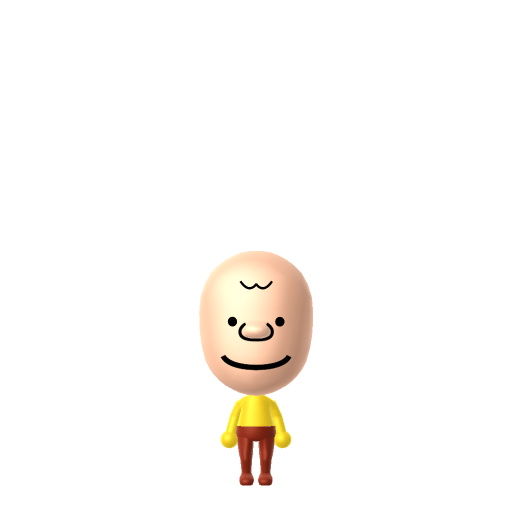
Good grief — the well-meaning, ever-hopeful Peanuts kid.
Charlie Brown is the protagonist of the comic strip Peanuts by Charles M. Schulz. He is a thoughtful, well-meaning boy known for repeated misfortunes — losing baseball games, having his kite eaten by a tree, missing the football kick.
Idealistic and romantic, always finding inspiration in the small details around them. Creative and imaginative in nature.In Tomodachi Life, set this Mii's sliders so Speech + Movement totals 4–7 and Thinking + Energy totals 8–11. See the full Daydreamer guide →
Why this fitsCharlie Brown speaks little, but his strips are full of reflective monologues and worried inner thoughts. That quiet-but-rich-inner-life profile fits Daydreamer (low Speech + Movement, high Thinking + Energy).
To make a Charlie Brown Mii in Tomodachi Life: Living the Dream, open Mii Maker and pick a round bald head with a single zig-zag of dark hair, large round eyes, and a slight frown, then dress him in his signature yellow zigzag-striped shirt. The picker-by-picker walkthrough below works for both Nintendo Switch (LTD) and 3DS (original Tomodachi Life).
Use the system Mii Maker, then bring the Mii into Tomodachi Life: Living the Dream.
Diagrams show where the option sits in the Mii Maker picker (4 columns, scroll to reach later rows). Editor menus differ slightly between regions and console revisions — if an exact option is missing, pick the closest one.
Charlie Brown's full appearance as a Mii Studio data string. Drop it into Mii rendering tools or community Mii editors that accept Studio codes (it's not a console import — for the game itself use the steps above).
08006e03080002120609030807020d00030000010002000804000a01001e0004000214031308130b04000a040503
This is a 3DS-format Mii QR code generated from Charlie Brown's Mii data. On a Nintendo 3DS, open Mii Maker → QR Code / Image Options → Scan QR Code and point the camera at it, then bring the Mii into the original Tomodachi Life. The Switch / Switch 2 has no camera, so it can't scan Mii QR codes — for Tomodachi Life: Living the Dream use the step-by-step instructions above (or the online Mii creator).
Download QR codeBuild cheat-sheet
Feature → the move to make in Mii Maker
Charlie Brown is famously near-bald — pick the roundest face and a tiny, sparse dark hairstyle to suggest the single front curl.
Give him large, simple round eyes and a slight, worried frown — he's the lovable underdog, not a grinner.
His yellow shirt with the black zigzag stripe is the whole signature — recreate it with LTD's in-game clothing and set yellow as the favourite colour.
Keep a short, young, average build — he's a grade-school kid, and the round head plus zigzag shirt do all the recognising.
Snoopy
His faithful, daydreaming pet beagle — the most famous dog in comics and Charlie Brown's constant companion.
Lucy van Pelt
The bossy neighbour who endlessly yanks away the football just as he runs to kick it — his great recurring tormentor.
Recreate Snoopy and Lucy as their own Miis and house them near your Charlie Brown Mii to rebuild the Peanuts gang — but Tomodachi Life: Living the Dream won't recreate the strip for you. Friendships grow from proximity and shared time, and romance runs on dating preferences and zodiac compatibility, so who gets close to whom is down to how you play.
Charlie Brown was created by Charles M. Schulz, whose comic strip Peanuts ran from 1950 to 2000 — the final daily strip appeared the day after Schulz died.
His best-known running gag is never getting to kick the football — Lucy pulls it away at the last second, every single time.
He pines hopelessly for "the little red-haired girl," a crush who is talked about but, in the original strips, almost never actually shown.
His exasperated catchphrase, "Good grief," became one of the most quoted lines in all of newspaper comics.
A Daydreamer-type Charlie Brown is the island's quiet thinker — soft-spoken on the outside but with a busy, worried inner world, the resident who overthinks every small setback. Daydreamers are low-key and room comfortably with similar gentle personalities, exactly what LTD's roommate harmony rewards, so settle him with another calm Mii. His luck in love isn't his to control, though — fitting, for a character defined by near-misses: crushes in Tomodachi Life: Living the Dream run on dating preferences, random chance and birthday/zodiac compatibility, never personality, so give your Charlie Brown a birthday and maybe, this time, the island lets him win one.
Use a round near-bald head with a tiny dark hairstyle, large round eyes and a slight frown, then dress him in the yellow zigzag-striped shirt with LTD's in-game clothing and set yellow as the favourite colour. He's a simple human kid, so the shirt and round head carry it — follow the picker-by-picker steps above for Switch (LTD) or 3DS.
A yellow shirt with a single black zigzag stripe running around it — one of the most recognisable outfits in comics. Recreate it with LTD's in-game clothing; it does most of the work of identifying the Mii.
Snoopy and Lucy van Pelt are the natural picks — build them as their own Miis and house them nearby to rebuild the Peanuts gang. LTD won't recreate the strip, but having them on one island sets the scene.
Daydreamer fits best — set low Speech + Movement with high-ish Thinking + Energy in the panel above. It matches his quiet exterior and the rich, reflective, slightly anxious inner life the strips are built on.
Sources: WikipediaCharacter facts are grounded in the source(s) above; Mii-Maker mapping is our own craft guidance.
Paste a Mii Studio code or upload a Mii QR image into the QR code Mii decoder to get this same step-by-step recreation guide for it.
Build a Mii from scratch in the online Mii creator, then bring its code here for rebuild steps.