All Mii ideas
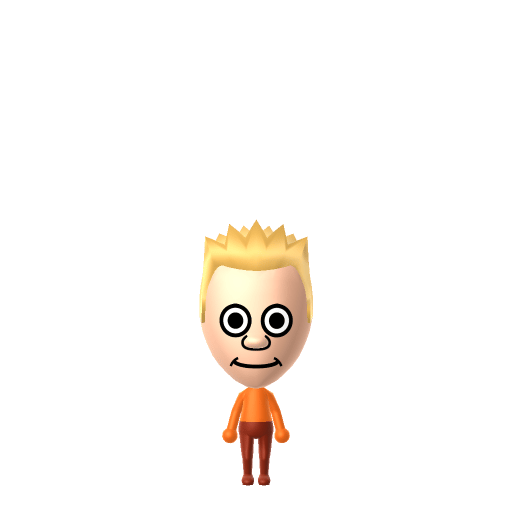
Bart Simpson Mii for Tomodachi Life
Funny Mii Idea

Bart Simpson Mii for Tomodachi Life

The mischievous, skateboarding ten-year-old at the center of Fox's The Simpsons.

#tv#simpsons#prankster

About the Bart Simpson Mii

Character File

Bartholomew JoJo "Bart" Simpson is the eldest child of the Simpson family and one of the main characters of The Simpsons, Fox's long-running animated sitcom created by Matt Groening. A 10-year-old skateboarding prankster from Springfield, he is voiced by Nancy Cartwright and known for catchphrases like "Eat my shorts" and "Ay, caramba!".

Bart Simpson Mii Quick Facts

Bart Simpson Mii — birthday, age & cast at a glance

Birthday
April 1 (per The Bart Book by Matt Groening; Bart himself names February 23 in the Simpsorama episode)
Age
10 (perpetual)
Voiced by
Nancy Cartwright
In Tomodachi Life

Set Bart's Mii birthday to April 1 in Mii Maker — Tomodachi Life: Living the Dream treats birthdays as a first-class input, feeding the compatibility meter and zodiac interactions on your island.

01 — Personality

Recommended personality for your Bart Simpson Mii: Maverick

A determined self-starter who removes every obstacle in their path. Highly driven, autonomous, and unstoppable.In Tomodachi Life, set this Mii's sliders so Speech + Movement totals 1215 and Thinking + Energy totals 03. See the full Maverick guide →

Why this fitsBart's whole role is rule-breaking with flair — prank calls to Moe's, chalkboard gags, skateboarding past authority figures — done loudly and unapologetically for the joy of the bit. That high-volume, self-amusing profile fits Maverick (high Speech + Movement, low Thinking + Energy).

02 — How to Make This Mii

How to Make a Bart Simpson Mii in Tomodachi Life

To make a Bart Simpson Mii in Tomodachi Life: Living the Dream, open Mii Maker and shape a small round face with bright yellow skin if your version's palette supports it (otherwise pale), spiky blonde hair, large round eyes, and a mischievous grin, then dress him in his signature red T-shirt and blue shorts colour scheme. The picker-by-picker walkthrough below works for both Nintendo Switch (LTD) and 3DS (original Tomodachi Life).

Use the system Mii Maker, then bring the Mii into Tomodachi Life: Living the Dream.

Body & Build

  1. 1
    Set gender to "Male".
  2. 2
    Set favorite color to orange.
  3. 3
    Set height to 9%.

Hair

  1. 4
    Set hair style.
    Row 3 · Column 4
  2. 5
    Set hair color in the expanded colors menu.

Eyes

  1. 6
    Set eyes.
    Row 8 · Column 1
  2. 7
    Make eyes 1 larger.
  3. 8
    Rotate outer edge of the eyes all the way down, then rotate it 4 ticks back up.
  4. 9
    Move eyes 1 closer.

Eyebrows

  1. 10
    Set eyebrows.
    Row 1 · Column 2
  2. 11
    Set eyebrows color in the expanded colors menu.
  3. 12
    Make eyebrows 4 smaller.
  4. 13
    Rotate outer edge of the eyebrows 1 ticks down.
  5. 14
    Move eyebrows 2 further apart.

Nose

  1. 15
    Set nose.
    Row 2 · Column 1
  2. 16
    Make nose 1 smaller

Mouth

  1. 17
    Set mouth.
    Row 1 · Column 4
  2. 18
    Make mouth 1 larger.
  3. 19
    Move mouth 1 ticks down.

Diagrams show where the option sits in the Mii Maker picker (4 columns, scroll to reach later rows). Editor menus differ slightly between regions and console revisions — if an exact option is missing, pick the closest one.

Mii Studio data code

Bart Simpson's full appearance as a Mii Studio data string. Drop it into Mii rendering tools or community Mii editors that accept Studio codes (it's not a console import — for the game itself use the steps above).

0800400308040503010c0308050000040a0000000001000804000a0700310b04000214031305150e04000a030509
03 — QR Code
Bart Simpson Mii QR code for the Nintendo 3DS

Scan this Bart Simpson Mii QR code

This is a 3DS-format Mii QR code generated from Bart Simpson's Mii data. On a Nintendo 3DS, open Mii Maker → QR Code / Image Options → Scan QR Code and point the camera at it, then bring the Mii into the original Tomodachi Life. The Switch / Switch 2 has no camera, so it can't scan Mii QR codes — for Tomodachi Life: Living the Dream use the step-by-step instructions above (or the online Mii creator).

Download QR code

Get the Bart Simpson Mii look

Build cheat-sheet

Feature → the move to make in Mii Maker

  1. Skin

    The Simpsons' bright cartoon yellow — pick the warmest tone (or yellow if your version's palette supports it) and let the hair and outfit carry the look.

  2. Hair

    Spiky blond hair — choose a short, sharply spiky style; his is standardised to nine points.

  3. Expression

    Large round eyes over a wide, mischievous grin — go for big eyes and a cheeky smile.

  4. Colour

    Set a red-top-and-blue-shorts colour scheme after import.

Did you know? — Bart Simpson Mii

  1. Matt Groening named him "Bart" as an anagram of "brat."

  2. Bart is the only fictional character ever named to Time magazine's list of the 100 most important people of the 20th century.

  3. He's voiced by Nancy Cartwright — a woman cast as the ten-year-old boy.

  4. His hair was eventually standardised to nine spikes of equal length.

What Mii Maker can't do for your Bart Simpson Mii

  • Mii Maker can’t

    Bright yellow Simpsons skin

    Closest you can get

    Mii Maker's skin tones don't include the cartoon yellow, so this is an inspired-by build — pick the warmest tone available and let the red shirt and spiky hair flag him as Bart.

  • Mii Maker can’t

    The nine-spike hair silhouette

    Closest you can get

    Mii Maker's hairstyles can't reproduce the exact spiked points, so pick the closest short, spiky style — the overall shape reads as Bart even without the precise nine spikes.

Pair your Bart Simpson Mii with

In Tomodachi Life

Recreate Homer and house him near Bart for the father-and-son dynamic — but Tomodachi Life: Living the Dream never imports family ties. Friendships grow from proximity and shared time, and romance runs on dating preferences, random crushes and zodiac/birthday compatibility, so the game won't read them as father and son; you steer the relationship by keeping them close and nudging their conversations.

Bart Simpson Mii — FAQ

Can I make Bart's yellow skin in Mii Maker?

Mii Maker's skin palette usually has no cartoon yellow, so this is an inspired-by build — pick the warmest tone available (or yellow if your version supports it). The spiky hair and red-shirt/blue-shorts colour scheme are what identify him.

How do I do Bart's spiky hair?

Choose the closest short, sharply spiky blond style. His hair was standardised to nine equal spikes, and while the editor won't match that exactly, the overall spiked silhouette reads as Bart.

What personality should I give a Bart Simpson Mii?

Maverick fits him best — set high Speech + Movement with low Thinking + Energy in the panel above. It matches his loud, rule-breaking-for-the-fun-of-it, prank-first streak.

Should I add Homer Simpson too?

Yes — recreate Homer and house him near Bart to rebuild the father-and-son pair. LTD bonds form from time spent together rather than canon, so whether they get along comes down to how you play matchmaker.

Sources: WikipediaCharacter facts are grounded in the source(s) above; Mii-Maker mapping is our own craft guidance.

More Miis like Bart Simpson

Have your own Mii?

Paste a Mii Studio code or upload a Mii QR image into the QR code Mii decoder to get this same step-by-step recreation guide for it.

Want to design your own?

Build a Mii from scratch in the online Mii creator, then bring its code here for rebuild steps.