All Mii ideas
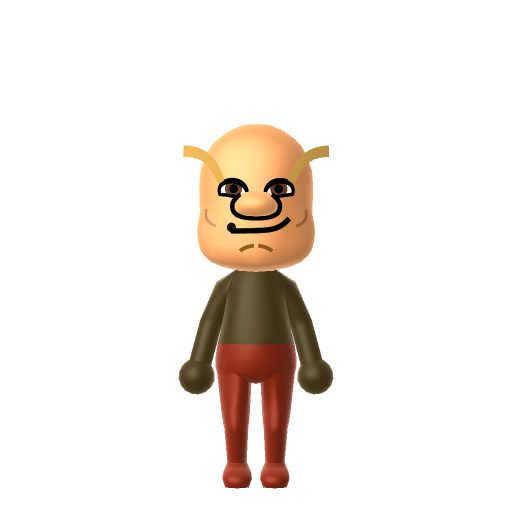
Eric Cartman Mii for Tomodachi Life
Funny Mii Idea

Eric Cartman Mii for Tomodachi Life

The loud, scheming, perpetually-eight-year-old antihero of Comedy Central's South Park.

#tv#south-park#schemer

Eric Cartman Mii Quick Facts

Eric Cartman Mii — age & cast at a glance

Age
8–10 (perpetual, third grade then fourth)
Voiced by
Trey Parker
In Tomodachi Life

After importing Cartman into Tomodachi Life: Living the Dream, dial in Trey Parker's nasal sneer with LTD's new voice pitch/speed/tone sliders — an LTD-exclusive Mii Maker option that doesn't exist in the Switch system Mii Maker.

About the Eric Cartman Mii

Character File

Eric Theodore Cartman is one of the four main characters of Comedy Central's South Park, created by Trey Parker and Matt Stone and on air since 1997. A fourth-grader in the fictional town of South Park, Colorado, he is voiced by Trey Parker and is widely regarded as one of the most overtly mean-spirited characters in mainstream animation.


01 — Personality

Recommended personality for your Eric Cartman Mii: Rogue

Combines sharp intelligence with unshakeable confidence and independence. A lone wolf who plays by their own rules.In Tomodachi Life, set this Mii's sliders so Speech + Movement totals 811 and Thinking + Energy totals 03. See the full Rogue guide →

Why this fitsCartman runs every episode the same way: hatch a self-serving plan, shout everyone down, betray a friend, walk off cackling. That openly self-interested, theatrically rule-breaking profile fits Rogue (high Speech + Movement, low Thinking + Energy).

02 — How to Make This Mii

How to Make a Eric Cartman Mii in Tomodachi Life

To make an Eric Cartman Mii in Tomodachi Life: Living the Dream, open Mii Maker and shape a round chubby face on a stocky build with pale skin, short brown hair, narrow scheming eyes, and a smug half-smile, then dress him in his signature red coat and yellow earflap hat colour scheme. The picker-by-picker walkthrough below works for both Nintendo Switch (LTD) and 3DS (original Tomodachi Life).

Use the system Mii Maker, then bring the Mii into Tomodachi Life: Living the Dream.

Body & Build

  1. 1
    Set gender to "Male".
  2. 2
    Set birth month to 1.
  3. 3
    Set birthday to 27.
  4. 4
    Set height to 0%.
  5. 5
    Set weight to 100%.

Face Shape & Skin

  1. 6
    Set face type.
  2. 7
    Set facial features/wrinkles.

Hair

  1. 8
    Set hair style.
    Row 2 · Column 2
  2. 9
    Set hair color in the expanded colors menu.

Eyes

  1. 10
    Set eyes.
    Row 8 · Column 1
  2. 11
    Set eye color in the expanded colors menu.
  3. 12
    Make eyes 2 larger.
  4. 13
    Rotate outer edge of the eyes all the way down, then rotate it 1 ticks back up.
  5. 14
    Move eyes 2 closer.
  6. 15
    Move eyes 1 ticks up.

Eyebrows

  1. 16
    Set eyebrows.
    Row 1 · Column 1
  2. 17
    Set eyebrows color in the expanded colors menu.
  3. 18
    Make eyebrows 2 smaller.
  4. 19
    Rotate outer edge of the eyebrows 1 ticks up.
  5. 20
    Move eyebrows 2 closer.
  6. 21
    Move eyebrows 1 ticks down.

Nose

  1. 22
    Set nose.
    Row 2 · Column 2
  2. 23
    Make nose 3 smaller
  3. 24
    Move nose 8 ticks down.

Mouth

  1. 25
    Set mouth.
    Row 2 · Column 5

Facial Hair

  1. 26
    Set mustache type.
    Row 1 · Column 2
  2. 27
    Make mustache 3 smaller

Diagrams show where the option sits in the Mii Maker picker (4 columns, scroll to reach later rows). Editor menus differ slightly between regions and console revisions — if an exact option is missing, pick the closest one.

Mii Studio data code

Eric Cartman's full appearance as a Mii Studio data string. Drop it into Mii rendering tools or community Mii editors that accept Studio codes (it's not a console import — for the game itself use the steps above).

08007f0309010603000b0308070206000b0000050700000804000a0500330004000214031304060d01010a010411
03 — QR Code
Eric Cartman Mii QR code for the Nintendo 3DS

Scan this Eric Cartman Mii QR code

This is a 3DS-format Mii QR code generated from Eric Cartman's Mii data. On a Nintendo 3DS, open Mii Maker → QR Code / Image Options → Scan QR Code and point the camera at it, then bring the Mii into the original Tomodachi Life. The Switch / Switch 2 has no camera, so it can't scan Mii QR codes — for Tomodachi Life: Living the Dream use the step-by-step instructions above (or the online Mii creator).

Download QR code

Get the Eric Cartman Mii look

Build cheat-sheet

Feature → the move to make in Mii Maker

  1. Face & build

    A round, chubby face on a short, stocky frame — pick the roundest face shape and a fuller body slider.

  2. Hair

    Short brown hair sits under the hat — choose a short brown style.

  3. Expression

    Narrow, scheming eyes and a smug half-smile — go for slim eyes and a lopsided confident mouth.

  4. Hat & colour

    His turquoise earflap beanie with a yellow brim and pom-pom has no Mii Maker equivalent (there are no hats), so add it as an in-game accessory and dress him in a red coat and brown trousers.

Did you know? — Eric Cartman Mii

  1. South Park debuted on August 13, 1997, and Cartman is voiced by series co-creator Trey Parker.

  2. Trey Parker and Matt Stone have said Cartman was inspired to some degree by All in the Family's Archie Bunker.

  3. His design and the name "Cartman" were locked in by the 1995 short "The Spirit of Christmas" (the "Jesus vs. Santa" cut) that helped launch South Park.

  4. Wikipedia describes Cartman as one of the most influential fictional characters of all time and an American cultural icon.

Eric Cartman Mii on your island

Picture it

A Rogue Cartman is the island's openly self-interested troublemaker — loud, scheming, and happy to shout everyone down for his own ends. LTD grows friendships through proximity and repeated conversations rather than personality scores, so dropping him into the middle of an island of up to 70 residents guarantees he stirs the pot. For the full effect, dial in Trey Parker's nasal sneer on LTD's exclusive voice pitch/speed/tone sliders — an in-game Mii Maker option the Switch system editor doesn't have.

Life on your island

Eric Cartman Mii — FAQ

How do I make Cartman's earflap hat in Mii Maker?

You can't — Mii Maker has no hats. Build his round face and short brown hair first, then add his turquoise-and-yellow earflap beanie as an in-game accessory once he's imported into Tomodachi Life: Living the Dream.

Is Eric Cartman easy to recreate?

Mostly — apart from the hat, his look is simple: a round chubby face, short brown hair, narrow scheming eyes and a smug half-smile. The red coat and brown trousers go on as in-game clothing.

What personality should I give an Eric Cartman Mii?

Rogue fits him best — set high Speech + Movement with low Thinking + Energy in the panel above. It matches his openly self-interested, scheme-and-shout, theatrically rule-breaking streak.

Can I match Cartman's voice?

Yes — LTD adds exclusive voice pitch, speed and tone sliders in its in-game Mii Maker (not present in the Switch system editor). Nudge them toward a higher, nasal sneer to land Trey Parker's delivery.

Sources: WikipediaCharacter facts are grounded in the source(s) above; Mii-Maker mapping is our own craft guidance.

More Miis like Eric Cartman

Have your own Mii?

Paste a Mii Studio code or upload a Mii QR image into the QR code Mii decoder to get this same step-by-step recreation guide for it.

Want to design your own?

Build a Mii from scratch in the online Mii creator, then bring its code here for rebuild steps.