Character File
Shrek is a fictional ogre created by American author William Steig and the protagonist of DreamWorks Animation's Shrek film series. The name comes from a Yiddish word related to the German Schreck, meaning "fear" or "fright."
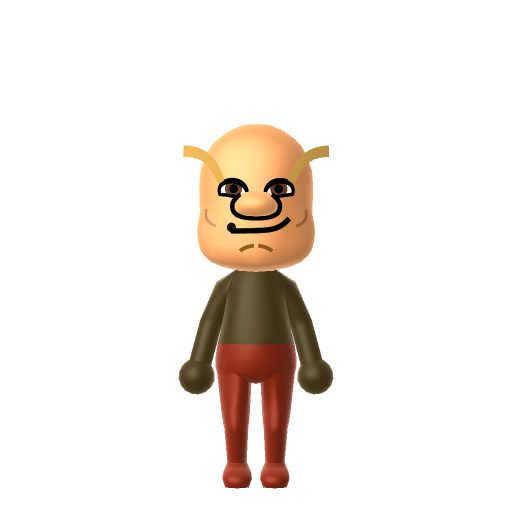
The lovable ogre from the swamp. Get out of my island!
Shrek is a fictional ogre created by American author William Steig and the protagonist of DreamWorks Animation's Shrek film series. The name comes from a Yiddish word related to the German Schreck, meaning "fear" or "fright."
Combines sharp intelligence with unshakeable confidence and independence. A lone wolf who plays by their own rules.In Tomodachi Life, set this Mii's sliders so Speech + Movement totals 8–11 and Thinking + Energy totals 0–3. See the full Rogue guide →
Why this fitsShrek opens the franchise by chasing villagers off his swamp and grumbles his way through most social situations on his own terms. That gruff, rule-breaking profile fits Rogue (high Speech + Movement, low Thinking + Energy).
To make a Shrek Mii in Tomodachi Life: Living the Dream, open Mii Maker and pick green skin, a bald round head, wide expressive eyes, and a stocky frame in a brown vest — Mii Maker can't add his trumpet-shaped ears, so colour and shape carry the look. The picker-by-picker walkthrough below works for both Nintendo Switch (LTD) and 3DS (original Tomodachi Life).
Use the system Mii Maker, then bring the Mii into Tomodachi Life: Living the Dream.
Diagrams show where the option sits in the Mii Maker picker (4 columns, scroll to reach later rows). Editor menus differ slightly between regions and console revisions — if an exact option is missing, pick the closest one.
Shrek's full appearance as a Mii Studio data string. Drop it into Mii rendering tools or community Mii editors that accept Studio codes (it's not a console import — for the game itself use the steps above).
06007f030a040426020a03070907090a090100030309001202000707001e7f070104140313080f0a03020d070504
This is a 3DS-format Mii QR code generated from Shrek's Mii data. On a Nintendo 3DS, open Mii Maker → QR Code / Image Options → Scan QR Code and point the camera at it, then bring the Mii into the original Tomodachi Life. The Switch / Switch 2 has no camera, so it can't scan Mii QR codes — for Tomodachi Life: Living the Dream use the step-by-step instructions above (or the online Mii creator).
Download QR codeHis trumpet-shaped ears
Mii Maker has no ogre-ear option, so the trumpet ears can't be added — the bald head, broad face and green tone have to carry the silhouette instead.
True ogre-green skin
Mii Maker's skin tones don't include a real ogre-green, so pick the closest available tone and lean on the bald head and brown vest for recognition.
Build cheat-sheet
Feature → the move to make in Mii Maker
Shrek is bald with a round, heavy head — pick a clean bald or near-bald style and a wide, rounded face shape.
Give him wide, expressive eyes under a heavy brow and a slightly grumpy mouth — the gruff-but-warm ogre look.
Push the build stocky and broad — Shrek is a big, heavy-set ogre, not a slim one.
Dress him in his brown vest and untucked shirt using LTD's in-game clothing, and set a green or brown favourite colour to tie the look together.
Princess Fiona
The princess he rescues and falls for — they marry and she chooses ogre form, making her his canonical Sweethearts pairing.
Donkey
His relentlessly chatty best friend and sidekick (voiced by Eddie Murphy) — the talkative foil to Shrek's grumpiness.
Recreate Fiona and Donkey as their own Miis and house them near your Shrek Mii to rebuild the swamp crew — but Tomodachi Life: Living the Dream won't recreate the fairy tale for you. Friendships grow from proximity and shared time, and romance runs on dating preferences and zodiac compatibility, so whether Shrek and Fiona become Sweethearts is down to how you play.
Shrek began as a 1990 picture book by American cartoonist William Steig before DreamWorks turned him into a film star in 2001.
Chris Farley was originally cast as Shrek and reportedly recorded most of his lines before his death in 1997; Mike Myers took over and famously re-recorded the role in a Scottish accent.
Shrek won the very first Academy Award for Best Animated Feature, handed out at the 2002 ceremony.
His name comes from the Yiddish word related to the German "Schreck," meaning "fear" or "fright."
A Rogue-type Shrek is the island's lovable grump — high on Speech and Movement, blunt, territorial and happiest left alone, yet warm once you're past the growl. Rogues bring the friction, so the comedy is in dropping him among your sunnier residents. He rooms most easily with other big personalities, which is what LTD's roommate harmony rewards. Romance, though, isn't something he can chase off or summon: crushes in Tomodachi Life: Living the Dream run on dating preferences, random chance and birthday/zodiac compatibility — so set your Shrek a birthday, recreate Fiona nearby, and let the island decide.
Use a bald round head, a wide heavy face, expressive eyes and a stocky build, then dress him in his brown vest with LTD's in-game clothing. Mii Maker can't add his trumpet ears or a true ogre-green, so the bald head and broad shape carry the look — follow the picker-by-picker steps above for Switch (LTD) or 3DS.
Only approximately. Mii Maker's skin tones don't include a real ogre-green, so pick the closest available tone and let the bald head, broad face and brown vest do the recognising. The trumpet-shaped ears can't be made at all.
Princess Fiona for the romance and Donkey for the comedy — build them as their own Miis and house them near Shrek. LTD won't recreate the films, since relationships form from time spent together, but having the swamp crew on one island sets it up.
Rogue fits best — set high Speech + Movement with low-to-mid Thinking + Energy in the panel above. It matches his blunt, territorial, get-out-of-my-swamp streak that softens into loyalty.
Sources: WikipediaScreen RantWikipediaCharacter facts are grounded in the source(s) above; Mii-Maker mapping is our own craft guidance.
Paste a Mii Studio code or upload a Mii QR image into the QR code Mii decoder to get this same step-by-step recreation guide for it.
Build a Mii from scratch in the online Mii creator, then bring its code here for rebuild steps.