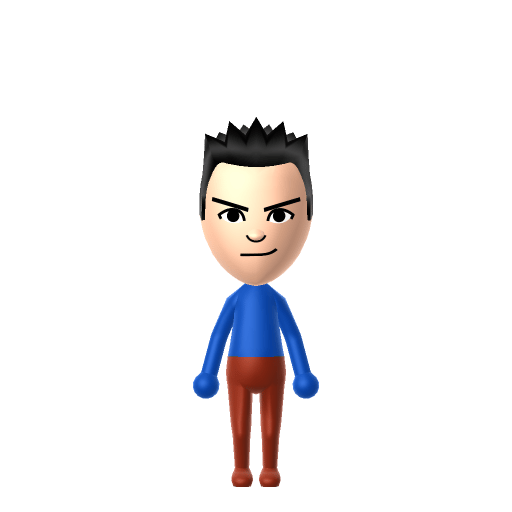
All Mii ideas
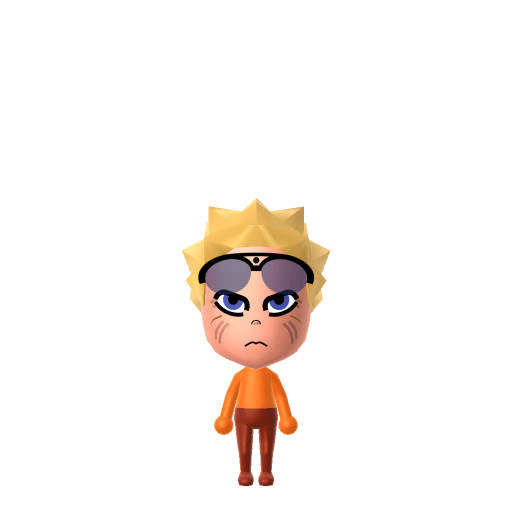
Naruto Uzumaki Mii for Tomodachi Life
Anime Mii Idea

Naruto Uzumaki Mii for Tomodachi Life

The energetic ninja who never gives up, believe it!

#anime#ninja#shonen

About the Naruto Uzumaki Mii

Character File

Naruto Uzumaki is the protagonist of the manga and anime series Naruto, created by Masashi Kishimoto. He is a ninja from the Hidden Leaf Village, ostracised as a child because of the Nine-Tailed Fox sealed inside him, yet he refuses to give up on becoming Hokage.

Naruto Uzumaki Mii Quick Facts

Naruto Uzumaki Mii — cast at a glance

Voiced by
Junko Takeuchi (Japanese); Maile Flanagan (English)
In Tomodachi Life

After importing Naruto into Tomodachi Life: Living the Dream, push the voice pitch up and speed the cadence on LTD's new voice sliders to land Junko Takeuchi's hyperactive shout — those sliders are an LTD-exclusive Mii Maker option that doesn't exist in the Switch system Mii Maker.

01 — Personality

Recommended personality for your Naruto Uzumaki Mii: Dynamo

Passionate leaders who naturally command attention through decisive action and infectious energy.In Tomodachi Life, set this Mii's sliders so Speech + Movement totals 12–15 and Thinking + Energy totals 8–11. See the full Dynamo guide →

Why this fitsNaruto is loud, relentless, and broadcasts his ambitions to anyone within earshot — "Believe it!" That high-volume, high-tenacity profile fits Dynamo (high Speech + Movement, high Thinking + Energy).

02 — How to Make This Mii

How to Make a Naruto Uzumaki Mii in Tomodachi Life

To make a Naruto Uzumaki Mii in Tomodachi Life: Living the Dream, open Mii Maker and pick spiky blonde hair, bright blue eyes, and a wide confident grin, then dress him in his signature orange jumpsuit colour palette. The picker-by-picker walkthrough below works for both Nintendo Switch (LTD) and 3DS (original Tomodachi Life).

Use the system Mii Maker, then bring the Mii into Tomodachi Life: Living the Dream.

Body & Build

  1. 1
    Set gender to "Male".
  2. 2
    Set birth month to 10.
  3. 3
    Set birthday to 10.
  4. 4
    Set favorite color to orange.
  5. 5
    Set height to 24%.
  6. 6
    Set weight to 69%.

Face Shape & Skin

  1. 7
    Set face/skin color.
  2. 8
    Set face type.
  3. 9
    Set facial features/wrinkles.

Hair

  1. 10
    Set hair style.
    ⋯
    ⋯
    Row 3 · Column 6
  2. 11
    Set hair color in the expanded colors menu.

Eyes

  1. 12
    Set eyes.
    ⋯
    Row 1 · Column 6
  2. 13
    Set eye color in the expanded colors menu.
  3. 14
    Make eyes 1 larger.
  4. 15
    Rotate outer edge of the eyes all the way down, then rotate it 6 ticks back up.
  5. 16
    Move eyes 3 ticks down.

Eyebrows

  1. 17
    Set eyebrows.
    ⋯
    Row 1 · Column 6
  2. 18
    Set eyebrows color in the expanded colors menu.
  3. 19
    Make eyebrows 4 smaller.
  4. 20
    Rotate outer edge of the eyebrows 4 ticks down.
  5. 21
    Move eyebrows 9 further apart.
  6. 22
    Move eyebrows 8 ticks down.

Nose

  1. 23
    Set nose.
    ⋯
    Row 2 · Column 2
  2. 24
    Make nose 4 smaller
  3. 25
    Move nose 1 ticks down.

Mouth

  1. 26
    Set mouth.
    ⋯
    Row 2 · Column 3
  2. 27
    Make mouth 3 smaller
  3. 28
    Move mouth 1 ticks down.

Facial Hair

  1. 29
    Set beard color in the expanded colors menu.

Glasses

  1. 30
    Set glasses type.
    ⋯
    ⋯
    Row 3 · Column 5
  2. 31
    Set glasses color in the expanded colors menu.
  3. 32
    Move glasses 8 ticks up.

Beauty Mark

  1. 33
    Turn mole on.
  2. 34
    Move mole 6 ticks to the right.
  3. 35
    Move mole 18 ticks up.

Diagrams show where the option sits in the Mii Maker picker (4 columns, scroll to reach later rows). Editor menus differ slightly between regions and console revisions — if an exact option is missing, pick the closest one.

Mii Studio data code

Naruto Uzumaki's full appearance as a Mii Studio data string. Drop it into Mii rendering tools or community Mii editors that accept Studio codes (it's not a console import — for the game itself use the steps above).

060057030c060511020f03060200130b120300040b01001004060207001f1f040108020313010a0e04000a00040a
03 — QR Code
Naruto Uzumaki Mii QR code for the Nintendo 3DS

Scan this Naruto Uzumaki Mii QR code

This is a 3DS-format Mii QR code generated from Naruto Uzumaki's Mii data. On a Nintendo 3DS, open Mii Maker → QR Code / Image Options → Scan QR Code and point the camera at it, then bring the Mii into the original Tomodachi Life. The Switch / Switch 2 has no camera, so it can't scan Mii QR codes — for Tomodachi Life: Living the Dream use the step-by-step instructions above (or the online Mii creator).

Download QR code

Get the Naruto Uzumaki Mii look

Build cheat-sheet

Feature → the move to make in Mii Maker

  1. Hair

    Spiky, bright blonde hair that sticks out in all directions — pick a spiky style in the lightest yellow/blonde available.

  2. Eyes

    Big, bright blue eyes full of energy — choose large round eyes in the bluest colour.

  3. Expression

    A wide, confident, open-mouthed grin is his trademark — go with the biggest smile.

  4. Colour

    Set an orange colour theme for his unmistakable orange-and-black jumpsuit.

What Mii Maker can't do for your Naruto Uzumaki Mii

  • Mii Maker can’t

    Three whisker marks on each cheek

    Closest you can get

    The system Mii Maker has no cheek-marking option. Good news for LTD players: LTD's in-game Mii Maker adds custom face paint, so you can paint the six whisker marks on after importing the Mii.

  • Mii Maker can’t

    Ninja forehead protector (headband)

    Closest you can get

    Mii Maker has no headband part, and LTD strips imported hats into the wardrobe anyway. Lean on the spiky blonde hair and orange colours so he still reads as Naruto.

Did you know? — Naruto Uzumaki Mii

  1. Naruto became the jinchūriki (living host) of the Nine-Tailed Fox on the day he was born — the demon's chakra is the in-story reason for the three whisker marks on each cheek.

  2. After the Fourth Great Ninja War, Naruto finally achieves his lifelong dream and becomes the Seventh Hokage, leader of the Hidden Leaf Village.

  3. He marries Hinata Hyuga, and the two have a son, Boruto, and a daughter, Himawari.

Pair your Naruto Uzumaki Mii with

Hinata Hyuga

The quiet admirer who eventually becomes Naruto's wife and mother of Boruto and Himawari.

Sasuke Uchiha

His rival and best friend — their clash and reconciliation is the heart of the series.

In Tomodachi Life

Build the Hidden Leaf cast as island neighbours, but Tomodachi Life: Living the Dream forms its own bonds — friendships and crushes come from proximity, dating preferences and birthday/zodiac compatibility, not from the source story, so your island's Naruto might befriend (or crush on) someone entirely off-script.

Naruto Uzumaki Mii — FAQ

Can I give a Naruto Mii his whisker marks?

Not in the Switch system Mii Maker — it has no cheek-marking option. But LTD's own in-game Mii Maker adds custom face paint, so once you import the Mii into Tomodachi Life: Living the Dream you can paint on the three whiskers per cheek.

What colour is Naruto's outfit?

Bright orange with black accents — his signature jumpsuit. Set an orange colour theme in Mii Maker to match.

What personality fits a Naruto Mii?

Dynamo fits best — set Speech, Movement, Thinking and Energy all high in the personality panel above. It matches his loud, relentless, never-give-up energy.

Sources: WikipediaCharacter facts are grounded in the source(s) above; Mii-Maker mapping is our own craft guidance.

More Miis like Naruto Uzumaki

Have your own Mii?

Paste a Mii Studio code or upload a Mii QR image into the QR code Mii decoder to get this same step-by-step recreation guide for it.

Want to design your own?

Build a Mii from scratch in the online Mii creator, then bring its code here for rebuild steps.