All Mii ideas
Sonic Mii for Tomodachi Life
Video Game Mii Idea

Sonic Mii for Tomodachi Life

The fastest hedgehog alive, always running toward adventure.

#sega#classic#speed

Sonic Mii Quick Facts

Sonic Mii — cast at a glance

Voiced by
Roger Craig Smith (games, 2010–present); Ben Schwartz (2020–2024 films)
In Tomodachi Life

Sonic is all cocky energy and fast quips — after importing him into Tomodachi Life: Living the Dream, push the pitch up and the speed toward fast on LTD's voice sliders for that brash, rapid-fire delivery; those sliders are an LTD-exclusive Mii Maker option the Switch system Mii Maker doesn't have.

About the Sonic Mii

Character File

Sonic the Hedgehog is a character created by Yuji Naka and Naoto Ohshima and is the mascot of Sega. An anthropomorphic blue hedgehog who runs at supersonic speed, he races through levels collecting rings and avoiding obstacles as he tries to defeat his archenemy.

01 — Personality

Recommended personality for your Sonic Mii: Dynamo

Passionate leaders who naturally command attention through decisive action and infectious energy.In Tomodachi Life, set this Mii's sliders so Speech + Movement totals 12–15 and Thinking + Energy totals 8–11. See the full Dynamo guide →

Why this fitsSonic's whole identity is speed and dramatic flair — he races forward, taunts villains, and never sits still. That high-tempo, expressive profile maps to Dynamo (high Speech + Movement, mid Thinking + Energy).

02 — How to Make This Mii

How to Make a Sonic Mii in Tomodachi Life

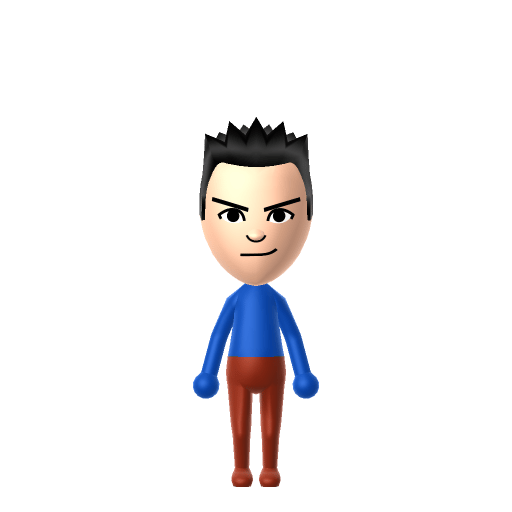
To make a Sonic Mii in Tomodachi Life: Living the Dream, open Mii Maker and pick a bright blue spiky hairstyle, green eyes, and a confident grin to translate Sonic's hedgehog silhouette into Mii form — colour and spike shape are the key signals since Mii Maker can't render fur. The picker-by-picker walkthrough below works for both Nintendo Switch (LTD) and 3DS (original Tomodachi Life).

Use the system Mii Maker, then bring the Mii into Tomodachi Life: Living the Dream.

Body & Build

  1. 1
    Set gender to "Male".
  2. 2
    Set birth month to 4.
  3. 3
    Set birthday to 26.
  4. 4
    Set favorite color to blue.
  5. 5
    Set height to 26%.
  6. 6
    Set weight to 22%.

Face Shape & Skin

  1. 7
    Set face/skin color.
  2. 8
    Set face type.

Hair

  1. 9
    Set hair style.
    ⋯
    ⋯
    Row 12 · Column 2
  2. 10
    Set hair color in the expanded colors menu.

Eyes

  1. 11
    Set eyes.
    ⋯
    ⋯
    Row 5 · Column 6
  2. 12
    Set eye color in the expanded colors menu.
  3. 13
    Make eyes 3 larger.
  4. 14
    Unsquash the eyes 1 to the right.
  5. 15
    Rotate outer edge of the eyes all the way down, then rotate it 5 ticks back up.
  6. 16
    Move eyes 1 closer.
  7. 17
    Move eyes 4 ticks down.

Eyebrows

  1. 18
    Set eyebrows.
    ⋯
    Row 2 · Column 5
  2. 19
    Set eyebrows color in the expanded colors menu.
  3. 20
    Make eyebrows 4 larger.
  4. 21
    Unsquash the eyebrows 3 to the right.
  5. 22
    Rotate outer edge of the eyebrows 4 ticks up.
  6. 23
    Move eyebrows 2 closer.
  7. 24
    Move eyebrows 5 ticks down.

Nose

  1. 25
    Set nose.
    ⋯
    Row 1 · Column 6
  2. 26
    Make nose 1 smaller
  3. 27
    Move nose 2 ticks down.

Mouth

  1. 28
    Set mouth.
    ⋯
    ⋯
    Row 4 · Column 1
  2. 29
    Make mouth 1 smaller
  3. 30
    Unsquash the mouth 3 to the right.
  4. 31
    Move mouth 3 ticks down.

Facial Hair

  1. 32
    Make mustache 4 smaller
  2. 33
    Move mustache 4 ticks up.

Glasses

  1. 34
    Set glasses type.
    ⋯
    ⋯
    Row 3 · Column 2
  2. 35
    Set glasses color in the expanded colors menu.
  3. 36
    Make glasses 3 larger.
  4. 37
    Move glasses 8 ticks up.

Beauty Mark

  1. 38
    Turn mole on.
  2. 39
    Make mole 4 larger.
  3. 40
    Move mole 6 ticks to the right.

Diagrams show where the option sits in the Mii Maker picker (4 columns, scroll to reach later rows). Editor menus differ slightly between regions and console revisions — if an exact option is missing, pick the closest one.

Mii Studio data code

Sonic's full appearance as a Mii Studio data string. Drop it into Mii rendering tools or community Mii editors that accept Studio codes (it's not a console import — for the game itself use the steps above).

08001c040c050706011006040a0805000f0100010005001007080204006621080108140613030f1000000603000b
03 — QR Code
Sonic Mii QR code for the Nintendo 3DS

Scan this Sonic Mii QR code

This is a 3DS-format Mii QR code generated from Sonic's Mii data. On a Nintendo 3DS, open Mii Maker → QR Code / Image Options → Scan QR Code and point the camera at it, then bring the Mii into the original Tomodachi Life. The Switch / Switch 2 has no camera, so it can't scan Mii QR codes — for Tomodachi Life: Living the Dream use the step-by-step instructions above (or the online Mii creator).

Download QR code

Get the Sonic Mii look

Build cheat-sheet

Feature → the move to make in Mii Maker

  1. Hair

    Bright blue, swept-back spikes are the whole silhouette — pick the spikiest hairstyle in the most vivid blue available.

  2. Eyes

    Large green eyes — choose big, confident eyes in emerald green.

  3. Expression

    A cocky, self-assured grin is his default — use a smirking, confident mouth.

  4. Shoes & accents

    His red-and-white shoes and white gloves go on as in-game clothing, adding the recognisable red accent after import.

What Mii Maker can't do for your Sonic Mii

  • Mii Maker can’t

    His anthropomorphic hedgehog body

    Closest you can get

    Mii Maker can't build a hedgehog — no muzzle, no fur, no quills. This is an inspired-by, human-form Sonic where blue spiky hair and green eyes carry the likeness.

  • Mii Maker can’t

    His peach muzzle and blue fur

    Closest you can get

    Mii skin and fur tones don't include cartoon blue, so the colour lives entirely in the spiky hair; pick a warm human skin tone and let the hair do the work.

Did you know? — Sonic Mii

  1. Sonic was created as Sega's answer to Mario — the company wanted a mascot to rival Nintendo's.

  2. His name comes from his defining ability: he runs at or beyond the speed of sound.

  3. His signature blue colour was deliberately picked to match Sega's cobalt-blue corporate logo.

  4. His original 1991 design was short and round, later redesigned with longer legs and a leaner body.

Sonic Mii on your island

Picture it

A Dynamo-type Sonic is the island's restless live wire — fast-talking, always on the move, the first to liven up a quiet day. LTD grows friendships through proximity and repeated conversations rather than personality scores, so place him centrally and recreate Knuckles and Shadow nearby for the Sonic-cast energy. The twist is the game ignores canon: your Sonic might become Best Friends with his rival Shadow, or chase a crush from a completely different series — on an island of up to 70 residents, the chaos is part of the charm.

Life on your island

Pair your Sonic Mii with

In Tomodachi Life

Recreate Knuckles and Shadow to gather Sonic's circle on one island — but Tomodachi Life: Living the Dream writes its own story. Friendships grow from proximity and shared time, and romance runs on dating preferences, random crushes and zodiac/birthday compatibility, so the game won't recreate the rivalries for you; house them close and steer their conversations.

Sonic Mii — FAQ

Can Mii Maker make a real Sonic?

No — Mii Maker can't build an anthropomorphic hedgehog with a muzzle, fur and quills. This is an inspired-by, human-form Sonic where bright blue spiky hair, green eyes and his red-and-white shoes (added in-game) carry the likeness.

Does Sonic have a birthday I can set?

No official character birthday exists. Sega informally marks "Sonic's birthday" on June 23, but that's the 1991 US game-release anniversary, not a canonical birth date — so set whatever date you like in Mii Maker.

What personality should I give a Sonic Mii?

Dynamo fits him best — set high Speech + Movement with mid Thinking + Energy in the panel above. It matches his fast, flashy, never-sit-still energy.

Should I recreate Knuckles and Shadow too?

Yes — build Knuckles and Shadow and house them near Sonic to gather the cast. LTD bonds form from time spent together rather than canon, so whether Sonic and Shadow stay rivals or become Best Friends is up to how you play.

Sources: WikipediaSonic WikiCharacter facts are grounded in the source(s) above; Mii-Maker mapping is our own craft guidance.

More Miis like Sonic

Have your own Mii?

Paste a Mii Studio code or upload a Mii QR image into the QR code Mii decoder to get this same step-by-step recreation guide for it.

Want to design your own?

Build a Mii from scratch in the online Mii creator, then bring its code here for rebuild steps.