All Mii ideas
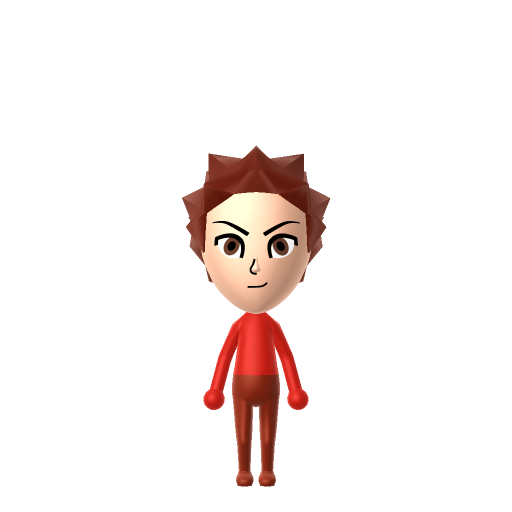
Tanjiro Kamado Mii for Tomodachi Life
Anime Mii Idea

Tanjiro Kamado Mii for Tomodachi Life

The kind-hearted demon-slaying protagonist of Demon Slayer: Kimetsu no Yaiba.

#anime#demon-slayer#swordsman

Tanjiro Kamado Mii Quick Facts

Tanjiro Kamado Mii — cast at a glance

Voiced by
Natsuki Hanae (Japanese); Zach Aguilar (English)
In Tomodachi Life

Tanjiro is famously gentle and earnest, so on your island give your Tanjiro Mii a warm, steady, mid-pitched voice on LTD's Mii Maker voice sliders (an LTD-exclusive option the Switch system Mii Maker lacks) to match his kind, level-headed delivery rather than a shouty shonen tone.

01 — Personality

Recommended personality for your Tanjiro Kamado Mii: Achiever

Diligent and productive, turning every plan into action. Results-focused and efficient in everything they do.In Tomodachi Life, set this Mii's sliders so Speech + Movement totals 8–11 and Thinking + Energy totals 4–7. See the full Achiever guide →

Why this fitsTanjiro trains relentlessly — mastering breathing forms through sheer, grinding effort — and never stops pushing toward a single goal: curing his sister and avenging his family. That disciplined, self-improving drive (high Thinking + Energy) reads as Achiever, so that's the personality this Tanjiro Mii ships with above.

02 — How to Make This Mii

How to Make a Tanjiro Kamado Mii in Tomodachi Life

To make a Tanjiro Mii in Tomodachi Life: Living the Dream, open Mii Maker and build a kind-faced young man with tousled dark hair, wide gentle dark-red eyes, level determined brows and a red colour scheme for his haori. His forehead scar, hanafuda earrings and checkered green-and-black haori can't be built in the face editor — the walkthrough below covers both Switch (LTD) and 3DS.

Use the system Mii Maker, then bring the Mii into Tomodachi Life: Living the Dream.

Body & Build

  1. 1
    Set gender to "Male".
  2. 2
    Set height to 69%.
  3. 3
    Set weight to 46%.

Hair

  1. 4
    Set hair style.
    ⋯
    ⋯
    Row 3 · Column 6
  2. 5
    Set hair color in the expanded colors menu.

Eyes

  1. 6
    Set eyes.
    ⋯
    ⋯
    Row 9 · Column 2
  2. 7
    Set eye color in the expanded colors menu.
  3. 8
    Unsquash the eyes 3 to the right.
  4. 9
    Rotate outer edge of the eyes all the way down, then rotate it 6 ticks back up.
  5. 10
    Move eyes 1 further apart.
  6. 11
    Move eyes 2 ticks down.

Eyebrows

  1. 12
    Set eyebrows.
    ⋯
    Row 1 · Column 6
  2. 13
    Set eyebrows color in the expanded colors menu.
  3. 14
    Squash the eyebrows 1 to the left.
  4. 15
    Rotate outer edge of the eyebrows 1 ticks up.
  5. 16
    Move eyebrows 1 ticks down.

Nose

  1. 17
    Make nose 2 smaller
  2. 18
    Move nose 1 ticks down.

Mouth

  1. 19
    Set mouth.
    ⋯
    ⋯
    Row 4 · Column 1
  2. 20
    Make mouth 3 smaller

Facial Hair

  1. 21
    Set beard color in the expanded colors menu.

Diagrams show where the option sits in the Mii Maker picker (4 columns, scroll to reach later rows). Editor menus differ slightly between regions and console revisions — if an exact option is missing, pick the closest one.

Mii Studio data code

Tanjiro Kamado's full appearance as a Mii Studio data string. Drop it into Mii rendering tools or community Mii editors that accept Studio codes (it's not a console import — for the game itself use the steps above).

01003a060a060431030e0208070413020b0000000000000804000a02001f58040002140313010f0d04000a02010a
03 — QR Code
Tanjiro Kamado Mii QR code for the Nintendo 3DS

Scan this Tanjiro Kamado Mii QR code

This is a 3DS-format Mii QR code generated from Tanjiro Kamado's Mii data. On a Nintendo 3DS, open Mii Maker → QR Code / Image Options → Scan QR Code and point the camera at it, then bring the Mii into the original Tomodachi Life. The Switch / Switch 2 has no camera, so it can't scan Mii QR codes — for Tomodachi Life: Living the Dream use the step-by-step instructions above (or the online Mii creator).

Download QR code

What Mii Maker can't do for your Tanjiro Kamado Mii

  • Mii Maker can’t

    The scar on his forehead

    Closest you can get

    the editor has no scar part, so you'd approximate it with Pro Mode face paint — enable Paint Behind and layer reddish tones on the forehead. It's the single most identifying mark, so it's worth the extra step for a Tanjiro Mii.

  • Mii Maker can’t

    His hanafuda earrings (rising sun over a mountain)

    Closest you can get

    The face editor has no earrings or accessories, so they simply can't be added — lean on the hair and face to carry the character instead.

  • Mii Maker can’t

    The checkered green-and-black haori

    Closest you can get

    Outfits aren't part of the face editor and there's no pattern option, so the iconic checkered haori can't be built — set his favourite colour to red and dress the imported Mii in the closest patterned or green top your Tomodachi Life wardrobe allows.

  • Mii Maker can’t

    The black-to-red hair gradient

    Closest you can get

    A Mii can only have one solid hair colour, so the signature black roots fading to red tips isn't possible — pick a single dark burgundy as the compromise that reads closest to both ends of the gradient.

  • Mii Maker can’t

    His nichirin sword

    Closest you can get

    Miis don't hold weapons or props, so his Demon Slayer blade can't be shown — the recognisable hair, eyes and red palette have to carry the Tanjiro Mii on their own.

Get the Tanjiro Kamado Mii look

Build cheat-sheet

Feature → the move to make in Mii Maker

  1. Hair

    Tanjiro has "ruffled, black hair with red tips" — the editor allows only one hair colour per Mii, so pick a short tousled style for the Tanjiro Mii in the darkest burgundy the editor offers to suggest that black-to-red gradient for your Tanjiro Mii.

  2. Eyes

    Wide, gentle, dark-red eyes — choose a large, soft eye shape and the closest reddish-brown eye colour so the Tanjiro Mii catches his kind stare.

  3. Brows

    Level, earnest, fairly thick eyebrows — the Tanjiro Mii's determined-but-gentle look lives in the brows, so keep them straight and solid rather than angled and angry.

  4. Colour scheme

    Set his favourite colour to red so the imported Tanjiro Mii leans into the red of his haori and the rising-sun motif.
Did you know? — Tanjiro Kamado Mii

  1. His design was partially influenced by Himura Kenshin from Nobuhiro Watsuki's manga Rurouni Kenshin.

  2. He ranked first in the debut Demon Slayer: Kimetsu no Yaiba character popularity poll with 6,742 votes.

  3. He won the "Best Boy" category at the 4th Crunchyroll Anime Awards, and Natsuki Hanae won Best Voice Actor for playing him.

  4. Tanjiro first appeared on 3 June 2016, in chapter 1 of the manga, "Cruelty".

Tanjiro Kamado Mii on your island

Picture it

An Achiever like the Tanjiro Mii brings quiet, relentless dedication to island life — the resident who's kind to everyone but always seems to be working toward something. Tomodachi Life: Living the Dream grows bonds through proximity and repeated conversations rather than Demon Slayer canon, so house your Tanjiro Mii near neighbours who bring out his gentle side and watch him become the island's steady, reliable friend. Just remember LTD writes its own story — your kind-hearted Tanjiro Mii might end up Best Friends, or even Sweethearts, with someone from a completely different world.

Life on your island

Tanjiro Kamado Mii — FAQ

Can Mii Maker make an accurate Tanjiro Mii?

Partly. His tousled dark hair, gentle wide eyes and earnest face all reproduce well, and a red colour scheme evokes his haori. But three of his most iconic features — the forehead scar, the hanafuda earrings and the checkered green-and-black haori — are all beyond what the editor can build, so a Tanjiro Mii gets you the face but needs Pro Mode face paint and the in-game wardrobe to go further.

How do I add Tanjiro's forehead scar to a Mii?

Use Pro Mode face paint. Enable Paint Behind so the mark sits naturally on the skin, then layer reddish tones on the forehead to shape the scar. the editor has no scar part, so face paint is the only way — and it's the single step that most turns a generic dark-haired Mii into an unmistakable Tanjiro Mii.

What hair colour should a Tanjiro Mii use?

Go as dark-burgundy as the editor allows. Tanjiro's hair is "black with red tips," but a Mii can only have one solid colour, so a deep burgundy is the compromise that reads closest to both the black roots and the red ends.

Can I make Tanjiro's checkered haori on a Mii?

Not in the face editor — it has no clothing or patterns, so the black-and-green checkered haori can't be built there. Set the Tanjiro Mii's favourite colour to red, then use your Tomodachi Life in-game wardrobe to add the closest green or patterned top once he's imported.

Sources: WikipediaKimetsu no Yaiba WikiCharacter facts are grounded in the source(s) above; Mii-Maker mapping is our own craft guidance.

More Miis like Tanjiro Kamado

Have your own Mii?

Paste a Mii Studio code or upload a Mii QR image into the QR code Mii decoder to get this same step-by-step recreation guide for it.

Want to design your own?

Build a Mii from scratch in the online Mii creator, then bring its code here for rebuild steps.