Hatsune Miku is a Vocaloid software voicebank developed by Crypton Future Media and the most recognisable virtual singer in the world. First released in 2007, she is depicted as a 16-year-old girl with long teal twin-tails and has inspired millions of user-created songs, concerts performed as a hologram, and crossover appearances across games, anime, and fashion.

Hatsune Miku Mii for Tomodachi Life
The world's most famous virtual idol — Crypton Future Media's teal-twin-tailed Vocaloid superstar.
About the Hatsune Miku Mii
Hatsune Miku Mii Quick Facts
Hatsune Miku Mii — birthday, age, height & cast at a glance
- Birthday
- August 31
- Age
- 16 (official character setting)
- Height
- 5'2" (158 cm)→ convert to slider notchesSource: Crypton Future Media official character profile
- Voiced by
- Saki Fujita (voice provider for the Vocaloid software)
Set Miku's Mii birthday to August 31 in Mii Maker — Tomodachi Life: Living the Dream uses birthdays to drive the compatibility meter and zodiac interactions on your island.
Recommended personality for your Hatsune Miku Mii: Charmer
Radiates effortless style and adapts to any situation with grace. Socially magnetic and naturally flexible.In Tomodachi Life, set this Mii's sliders so Speech + Movement totals 8–11 and Thinking + Energy totals 12–15. See the full Charmer guide →
Why this fitsMiku's entire existence is built on winning hearts — every song she sings, every hologram concert she headlines is pure audience-connection energy. She adapts to whoever is performing her and brings out enthusiasm in every crowd, which maps to Charmer (high Speech + Movement, low Thinking + Energy).
How to Make a Hatsune Miku Mii in Tomodachi Life
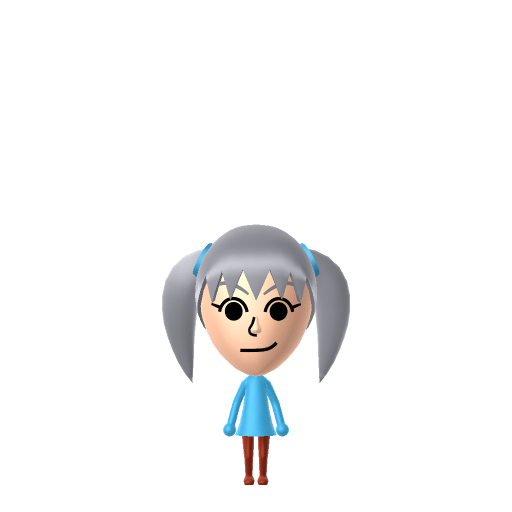
To make a Hatsune Miku Mii in Tomodachi Life: Living the Dream, open Mii Maker and pick long teal hair styled into twin high pigtails, large expressive blue-green eyes, and a light girlish face. The picker-by-picker walkthrough below works for both Nintendo Switch (LTD) and 3DS (original Tomodachi Life).
Use the system Mii Maker, then bring the Mii into Tomodachi Life: Living the Dream.
Body & Build
- 1Set gender to "Female".
- 2Set favorite color to cyan.
- 3Set height to 20%.
- 4Set weight to 20%.
Hair
- 5Set hair style.⋯⋯Row 22 · Column 5
- 6Set hair color in the expanded colors menu.
Eyes
- 7Set eyes.⋯Row 1 · Column 2
- 8Rotate outer edge of the eyes all the way down, then rotate it 3 ticks back up.
Eyebrows
- 9Set eyebrows.⋯Row 1 · Column 2
- 10Set eyebrows color in the expanded colors menu.
Nose
- 11Make nose 1 smaller
Mouth
- 12Set mouth.⋯⋯Row 4 · Column 1
Diagrams show where the option sits in the Mii Maker picker (4 columns, scroll to reach later rows). Editor menus differ slightly between regions and console revisions — if an exact option is missing, pick the closest one.
Mii Studio data code
Hatsune Miku's full appearance as a Mii Studio data string. Drop it into Mii rendering tools or community Mii editors that accept Studio codes (it's not a console import — for the game itself use the steps above).
08001a0308030404020c0304060400020a0000000006010804000a04007e1a040002140313040f0d04000a030109
Scan this Hatsune Miku Mii QR code
This is a 3DS-format Mii QR code generated from Hatsune Miku's Mii data. On a Nintendo 3DS, open Mii Maker → QR Code / Image Options → Scan QR Code and point the camera at it, then bring the Mii into the original Tomodachi Life. The Switch / Switch 2 has no camera, so it can't scan Mii QR codes — for Tomodachi Life: Living the Dream use the step-by-step instructions above (or the online Mii creator).
Download QR codeGet the Hatsune Miku Mii look
Build cheat-sheet
Feature → the move to make in Mii Maker
- Hair
Extremely long teal-green hair in two high twin-tails that reach past the knees — pick the longest twin-tail style and shift the colour as far toward teal/aqua as the palette allows.
- Eyes
Large, bright blue-green eyes to match her hair — choose big expressive eyes in the lightest teal/blue available.
- Face
A youthful, light-complexioned, girlish face — keep features soft and proportions young (she's canonically 16).
- Colour
Set a teal/grey colour theme to echo her signature stage outfit.
What Mii Maker can't do for your Hatsune Miku Mii
- Mii Maker can’t
Knee-length teal twin-tails
Closest you can getNo Mii hairstyle is anywhere near as long as Miku's signature twin-tails, and teal can be hard to hit exactly. Pick the longest twin-tail style and push the colour as teal as the palette goes — the silhouette still reads as Miku.
- Mii Maker can’t
Headset microphone & stage outfit
Closest you can getMii Maker has no headset or costume parts. Build the hair and face, then add a headset-style accessory and her grey-and-teal outfit in-game.
Did you know? — Hatsune Miku Mii
Hatsune Miku's name is built from the Japanese for 'first' (初), 'sound' (音) and 'future' (ミク) — together, 'the first sound of the future.'
She is a Vocaloid singing-synthesis voicebank, not a recorded singer — her voice is generated from samples taken from voice actress Saki Fujita, and anyone with the software can make her sing.
Despite being software, Miku headlines live concerts as an animated holographic projection cast onto a special glass screen, performing in front of real audiences.
Hatsune Miku Mii on your island
A Charmer Miku works an island like she works a crowd — Charmers are outgoing, audience-pleasing residents who bring out enthusiasm in everyone nearby, a perfect fit for a virtual idol. She'll mingle easily across an island of up to 70. Her relationships, though, are LTD's to decide: crushes form from dating preferences, chance and birthday/zodiac compatibility (set her August 31 birthday in Mii Maker so the game has it), never from her pop-star status.
Hatsune Miku Mii — FAQ
How do I get Hatsune Miku's teal twin-tails on a Mii?
Pick the longest twin-tail / pigtail hairstyle and push the colour as far toward teal-green as Mii Maker's palette allows. No Mii hair is as long as her real knee-length twin-tails, but the high twin-tail shape plus the teal colour reads clearly as Miku.
Can I add Miku's headset microphone?
Not in Mii Maker — it has no headset or costume parts. Build the teal twin-tails and face first, then add a headset-style accessory and her grey-and-teal stage outfit in-game in Tomodachi Life: Living the Dream.
What personality fits a Hatsune Miku Mii?
Charmer fits best — set Speech and Movement high with Thinking and Energy lower in the personality panel above. It matches her whole reason for existing: connecting with and delighting an audience.
Sources: WikipediaCrypton Future MediaCharacter facts are grounded in the source(s) above; Mii-Maker mapping is our own craft guidance.
Have your own Mii?
Paste a Mii Studio code or upload a Mii QR image into the QR code Mii decoder to get this same step-by-step recreation guide for it.
Want to design your own?
Build a Mii from scratch in the online Mii creator, then bring its code here for rebuild steps.