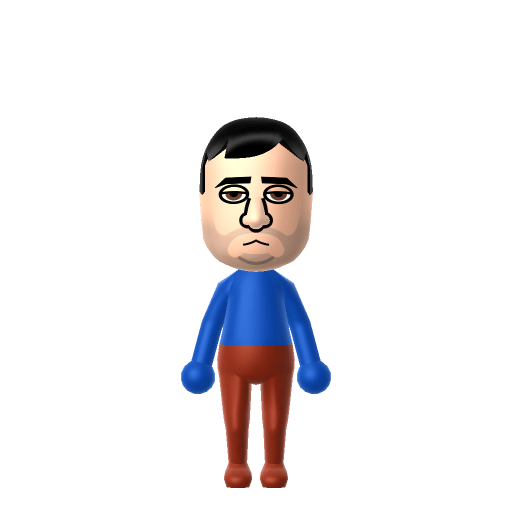
All Mii ideas
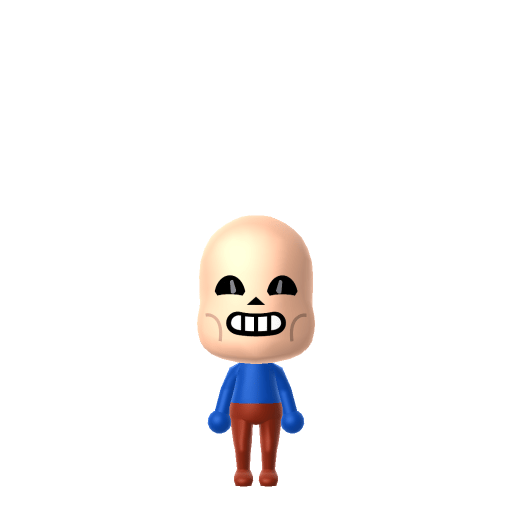
Sans Mii for Tomodachi Life
Video Game Mii Idea

Sans Mii for Tomodachi Life

The laid-back, pun-loving skeleton from Toby Fox's Undertale — and its hardest secret boss.

#game#undertale#skeleton

About the Sans Mii

Character File

Sans is a skeleton character in Toby Fox's 2015 indie RPG Undertale, the older brother of Papyrus and a sentry stationed in the snowy region of Snowdin. He is characterised by his sleepy demeanour, blue hoodie, and constant stream of bad puns — yet becomes the final boss of the game's Genocide route, widely regarded as one of the hardest fights in modern RPGs.

01 — Personality

Recommended personality for your Sans Mii: Observer

Keeps emotions tucked away inside but has a rich inner life. Introspective, independent, and deeply thoughtful.In Tomodachi Life, set this Mii's sliders so Speech + Movement totals 03 and Thinking + Energy totals 03. See the full Observer guide →

Why this fitsSans drifts through Snowdin slumped, dropping puns, refusing to take much seriously — until the moment the player crosses a line, at which point he reveals he's been watching the whole run. That watch-then-judge profile fits Observer (low Speech + Movement, high Thinking + low Energy).

02 — How to Make This Mii

How to Make a Sans Mii in Tomodachi Life

To make a Sans Mii in Tomodachi Life: Living the Dream, open Mii Maker and pick the palest white skin tone available, round wide-set eyes, no eyebrows, and a permanent half-smile — Mii Maker can't render an actual skull, so colour, slumped posture, and his blue hoodie shirt do the work. The picker-by-picker walkthrough below works for both Nintendo Switch (LTD) and 3DS (original Tomodachi Life).

Use the system Mii Maker, then bring the Mii into Tomodachi Life: Living the Dream.

Body & Build

  1. 1
    Set gender to "Male".
  2. 2
    Set favorite color to blue.
  3. 3
    Set height to 28%.
  4. 4
    Set weight to 100%.

Face Shape & Skin

  1. 5
    Set face type.
  2. 6
    Set facial features/wrinkles.

Hair

  1. 7
    Set hair style.
    Row 9 · Column 6

Eyes

  1. 8
    Set eyes.
    Row 4 · Column 2
  2. 9
    Make eyes 3 larger.
  3. 10
    Unsquash the eyes 3 to the right.
  4. 11
    Rotate outer edge of the eyes all the way down, then rotate it 3 ticks back up.
  5. 12
    Move eyes 1 further apart.
  6. 13
    Move eyes 2 ticks up.

Eyebrows

  1. 14
    Set eyebrows.
    Row 3 · Column 5
  2. 15
    Set eyebrows color in the expanded colors menu.
  3. 16
    Make eyebrows 4 smaller.
  4. 17
    Unsquash the eyebrows 3 to the right.
  5. 18
    Rotate outer edge of the eyebrows 5 ticks up.
  6. 19
    Move eyebrows 5 further apart.
  7. 20
    Move eyebrows 4 ticks down.

Nose

  1. 21
    Set nose.
    Row 1 · Column 6
  2. 22
    Make nose 2 larger.
  3. 23
    Move nose 4 ticks up.

Mouth

  1. 24
    Set mouth.
    Row 6 · Column 4
  2. 25
    Make mouth 3 larger.
  3. 26
    Move mouth 3 ticks up.

Facial Hair

  1. 27
    Make mustache 1 smaller
  2. 28
    Move mustache 1 ticks up.
  3. 29
    Set beard color in the expanded colors menu.

Diagrams show where the option sits in the Mii Maker picker (4 columns, scroll to reach later rows). Editor menus differ slightly between regions and console revisions — if an exact option is missing, pick the closest one.

Mii Studio data code

Sans's full appearance as a Mii Studio data string. Drop it into Mii rendering tools or community Mii editors that accept Studio codes (it's not a console import — for the game itself use the steps above).

04007f0608030722030a06040b000e070e0000030205000804000a01001e2304000214031307220a030009060005
03 — QR Code
Sans Mii QR code for the Nintendo 3DS

Scan this Sans Mii QR code

This is a 3DS-format Mii QR code generated from Sans's Mii data. On a Nintendo 3DS, open Mii Maker → QR Code / Image Options → Scan QR Code and point the camera at it, then bring the Mii into the original Tomodachi Life. The Switch / Switch 2 has no camera, so it can't scan Mii QR codes — for Tomodachi Life: Living the Dream use the step-by-step instructions above (or the online Mii creator).

Download QR code

Get the Sans Mii look

Build cheat-sheet

Feature → the move to make in Mii Maker

  1. Skin / colour

    Sans is a white skeleton, so pick the palest skin tone available — colour does the heavy lifting since Mii Maker can't make a skull.

  2. Eyes

    Two round, wide-set black dot eyes with no eyebrows capture his simple skeletal face; in his calm state his 'eyes' are small white dots.

  3. Expression

    He wears a permanent lazy half-smile — choose a relaxed, slightly smug closed mouth.

  4. Hoodie

    His blue hoodie over a white shirt and black shorts is his whole wardrobe; dress the Mii in a blue hooded top and set blue as the favourite colour.

What Mii Maker can't do for your Sans Mii

  • Mii Maker can’t

    Skeleton skull face

    Closest you can get

    Mii Maker only builds fleshed-out humanoid faces, so an actual skull is impossible — the palest skin tone, round dot eyes and no eyebrows are the closest approximation.

  • Mii Maker can’t

    Glowing blue eye (Genocide route)

    Closest you can get

    His left eye flares cyan-and-yellow during his boss fight, but Miis can't have glowing eyes; stick with plain round eyes and let the blue hoodie signal him instead.

Did you know? — Sans Mii

  1. Sans is named after the Comic Sans font, which is used for most of his in-game dialogue — fittingly, his brother Papyrus speaks in the Papyrus font.

  2. Toby Fox first sketched the character in a college notebook and initially named him 'Comic Sans' after the typeface.

  3. Fox cited 'special inspiration' from the webcomic Helvetica, which stars a skeleton named after a typeface.

  4. The laid-back NPC becomes the final boss of Undertale's Genocide route — a fight widely considered one of the hardest in modern RPGs, set to the track 'Megalovania'.

Pair your Sans Mii with

Papyrus

Sans's tall, energetic, spaghetti-loving younger brother — the eternally optimistic skeleton he lazily looks out for in Snowdin.

In Tomodachi Life

Recreate Papyrus as his own Mii (white skin, a confident grin, an orange-and-blue 'battle body') and house him near your Sans Mii to put the skeleton brothers together — but Tomodachi Life: Living the Dream writes its own relationships. Bonds there grow from proximity and shared time rather than canon, so house them close and steer it yourself.

Sans Mii on your island

Picture it

An Observer-type Sans is exactly on-brand — Observers hang back, move little and watch more than they act, which is precisely how Sans drifts through Snowdin dropping puns until you cross a line. He makes a deadpan, low-energy resident who quietly clocks everything happening in the Apartments. Don't expect his watchfulness to pick his partner, though: romance in LTD runs on dating preferences, random crushes and birthday/zodiac compatibility, not personality — so give your Sans Mii a birthday and let Love Pondering surprise you. Heh. No pressure.

Life on your island

Sans Mii — FAQ

How do you make a Sans Mii in Tomodachi Life?

Pick the palest skin tone, round wide-set dot eyes with no eyebrows, and a lazy half-smile, then dress him in a blue hoodie with blue as the favourite colour. Mii Maker can't render a skull, so colour and the hoodie do the work — follow the picker-by-picker steps above for Switch (LTD) or 3DS.

Why is the Sans Mii not an actual skeleton?

Mii Maker only builds fleshed-out humanoid faces, so a real skull is impossible. The palest skin tone, simple round dot eyes and no eyebrows are the closest approximation, with the blue hoodie sealing the recognition.

Where does the name 'Sans' come from?

It's named after the Comic Sans font, which is used for most of his dialogue — and his brother Papyrus is named after, and speaks in, the Papyrus font.

What personality should a Sans Mii have?

Observer fits best — set low Speech + Movement with high Thinking and low Energy in the panel above. It matches his watch-everything, act-only-when-it-matters demeanour on your island.

Sources: Undertale WikiWikipediaCharacter facts are grounded in the source(s) above; Mii-Maker mapping is our own craft guidance.

More Miis like Sans

Have your own Mii?

Paste a Mii Studio code or upload a Mii QR image into the QR code Mii decoder to get this same step-by-step recreation guide for it.

Want to design your own?

Build a Mii from scratch in the online Mii creator, then bring its code here for rebuild steps.