All Mii ideas
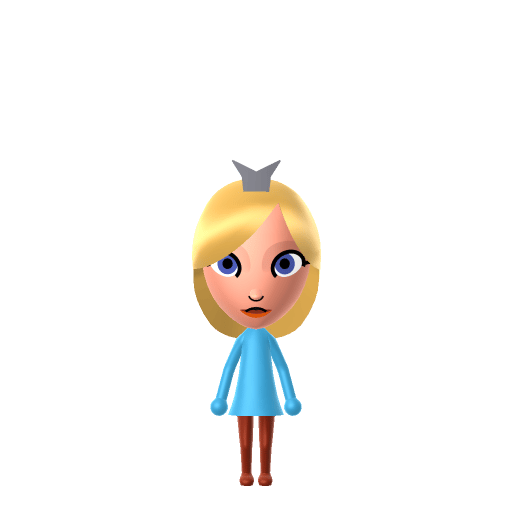
Rosalina Mii for Tomodachi Life
Video Game Mii Idea

Rosalina Mii for Tomodachi Life

The cosmic guardian of the Lumas who watches over the universe from her Observatory in Nintendo's Mario Galaxy series.

#nintendo#mario#space#female

About the Rosalina Mii

Character File

Rosalina is a character in Nintendo's Super Mario series who first appeared in Super Mario Galaxy (2007). She is a tall, serene woman who cares for star-shaped creatures called Lumas aboard the Comet Observatory. Her backstory — a young girl who lost her way home and grew old watching the cosmos — is told in a storybook that unlocks as the player collects Power Stars.

Rosalina Mii Quick Facts

Rosalina Mii — height & cast at a glance

Height
6'10" (208 cm)→ convert to slider notchesSource: Estimated from in-game model comparisons; not officially confirmed
Voiced by
Kerri Kane (English, Super Mario Galaxy) / Mercedes Rose (English, later appearances)
In Tomodachi Life

Rosalina's calm, cosmic personality makes her a perfect island observer — place her Mii apartment near the top floor and watch her stargaze. In Tomodachi Life: Living the Dream her serene demeanour tends to pair well with equally thoughtful residents.

01 — Personality

Recommended personality for your Rosalina Mii: Observer

Keeps emotions tucked away inside but has a rich inner life. Introspective, independent, and deeply thoughtful.In Tomodachi Life, set this Mii's sliders so Speech + Movement totals 03 and Thinking + Energy totals 03. See the full Observer guide →

Why this fitsRosalina watches the universe from her Observatory with perfect stillness, rarely initiating but always understanding. She speaks when she has something meaningful to say and lets others come to her — the defining traits of Observer (low Speech + Movement, low Thinking + Energy).

02 — How to Make This Mii

How to Make a Rosalina Mii in Tomodachi Life

To make a Rosalina Mii in Tomodachi Life: Living the Dream, open Mii Maker and select long platinum-blonde hair swept across one eye, large pale blue eyes, a pale complexion, and a tall slender face. The picker-by-picker walkthrough below works for both Nintendo Switch (LTD) and 3DS (original Tomodachi Life).

Use the system Mii Maker, then bring the Mii into Tomodachi Life: Living the Dream.

Body & Build

  1. 1
    Set gender to "Female".
  2. 2
    Set birth month to 8.
  3. 3
    Set birthday to 24.
  4. 4
    Set favorite color to cyan.
  5. 5
    Set height to 58%.
  6. 6
    Set weight to 30%.

Face Shape & Skin

  1. 7
    Set face/skin color.
  2. 8
    Set facial features/wrinkles.

Hair

  1. 9
    Set hair style.
    Row 10 · Column 1
  2. 10
    Set hair color in the expanded colors menu.

Eyes

  1. 11
    Set eyes.
    Row 7 · Column 6
  2. 12
    Set eye color in the expanded colors menu.
  3. 13
    Make eyes 1 larger.
  4. 14
    Rotate outer edge of the eyes all the way down, then rotate it 7 ticks back up.
  5. 15
    Move eyes 4 further apart.
  6. 16
    Move eyes 5 ticks down.

Eyebrows

  1. 17
    Set eyebrows.
    Row 1 · Column 3
  2. 18
    Set eyebrows color in the expanded colors menu.
  3. 19
    Make eyebrows 4 larger.
  4. 20
    Rotate outer edge of the eyebrows 5 ticks up.
  5. 21
    Move eyebrows 2 closer.
  6. 22
    Move eyebrows 7 ticks up.

Nose

  1. 23
    Set nose.
    Row 1 · Column 2
  2. 24
    Make nose 3 smaller
  3. 25
    Move nose 5 ticks down.

Mouth

  1. 26
    Set mouth.
    Row 1 · Column 2
  2. 27
    Make mouth 1 smaller
  3. 28
    Move mouth 3 ticks down.

Facial Hair

  1. 29
    Set mustache type.
    Row 1 · Column 3
  2. 30
    Make mustache 3 smaller
  3. 31
    Move mustache 3 ticks down.

Beauty Mark

  1. 32
    Turn mole on.
  2. 33
    Make mole 2 larger.
  3. 34
    Move mole 6 ticks to the right.
  4. 35
    Move mole 6 ticks down.

Diagrams show where the option sits in the Mii Maker picker (4 columns, scroll to reach later rows). Editor menus differ slightly between regions and console revisions — if an exact option is missing, pick the closest one.

Mii Studio data code

Rosalina's full appearance as a Mii Studio data string. Drop it into Mii rendering tools or community Mii editors that accept Studio codes (it's not a console import — for the game itself use the steps above).

080026030c07051d061103040b080c00030300000806010804000a07000c4a0601081a031303011001020d010a0e
03 — QR Code
Rosalina Mii QR code for the Nintendo 3DS

Scan this Rosalina Mii QR code

This is a 3DS-format Mii QR code generated from Rosalina's Mii data. On a Nintendo 3DS, open Mii Maker → QR Code / Image Options → Scan QR Code and point the camera at it, then bring the Mii into the original Tomodachi Life. The Switch / Switch 2 has no camera, so it can't scan Mii QR codes — for Tomodachi Life: Living the Dream use the step-by-step instructions above (or the online Mii creator).

Download QR code

Get the Rosalina Mii look

Build cheat-sheet

Feature → the move to make in Mii Maker

  1. Hair

    Long platinum-blonde hair swept across one eye — pick the longest pale-blonde style and, if the editor allows, angle the fringe to one side.

  2. Eyes

    Large, pale blue eyes — choose big round eyes in the palest blue available.

  3. Complexion

    A fair, pale complexion — pick the lightest skin tone.

  4. Build

    Tall and slender — push the height slider up and keep the frame slim; she's notably taller than Peach.

  5. Outfit

    Her flowing turquoise gown and small crown go on as in-game clothing once she's imported into LTD.

Rosalina Mii on your island

Picture it

An Observer-type Rosalina is the island's quiet centre of gravity — she rarely starts a conversation, but she's the resident everyone drifts toward. Her calm, cosmic temperament suits a top-floor apartment where she can keep watch over the island below. LTD grows bonds through proximity and repeated conversations rather than personality scores, and her serene demeanour tends to click with equally thoughtful, low-key residents; on an island of up to 70, she's content to let relationships find her rather than chase them.

Life on your island

Did you know? — Rosalina Mii

  1. Rosalina first appeared in Super Mario Galaxy (2007), caring for the star-shaped Lumas aboard the Comet Observatory.

  2. Her backstory — a young girl who lost her way home and grew old watching the cosmos — is told in a storybook that unlocks as you collect Power Stars.

  3. She's depicted as notably taller than Princess Peach, reinforcing her serene, otherworldly presence.

Rosalina Mii — FAQ

Can Mii Maker make an accurate Rosalina?

Yes — Rosalina is human-form, so the long platinum hair, pale blue eyes and tall slender face all reproduce well. Her turquoise gown and crown go on as in-game clothing after you import her into LTD.

Why doesn't this page pair Rosalina with Mario or Peach?

Because she's a cosmic guardian who stands apart from the Mushroom Kingdom regulars — her defining bond is with the Lumas, not the Mario–Peach–Bowser triangle. You can still house her near the rest of the cast, but her character is the self-contained loner.

What personality should I give a Rosalina Mii?

Observer fits her best — set low Speech + Movement with low Thinking + Energy in the panel above. It matches her stillness: she watches, understands, and lets others come to her.

Does Rosalina have a birthday I can set?

No official birthday exists for Rosalina, so pick whatever date you like in Mii Maker. LTD uses birthdays for zodiac compatibility and celebrations, so it's worth setting one even though it isn't canon.

Sources: WikipediaSuper Mario WikiCharacter facts are grounded in the source(s) above; Mii-Maker mapping is our own craft guidance.

More Miis like Rosalina

Have your own Mii?

Paste a Mii Studio code or upload a Mii QR image into the QR code Mii decoder to get this same step-by-step recreation guide for it.

Want to design your own?

Build a Mii from scratch in the online Mii creator, then bring its code here for rebuild steps.