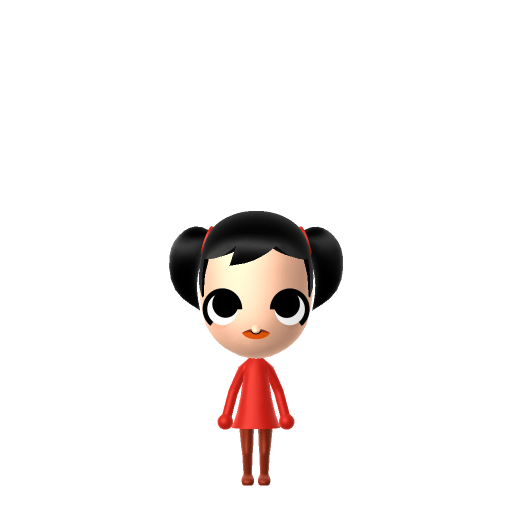
Pomni is the protagonist of The Amazing Digital Circus, an animated web series by the Australian studio Glitch Productions, created by Gooseworx. She is a human who wakes up trapped inside a circus-themed virtual-reality simulation in the form of a cartoon jester, overseen by an erratic AI ringmaster named Caine. As the newest arrival, her anxious search for a way out drives the show.

Pomni Mii for Tomodachi Life
The anxious jester protagonist of the hit web series The Amazing Digital Circus.
About the Pomni Mii
Pomni Mii Quick Facts
Pomni Mii — cast at a glance
- Voiced by
- Lizzie Freeman
Lean into her nervous energy on LTD's voice sliders — a higher, wavering pitch suits Pomni's anxious delivery once she's a resident on your island.
Recommended personality for your Pomni Mii: Observer
Keeps emotions tucked away inside but has a rich inner life. Introspective, independent, and deeply thoughtful.In Tomodachi Life, set this Mii's sliders so Speech + Movement totals 0–3 and Thinking + Energy totals 0–3. See the full Observer guide →
Why this fitsPomni is written as nervous and overwhelmed — a former accountant thrown into a world she can't make sense of, watching the chaos warily while she looks for an exit. That anxious, watchful profile fits the Observer (Introvert) type in the Reserved group.
How to Make a Pomni Mii in Tomodachi Life
This is an inspired-by Pomni Mii: her huge cartoon eyes, two-pointed jester hat and harlequin suit can't be reproduced in Mii Maker, so the build aims for a pale-faced character with big round eyes, dark hair and a red-and-blue jester colour scheme as clothing. Open Mii Maker, pick the palest skin, large round eyes and a small uneasy mouth. Works on Switch (LTD) and 3DS.
Use the system Mii Maker, then bring the Mii into Tomodachi Life: Living the Dream.
Body & Build
- 1Set gender to "Female".
- 2Set height to 33%.
- 3Set weight to 31%.
Face Shape & Skin
- 4Set face type.
- 5Set makeup.
Hair
- 6Set hair style.⋯⋯Row 22 · Column 1
- 7Set hair color in the expanded colors menu.
Eyes
- 8Set eyes.⋯⋯Row 3 · Column 1
- 9Make eyes 3 larger.
- 10Rotate outer edge of the eyes all the way down, then rotate it 3 ticks back up.
- 11Move eyes 2 further apart.
- 12Move eyes 4 ticks down.
Eyebrows
- 13Set eyebrows.⋯⋯Row 4 · Column 6
- 14Rotate outer edge of the eyebrows 1 ticks down.
Nose
- 15Set nose.⋯Row 1 · Column 2
- 16Make nose 4 smaller
- 17Move nose 6 ticks down.
Mouth
- 18Set mouth.⋯Row 2 · Column 1
- 19Make mouth 1 smaller
Beauty Mark
- 20Make mole 4 larger.
- 21Move mole 12 ticks to the right.
- 22Move mole 2 ticks down.
Diagrams show where the option sits in the Mii Maker picker (4 columns, scroll to reach later rows). Editor menus differ slightly between regions and console revisions — if an exact option is missing, pick the closest one.
Mii Studio data code
Pomni's full appearance as a Mii Studio data string. Drop it into Mii rendering tools or community Mii editors that accept Studio codes (it's not a console import — for the game itself use the steps above).
080028030803072104100301050417020a0001010000010804000a08002e2a08000e16031303000d04000a000a0f
Scan this Pomni Mii QR code
This is a 3DS-format Mii QR code generated from Pomni's Mii data. On a Nintendo 3DS, open Mii Maker → QR Code / Image Options → Scan QR Code and point the camera at it, then bring the Mii into the original Tomodachi Life. The Switch / Switch 2 has no camera, so it can't scan Mii QR codes — for Tomodachi Life: Living the Dream use the step-by-step instructions above (or the online Mii creator).
Download QR codeWhat Mii Maker can't do for your Pomni Mii
- Mii Maker can’t
Huge spiral-pupil eyes and asymmetric lashes
Closest you can getMii eyes can't do the oversized, spiralling, mismatched look — the largest round eyes are the closest stand-in.
- Mii Maker can’t
Two-pointed jester hat with bells
Closest you can getMii Maker has no jester hat; dark twin buns hint at the two points, and the rest is carried by the red-and-blue colour scheme.
- Mii Maker can’t
Asymmetric harlequin costume
Closest you can getMii clothing can't be split red/blue with mismatched gloves — approximate with a red or blue outfit plus yellow accents after import.
Get the Pomni Mii look
Build cheat-sheet
Feature → the move to make in Mii Maker
- Face
A pale, almost white face — pick the lightest skin tone.
- Eyes
Big, round, expressive eyes are her signature — choose the largest round eye option.
- Hair
Dark hair, mostly hidden under her hat; two small buns loosely echo the two points of her jester hat.
- Colours
Add a red-and-blue outfit with yellow accents as in-game clothing to suggest the harlequin suit.
Pair your Pomni Mii with
Caine
The erratic AI ringmaster who runs the digital circus.
Ragatha
An optimistic rag-doll resident and one of the kinder members of the troupe.
Jax
A callous trickster rabbit who causes trouble for the others.
Recreate the circus troupe as neighbours, but remember Tomodachi Life: Living the Dream forms its own bonds — friendships and crushes emerge from proximity, preferences and chance, not from the source story.
Pomni Mii on your island
An Observer like Pomni hangs back at first, watching the island's chaos before she warms up — fitting for a character who spends her series trying to make sense of a world gone strange. LTD builds friendships through proximity and repeated visits, so place her near a few gentle residents and let her settle in at her own pace.
Pomni Mii — FAQ
Can you make an accurate Pomni Mii?
Only an inspired-by version. Pomni's huge spiral-pupil eyes, two-pointed jester hat and asymmetric harlequin suit can't be reproduced in Mii Maker. The closest build is a pale face with big round eyes, dark hair and a red-and-blue jester colour scheme.
What show is Pomni from?
The Amazing Digital Circus, an animated web series by Glitch Productions created by Gooseworx, whose pilot became one of the most-viewed animation pilots on YouTube.
What personality fits a Pomni Mii?
Observer (Introvert) in the Reserved group fits her anxious, watchful, overwhelmed character — set Speech and Energy on the lower side in the personality panel above.
Sources: WikipediaCharacter facts are grounded in the source(s) above; Mii-Maker mapping is our own craft guidance.
Have your own Mii?
Paste a Mii Studio code or upload a Mii QR image into the QR code Mii decoder to get this same step-by-step recreation guide for it.
Want to design your own?
Build a Mii from scratch in the online Mii creator, then bring its code here for rebuild steps.