All Mii ideas
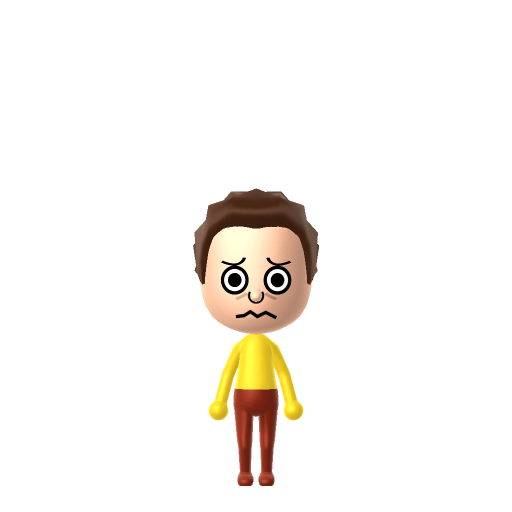
Morty Smith Mii for Tomodachi Life
Funny Mii Idea

Morty Smith Mii for Tomodachi Life

Rick's anxious teenage grandson and reluctant sidekick in Rick and Morty.

#tv#rick-and-morty#sidekick

Morty Smith Mii Quick Facts

Morty Smith Mii — age & cast at a glance

Age
14
Voiced by
Justin Roiland (seasons 1–6); Harry Belden from season 7
In Tomodachi Life

Morty stammers and second-guesses everything, so on your island give your Morty Mii a higher-pitched, slightly wavering voice on LTD's Mii Maker voice sliders (an LTD-exclusive option the Switch system Mii Maker lacks) to catch that anxious "aw geez, Rick" delivery.

01 — Personality

Recommended personality for your Morty Smith Mii: Observer

Keeps emotions tucked away inside but has a rich inner life. Introspective, independent, and deeply thoughtful.In Tomodachi Life, set this Mii's sliders so Speech + Movement totals 0–3 and Thinking + Energy totals 0–3. See the full Observer guide →

Why this fitsMorty is defined by his "awkward, anxious, second-guessing, doubtful personality, and low sense of self-esteem" — he hangs back, watches Rick's chaos unfold and reacts rather than leads. That hesitant, watchful disposition reads as Observer, so that's the personality this Morty Mii ships with above.

02 — How to Make This Mii

How to Make a Morty Smith Mii in Tomodachi Life

To make a Morty Mii in Tomodachi Life: Living the Dream, open Mii Maker and build a nervous-looking 14-year-old boy with short brown hair, wide worried eyes and a small uneasy mouth, then set a yellow colour scheme for his signature T-shirt. The picker-by-picker walkthrough below works for both Nintendo Switch (LTD) and 3DS.

Use the system Mii Maker, then bring the Mii into Tomodachi Life: Living the Dream.

Body & Build

  1. 1
    Set gender to "Male".
  2. 2
    Set birth month to 12.
  3. 3
    Set birthday to 2.
  4. 4
    Set favorite color to yellow.

Face Shape & Skin

  1. 5
    Set face type.
  2. 6
    Set facial features/wrinkles.

Hair

  1. 7
    Set hair style.
    ⋯
    ⋯
    Row 4 · Column 2

Eyes

  1. 8
    Set eyes.
    ⋯
    ⋯
    Row 8 · Column 1
  2. 9
    Rotate outer edge of the eyes all the way down, then rotate it 4 ticks back up.
  3. 10
    Move eyes 2 ticks down.

Eyebrows

  1. 11
    Set eyebrows.
    ⋯
    ⋯
    Row 4 · Column 2
  2. 12
    Set eyebrows color in the expanded colors menu.
  3. 13
    Squash the eyebrows 3 to the left.
  4. 14
    Rotate outer edge of the eyebrows 1 ticks down.
  5. 15
    Move eyebrows 1 further apart.
  6. 16
    Move eyebrows 1 ticks down.

Nose

  1. 17
    Set nose.
    ⋯
    ⋯
    Row 3 · Column 2
  2. 18
    Make nose 2 smaller
  3. 19
    Move nose 1 ticks down.

Mouth

  1. 20
    Set mouth.
    ⋯
    ⋯
    Row 4 · Column 6

Diagrams show where the option sits in the Mii Maker picker (4 columns, scroll to reach later rows). Editor menus differ slightly between regions and console revisions — if an exact option is missing, pick the closest one.

Mii Studio data code

Morty Smith's full appearance as a Mii Studio data string. Drop it into Mii rendering tools or community Mii editors that accept Studio codes (it's not a console import — for the game itself use the steps above).

0800400308040403020e000805040d030b0000090402000804000a01004440040002140313040c0d04000a020e0a
03 — QR Code
Morty Smith Mii QR code for the Nintendo 3DS

Scan this Morty Smith Mii QR code

This is a 3DS-format Mii QR code generated from Morty Smith's Mii data. On a Nintendo 3DS, open Mii Maker → QR Code / Image Options → Scan QR Code and point the camera at it, then bring the Mii into the original Tomodachi Life. The Switch / Switch 2 has no camera, so it can't scan Mii QR codes — for Tomodachi Life: Living the Dream use the step-by-step instructions above (or the online Mii creator).

Download QR code

Pair your Morty Smith Mii with

In Tomodachi Life

A Morty Mii really only makes sense with a Rick Mii nearby — but remember Tomodachi Life: Living the Dream writes its own story. Bonds on your island grow from proximity, dating preferences and birthday/zodiac compatibility, not from Rick and Morty canon, so the grandfather-grandson pair might drift apart or bond with completely unrelated residents. The ant-farm unpredictability is part of the charm.

Did you know? — Morty Smith Mii

  1. Morty is described on Wikipedia as "the good-natured and impressionable grandson of Rick Sanchez" — the emotional anchor that keeps the show's chaos grounded.

  2. Justin Roiland voiced both Rick and Morty for the first six seasons; from season seven Harry Belden took over the Morty role, so a Morty Mii can represent either voice era.

  3. Morty's plain yellow T-shirt and blue jeans make him one of the easiest cartoon characters to turn into a Mii — the design is deliberately generic, which is part of the everyman joke.

Get the Morty Smith Mii look

Build cheat-sheet

Feature → the move to make in Mii Maker

  1. Hair

    Short, plain brown hair with a rounded fringe — pick a simple short brown style for the Morty Mii; nothing spiky or elaborate.

  2. Eyes

    Wide, worried, slightly raised-in-the-middle eyes sell the anxiety — choose a large, open eye shape and nudge the brows up so the Morty Mii wears that permanent unease.

  3. Mouth

    A small, uncertain mouth — keep the Morty Mii's mouth modest and slightly downturned rather than a confident grin.

  4. Colour scheme

    Set the Morty Mii's favourite colour to yellow so he leans into his instantly recognisable yellow T-shirt.
Morty Smith Mii — FAQ

Can Mii Maker make an accurate Morty Mii?

Yes — unusually so. Morty's design is deliberately plain: short brown hair, wide anxious eyes and a small uneasy mouth all reproduce cleanly in the editor, and his yellow T-shirt comes through as an in-game colour scheme. A Morty Mii is one of the closer character matches you can build without any workarounds.

How do I make a Morty Mii look anxious?

Lean on the eyes and eyebrows. Pick a wide, open eye shape and raise the inner ends of the brows so they tilt up in the middle — that's the universal shorthand for worry, and it's what sells a Morty Mii over a generic brown-haired boy.

Should I make a Rick Mii to go with my Morty Mii?

Absolutely — the two are a package deal. Build a Rick Mii as a neighbour to your Morty Mii for the full double act. Just don't expect the game to keep them together: in Tomodachi Life the pairing is something you recreate, and the island decides their actual relationships.

What colour is Morty's shirt for the Mii colour scheme?

Yellow. His plain yellow T-shirt is his single most recognisable feature, so setting the Morty Mii's favourite colour to yellow does most of the work of making him read as Morty.

Sources: WikipediaCharacter facts are grounded in the source(s) above; Mii-Maker mapping is our own craft guidance.

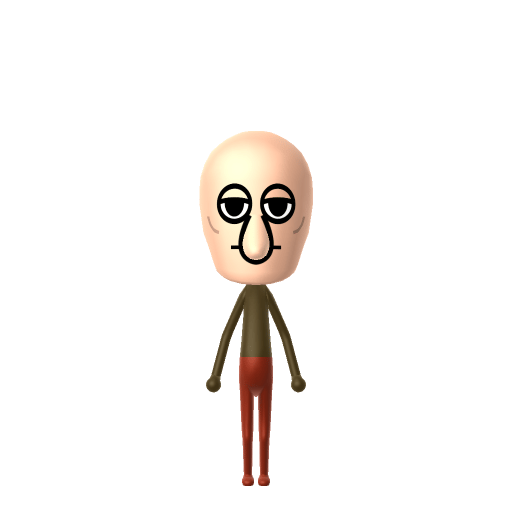
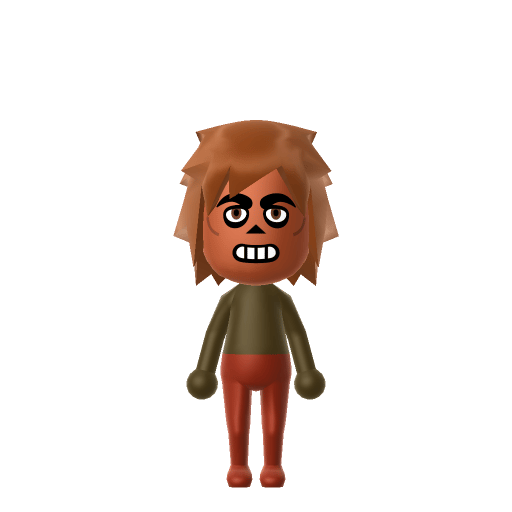
More Miis like Morty Smith

Have your own Mii?

Paste a Mii Studio code or upload a Mii QR image into the QR code Mii decoder to get this same step-by-step recreation guide for it.

Want to design your own?

Build a Mii from scratch in the online Mii creator, then bring its code here for rebuild steps.