All Mii ideas
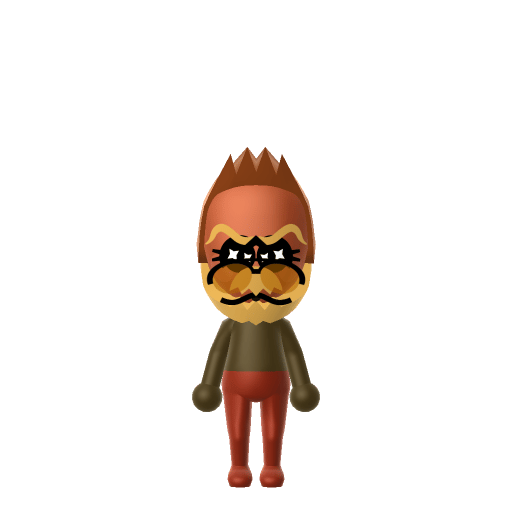
Donkey Kong Mii for Tomodachi Life
Video Game Mii Idea

Donkey Kong Mii for Tomodachi Life

The tie-wearing ape who loves bananas and adventure.

#nintendo#classic#ape

About the Donkey Kong Mii

Character File

Donkey Kong is a character created by Shigeru Miyamoto and the star of Nintendo's Donkey Kong franchise, where he leads the Kong family. He is portrayed as a large, powerful gorilla, stubborn and buffoonish, who attacks using physical strength.

01 — Personality

Recommended personality for your Donkey Kong Mii: Go-Getter

Bold and energetic, always pursuing the next goal with unmatched enthusiasm and determination.In Tomodachi Life, set this Mii's sliders so Speech + Movement totals 12–15 and Thinking + Energy totals 12–15. See the full Go-Getter guide →

Why this fitsDonkey Kong is a leader who acts first and talks (or grunts) loudly — physical, decisive, and front-of-the-pack. That tempo-and-leadership profile fits Go-Getter (high Speech + Movement, high Thinking + Energy).

02 — How to Make This Mii

How to Make a Donkey Kong Mii in Tomodachi Life

To make a Donkey Kong Mii in Tomodachi Life: Living the Dream, open Mii Maker and build a broad, muscular frame with a dark skin tone, brown hair, a wide jaw, and his signature red tie marked with the 'DK' initials. The picker-by-picker walkthrough below works for both Nintendo Switch (LTD) and 3DS (original Tomodachi Life).

Use the system Mii Maker, then bring the Mii into Tomodachi Life: Living the Dream.

Body & Build

  1. 1
    Set gender to "Male".
  2. 2
    Set favorite color to brown.
  3. 3
    Set height to 67%.
  4. 4
    Set weight to 100%.

Face Shape & Skin

  1. 5
    Set face/skin color.
  2. 6
    Set makeup.

Hair

  1. 7
    Set hair style.
    ⋯
    ⋯
    Row 3 · Column 3
  2. 8
    Set hair color in the expanded colors menu.

Eyes

  1. 9
    Set eyes.
    ⋯
    ⋯
    Row 8 · Column 4
  2. 10
    Make eyes 2 larger.
  3. 11
    Rotate outer edge of the eyes all the way down, then rotate it 1 ticks back up.
  4. 12
    Move eyes 2 closer.

Eyebrows

  1. 13
    Set eyebrows.
    ⋯
    ⋯
    Row 4 · Column 3
  2. 14
    Set eyebrows color in the expanded colors menu.
  3. 15
    Make eyebrows 3 larger.
  4. 16
    Move eyebrows 2 closer.
  5. 17
    Move eyebrows 3 ticks down.

Nose

  1. 18
    Set nose.
    ⋯
    Row 1 · Column 6
  2. 19
    Make nose 4 larger.
  3. 20
    Move nose 7 ticks up.

Mouth

  1. 21
    Set mouth.
    ⋯
    Row 2 · Column 2
  2. 22
    Make mouth 4 larger.
  3. 23
    Move mouth 4 ticks down.

Facial Hair

  1. 24
    Set mustache type.
    ⋯
    Row 1 · Column 2
  2. 25
    Make mustache 4 larger.
  3. 26
    Set beard type.
    ⋯
    Row 2 · Column 1
  4. 27
    Set beard color in the expanded colors menu.

Glasses

  1. 28
    Set glasses type.
    ⋯
    ⋯
    Row 3 · Column 5
  2. 29
    Set glasses color in the expanded colors menu.
  3. 30
    Make glasses 1 smaller
  4. 31
    Move glasses 10 ticks down.

Beauty Mark

  1. 32
    Turn mole on.
  2. 33
    Make mole 4 larger.
  3. 34
    Move mole 6 ticks to the right.
  4. 35
    Move mole 7 ticks down.

Diagrams show where the option sits in the Mii Maker picker (4 columns, scroll to reach later rows). Editor menus differ slightly between regions and console revisions — if an exact option is missing, pick the closest one.

Mii Studio data code

Donkey Kong's full appearance as a Mii Studio data string. Drop it into Mii rendering tools or community Mii editors that accept Studio codes (it's not a console import — for the game itself use the steps above).

07037f030801060a000c0307060716000d04010000090011030614030026550801081b031308081108010a080002
03 — QR Code
Donkey Kong Mii QR code for the Nintendo 3DS

Scan this Donkey Kong Mii QR code

This is a 3DS-format Mii QR code generated from Donkey Kong's Mii data. On a Nintendo 3DS, open Mii Maker → QR Code / Image Options → Scan QR Code and point the camera at it, then bring the Mii into the original Tomodachi Life. The Switch / Switch 2 has no camera, so it can't scan Mii QR codes — for Tomodachi Life: Living the Dream use the step-by-step instructions above (or the online Mii creator).

Download QR code

Get the Donkey Kong Mii look

Build cheat-sheet

Feature → the move to make in Mii Maker

  1. Skin

    Donkey Kong's fur reads as a deep, warm brown — pick the darkest brown skin tone in Mii Maker.

  2. Hair

    Short brown hair kept close to the head stands in for his fur.

  3. Build

    He's a large, powerful gorilla, so push the height and weight sliders toward a big, heavy build.

  4. Face

    Give him a broad, heavy jaw using the widest face shape.

What Mii Maker can't do for your Donkey Kong Mii

  • Mii Maker can’t

    Red "DK" necktie

    Closest you can get

    Mii Maker has no necktie part and no way to add the 'DK' lettering. Dress the Mii in a red shirt and set red as the favorite colour so the signature red still reads at a glance.

  • Mii Maker can’t

    Gorilla muzzle & heavy brow

    Closest you can get

    Mii faces can't form a true great-ape muzzle. Use the widest face shape, lower the eyebrows, and enlarge and lower the nose to suggest the heavy brow and snout.

Did you know? — Donkey Kong Mii

  1. Donkey Kong debuted in the 1981 arcade game Donkey Kong — and the character the player controls in it is Mario, then known only as "Jumpman".

  2. Donkey Kong was created by Shigeru Miyamoto; the original arcade game became one of Nintendo's first major hits.

  3. In Illumination's The Super Mario Bros. Movie (2023), Donkey Kong is voiced by Seth Rogen.

Donkey Kong Mii on your island

Picture it

Drop a Go-Getter Donkey Kong on your island and he won't sit still — Go-Getters act first, so he's quick to make friends and quick to head for Love Pondering once a crush strikes. He rooms most happily with Miis of similar personalities, so bunking him with other outgoing residents keeps the Apartments drama-free. One LTD twist to expect, though: who a Mii actually falls for isn't set by personality — romance runs on dating preferences and random crushes — so even a bold DK might end up pining after the last resident you'd guess.

Life on your island

Donkey Kong Mii — FAQ

How do you make Donkey Kong's tie on a Mii?

Mii Maker doesn't include a necktie or a way to add the 'DK' logo. The closest is to dress your Mii in a red shirt and set red as the favorite colour, so the signature red still reads at a glance.

Can I scan a Donkey Kong Mii QR code on a Nintendo Switch?

No — the Switch and Switch 2 have no camera, so Tomodachi Life: Living the Dream can't scan Mii QR codes. Build him by hand with the steps above or use the online Mii creator. On the original 3DS Tomodachi Life you can scan the QR code on this page.

What personality should a Donkey Kong Mii have in Tomodachi Life?

Go-Getter fits best — set Speech + Movement and Thinking + Energy to the high ranges shown in the personality panel above. It matches a character who leads from the front and acts first.

Is Donkey Kong a built-in Mii in Tomodachi Life?

No. Tomodachi Life ships with template Miis but not Donkey Kong, so you recreate him yourself with the Mii Maker steps on this page.

Sources: WikipediaCharacter facts are grounded in the source(s) above; Mii-Maker mapping is our own craft guidance.

More Miis like Donkey Kong

Have your own Mii?

Paste a Mii Studio code or upload a Mii QR image into the QR code Mii decoder to get this same step-by-step recreation guide for it.

Want to design your own?

Build a Mii from scratch in the online Mii creator, then bring its code here for rebuild steps.