All Mii ideas
Captain Jack Sparrow Mii for Tomodachi Life
Movie & TV Mii Idea

Captain Jack Sparrow Mii for Tomodachi Life

The rum-soaked, fast-talking pirate captain of the Black Pearl from Disney's Pirates of the Caribbean.

#movie#pirates-of-the-caribbean#pirate

About the Captain Jack Sparrow Mii

Character File

Captain Jack Sparrow is the roguish pirate at the heart of Disney's Pirates of the Caribbean film series, played by Johnny Depp. He first appeared in Pirates of the Caribbean: The Curse of the Black Pearl (2003), where his unpredictable, wily charm earned Depp an Academy Award nomination, and he captains the legendary ship the Black Pearl.

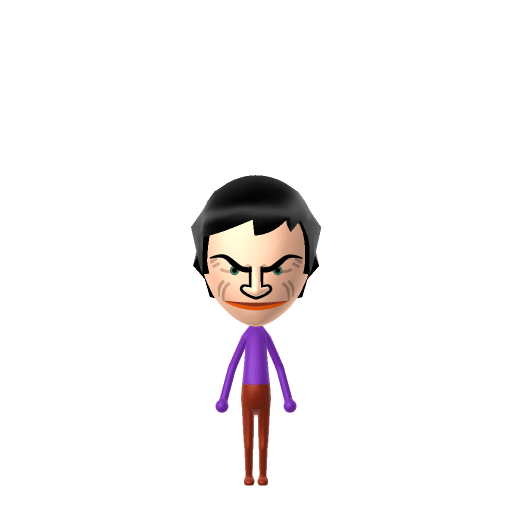
Captain Jack Sparrow Mii Quick Facts

Captain Jack Sparrow Mii — cast at a glance

Portrayed by
Johnny Depp
In Tomodachi Life

Jack thrives on chaos, so let him loose among a crowded Apartments block in Tomodachi Life: Living the Dream — the more residents to scheme around, the more in-character he feels.

01 — Personality

Recommended personality for your Captain Jack Sparrow Mii: Maverick

A determined self-starter who removes every obstacle in their path. Highly driven, autonomous, and unstoppable.In Tomodachi Life, set this Mii's sliders so Speech + Movement totals 12–15 and Thinking + Energy totals 0–3. See the full Maverick guide →

Why this fitsJack Sparrow talks his way out of every corner with schemes nobody sees coming, dodging rules and allegiances as it suits him. That unpredictable, improvising-trickster profile is pure Maverick (high Speech + Movement, mid Thinking + Energy).

02 — How to Make This Mii

How to Make a Captain Jack Sparrow Mii in Tomodachi Life

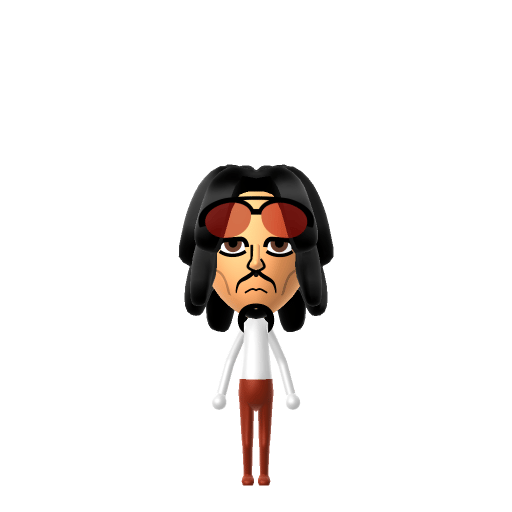
To make a Captain Jack Sparrow Mii in Tomodachi Life: Living the Dream, open Mii Maker and build long dark dreadlocked hair under a red bandana, add a thin braided moustache and goatee, kohl-dark eyes, and a weathered tan. A tricorn hat and beaded braids finish the pirate look in-game. The walkthrough below works for both Switch (LTD) and 3DS.

Use the system Mii Maker, then bring the Mii into Tomodachi Life: Living the Dream.

Body & Build

  1. 1
    Set gender to "Male".
  2. 2
    Set favorite color to white.
  3. 3
    Set height to 69%.
  4. 4
    Set weight to 11%.

Face Shape & Skin

  1. 5
    Set face/skin color.
  2. 6
    Set facial features/wrinkles.

Hair

  1. 7
    Set hair style.
    ⋯
    ⋯
    Row 7 · Column 1
  2. 8
    Set hair color in the expanded colors menu.

Eyes

  1. 9
    Set eyes.
    ⋯
    Row 1 · Column 6
  2. 10
    Set eye color in the expanded colors menu.
  3. 11
    Rotate outer edge of the eyes all the way down, then rotate it 4 ticks back up.
  4. 12
    Move eyes 1 ticks up.

Eyebrows

  1. 13
    Set eyebrows.
    ⋯
    ⋯
    Row 4 · Column 1
  2. 14
    Set eyebrows color in the expanded colors menu.
  3. 15
    Make eyebrows 1 smaller.
  4. 16
    Rotate outer edge of the eyebrows 5 ticks down.
  5. 17
    Move eyebrows 2 closer.
  6. 18
    Move eyebrows 8 ticks down.

Nose

  1. 19
    Set nose.
    ⋯
    Row 1 · Column 5
  2. 20
    Make nose 1 smaller
  3. 21
    Move nose 3 ticks up.

Mouth

  1. 22
    Set mouth.
    ⋯
    Row 2 · Column 3
  2. 23
    Make mouth 3 smaller

Facial Hair

  1. 24
    Set mustache type.
    ⋯
    Row 2 · Column 1
  2. 25
    Make mustache 1 smaller
  3. 26
    Move mustache 6 ticks down.
  4. 27
    Set beard type.
    ⋯
    Row 1 · Column 2

Glasses

  1. 28
    Set glasses type.
    ⋯
    ⋯
    Row 3 · Column 5
  2. 29
    Set glasses color in the expanded colors menu.
  3. 30
    Move glasses 10 ticks up.

Beauty Mark

  1. 31
    Turn mole on.
  2. 32
    Make mole 1 smaller
  3. 33
    Move mole 6 ticks to the right.
  4. 34
    Move mole 1 ticks up.

Diagrams show where the option sits in the Mii Maker picker (4 columns, scroll to reach later rows). Editor menus differ slightly between regions and console revisions — if an exact option is missing, pick the closest one.

Mii Studio data code

Captain Jack Sparrow's full appearance as a Mii Studio data string. Drop it into Mii rendering tools or community Mii editors that accept Studio codes (it's not a console import — for the game itself use the steps above).

08010e030a040411020b030801030f0012010000020a000f04060008002a57030108130313010a0d030310030606
03 — QR Code
Captain Jack Sparrow Mii QR code for the Nintendo 3DS

Scan this Captain Jack Sparrow Mii QR code

This is a 3DS-format Mii QR code generated from Captain Jack Sparrow's Mii data. On a Nintendo 3DS, open Mii Maker → QR Code / Image Options → Scan QR Code and point the camera at it, then bring the Mii into the original Tomodachi Life. The Switch / Switch 2 has no camera, so it can't scan Mii QR codes — for Tomodachi Life: Living the Dream use the step-by-step instructions above (or the online Mii creator).

Download QR code

Get the Captain Jack Sparrow Mii look

Build cheat-sheet

Feature → the move to make in Mii Maker

  1. Hair

    Long, dark, matted dreadlocks tied back under a faded red bandana — pick the longest dark hairstyle and a red colour theme.

  2. Facial hair

    A thin moustache plus a small braided goatee — use the smallest moustache and beard parts in a dark brown.

  3. Eyes

    Heavy kohl eyeliner gives him a smudged, sleepless stare — pick dark, slightly downturned eyes.

  4. Skin

    Years at sea leave him deeply tanned — pick a warm, weathered mid-brown skin tone.

Did you know? — Captain Jack Sparrow Mii

  1. Johnny Depp based Jack Sparrow's swaying, slurring manner on Rolling Stones guitarist Keith Richards (and partly on the cartoon skunk Pepé Le Pew).

  2. Keith Richards — the inspiration for the character — later appeared in the films as Jack's father, Captain Teague.

  3. Depp's performance in The Curse of the Black Pearl (2003) earned him his first Academy Award nomination for Best Actor.

Captain Jack Sparrow Mii on your island

Picture it

A Maverick Jack Sparrow keeps your island guessing — Mavericks are offbeat and unpredictable, so he'll strike up odd friendships and wander into Love Pondering on his own schedule. Just remember LTD's twist: who a Mii actually falls for runs on dating preferences and random crushes, not personality, so your scheming captain might end up smitten with the most straight-laced resident on the island. The chaos is part of the charm.

Life on your island

Captain Jack Sparrow Mii — FAQ

How do you make Jack Sparrow's beaded braids on a Mii?

Mii Maker has no hair-bead or trinket parts, so you can't add the beads directly. Pick the longest dark dreadlocked hairstyle with a red bandana colour theme so the silhouette still reads as Jack, then add a pirate outfit in-game.

Can I scan a Jack Sparrow Mii QR code on a Nintendo Switch?

No — the Switch and Switch 2 have no camera, so Tomodachi Life: Living the Dream can't scan Mii QR codes. Build him by hand with the steps above. On the original 3DS Tomodachi Life you can scan the QR code on this page.

What personality should a Jack Sparrow Mii have?

Maverick fits best — set Speech + Movement high and Thinking + Energy to the mid range shown in the personality panel above. It matches a character who improvises, schemes, and never does the expected thing.

Sources: WikipediaCharacter facts are grounded in the source(s) above; Mii-Maker mapping is our own craft guidance.

More Miis like Captain Jack Sparrow

Have your own Mii?

Paste a Mii Studio code or upload a Mii QR image into the QR code Mii decoder to get this same step-by-step recreation guide for it.

Want to design your own?

Build a Mii from scratch in the online Mii creator, then bring its code here for rebuild steps.