All Mii ideas
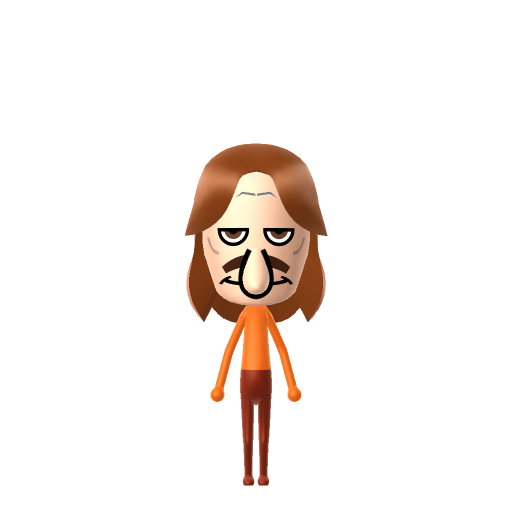
Kelpy G Mii for Tomodachi Life
Funny Mii Idea

Kelpy G Mii for Tomodachi Life

SpongeBob SquarePants' famous clarinet-playing octopus — Squidward's all-time musical idol.

#tv#spongebob#musician

About the Kelpy G Mii

Character File

Kelpy G is a recurring character in Nickelodeon's SpongeBob SquarePants, a famous clarinet-playing octopus whose name parodies real-world saxophonist Kenny G. He is repeatedly framed in the show as Squidward Tentacles' all-time musical idol, and first appears in the season-four episode "The Thing" (2005).

01 — Personality

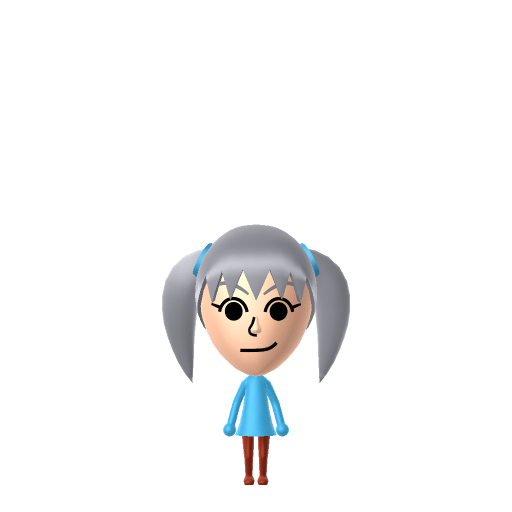
Recommended personality for your Kelpy G Mii: Charmer

Radiates effortless style and adapts to any situation with grace. Socially magnetic and naturally flexible.In Tomodachi Life, set this Mii's sliders so Speech + Movement totals 811 and Thinking + Energy totals 1215. See the full Charmer guide →

Why this fitsKelpy G is depicted as a smooth, crowd-pleasing performer — Squidward worships him precisely because he commands a stage with ease that Squidward himself never manages. That suave, audience-drawing profile fits Charmer (mid Speech + Movement, high Thinking + Energy).

02 — How to Make This Mii

How to Make a Kelpy G Mii in Tomodachi Life

To make a Kelpy G Mii in Tomodachi Life: Living the Dream, open Mii Maker and pick a long curly brown hairstyle, a pale skin tone to stand in for his light octopus colour, narrow chill eyes, and a relaxed half-smile — Mii Maker can't render tentacles, so hair and posture do the work. The picker-by-picker walkthrough below works for both Nintendo Switch (LTD) and 3DS (original Tomodachi Life).

Use the system Mii Maker, then bring the Mii into Tomodachi Life: Living the Dream.

Body & Build

  1. 1
    Set gender to "Male".
  2. 2
    Set favorite color to orange.
  3. 3
    Set height to 83%.
  4. 4
    Set weight to 0%.

Face Shape & Skin

  1. 5
    Set face type.
  2. 6
    Set facial features/wrinkles.

Hair

  1. 7
    Set hair style.
    Row 12 · Column 3
  2. 8
    Set hair color in the expanded colors menu.

Eyes

  1. 9
    Set eyes.
    Row 8 · Column 2
  2. 10
    Set eye color in the expanded colors menu.
  3. 11
    Rotate outer edge of the eyes all the way down, then rotate it 3 ticks back up.
  4. 12
    Move eyes 2 ticks down.

Eyebrows

  1. 13
    Set eyebrows.
    Row 2 · Column 2
  2. 14
    Set eyebrows color in the expanded colors menu.
  3. 15
    Make eyebrows 3 smaller.
  4. 16
    Squash the eyebrows 3 to the left.
  5. 17
    Rotate outer edge of the eyebrows 1 ticks down.
  6. 18
    Move eyebrows 2 closer.
  7. 19
    Move eyebrows 5 ticks up.

Nose

  1. 20
    Set nose.
    Row 2 · Column 3
  2. 21
    Make nose 4 larger.
  3. 22
    Move nose 8 ticks down.

Mouth

  1. 23
    Set mouth.
    Row 1 · Column 4
  2. 24
    Make mouth 4 larger.
  3. 25
    Squash the mouth 3 to the left.
  4. 26
    Move mouth 4 ticks down.

Facial Hair

  1. 27
    Set mustache type.
    Row 2 · Column 2
  2. 28
    Make mustache 4 larger.
  3. 29
    Set beard color in the expanded colors menu.

Diagrams show where the option sits in the Mii Maker picker (4 columns, scroll to reach later rows). Editor menus differ slightly between regions and console revisions — if an exact option is missing, pick the closest one.

Mii Studio data code

Kelpy G's full appearance as a Mii Studio data string. Drop it into Mii rendering tools or community Mii editors that accept Studio codes (it's not a console import — for the game itself use the steps above).

010000030a03042b020e0004050115000500000b0301000804000a03001b6904000214001308151108040a080811
03 — QR Code
Kelpy G Mii QR code for the Nintendo 3DS

Scan this Kelpy G Mii QR code

This is a 3DS-format Mii QR code generated from Kelpy G's Mii data. On a Nintendo 3DS, open Mii Maker → QR Code / Image Options → Scan QR Code and point the camera at it, then bring the Mii into the original Tomodachi Life. The Switch / Switch 2 has no camera, so it can't scan Mii QR codes — for Tomodachi Life: Living the Dream use the step-by-step instructions above (or the online Mii creator).

Download QR code

What Mii Maker can't do for your Kelpy G Mii

  • Mii Maker can’t

    His tentacles

    Closest you can get

    Kelpy G is an octopus and Mii Maker only builds humanoid bodies with arms and legs, so the tentacles can't be made — the big curly hair and relaxed posture carry the likeness instead.

  • Mii Maker can’t

    His octopus colour

    Closest you can get

    Mii Maker has no octopus skin tone, so pick the palest soft tone available and let the hair and chilled expression do the work.

Get the Kelpy G Mii look

Build cheat-sheet

Feature → the move to make in Mii Maker

  1. Hair

    His big, soft, curly brown hair is the signature — pick the longest, curliest brown style the editor offers; it does most of the recognising.

  2. Skin

    Use a pale, soft skin tone to stand in for his light octopus colour.

  3. Expression

    Give him narrow, chilled-out eyes and a relaxed half-smile — Kelpy G is effortlessly smooth, the picture of a cool jazz musician.

  4. Outfit

    Dress him in a suave performer's outfit using LTD's in-game clothing, and add a clarinet vibe through posture rather than props.

Pair your Kelpy G Mii with

In Tomodachi Life

Recreate Squidward as his own Mii and house him near your Kelpy G Mii to stage the superfan dynamic — but Tomodachi Life: Living the Dream won't recreate the show for you. Friendships there grow from proximity and shared time, so whether Squidward gets to live next door to his idol is down to how you play.

Did you know? — Kelpy G Mii

  1. His name is a direct parody of real-world smooth-jazz saxophonist Kenny G — with "kelp" swapped in for the underwater setting.

  2. He's a clarinet-playing octopus, repeatedly framed as Squidward Tentacles' all-time musical idol.

  3. He first appears in the season-four SpongeBob SquarePants episode "The Thing" in 2005.

  4. The joke is that Kelpy G has the effortless musical talent and adoring crowds that Squidward, despite years of clarinet practice, never manages to earn.

Kelpy G Mii on your island

Picture it

A Charmer-type Kelpy G is the island's smooth operator — relaxed, magnetic and able to win over a room without breaking a sweat, the resident everyone wants to be around. Charmers mix easily and room comfortably with a range of personalities, which suits LTD's roommate harmony nicely. His draw isn't something you can script into romance, though: crushes in Tomodachi Life: Living the Dream run on dating preferences, random chance and birthday/zodiac compatibility — never personality — so give your Kelpy G a birthday, recreate Squidward nearby for the superfan bit, and let the island take it from there.

Life on your island

Kelpy G Mii — FAQ

How do you make a Kelpy G Mii in Tomodachi Life?

Use a long curly brown hairstyle, a pale soft skin tone, narrow chilled eyes and a relaxed half-smile, then dress him in a suave performer's outfit with LTD's in-game clothing. Mii Maker can't make his tentacles, so the big curly hair carries it — follow the picker-by-picker steps above for Switch (LTD) or 3DS.

Who is Kelpy G a parody of?

Real-world smooth-jazz saxophonist Kenny G — the name just swaps in "kelp" for the underwater setting. In SpongeBob he's a clarinet-playing octopus and Squidward's all-time musical idol.

Should I make Squidward too?

Definitely — Squidward worships Kelpy G, so building both and housing them together stages a fun idol-and-superfan pairing. LTD won't recreate the show, but having them on one island sets it up.

What personality should a Kelpy G Mii have?

Charmer fits best — set mid Speech + Movement with high Thinking + Energy in the panel above. It matches his smooth, crowd-pleasing stage presence — exactly the easy talent Squidward envies.

Sources: Encyclopedia SpongeBobiaCharacter facts are grounded in the source(s) above; Mii-Maker mapping is our own craft guidance.

More Miis like Kelpy G

Have your own Mii?

Paste a Mii Studio code or upload a Mii QR image into the QR code Mii decoder to get this same step-by-step recreation guide for it.

Want to design your own?

Build a Mii from scratch in the online Mii creator, then bring its code here for rebuild steps.