All Mii ideas
Lyra Mii for Tomodachi Life
Video Game Mii Idea

Lyra Mii for Tomodachi Life

The cheerful girl heroine of Pokémon HeartGold & SoulSilver, with her Marill.

#pokemon#nintendo#trainer#female#heartgold#soulsilver

Lyra Mii Quick Facts

Lyra Mii — age & height at a glance

Age
Teen trainer (unspecified)
Height
4'11" (150 cm)→ convert to slider notchesSource: Bulbapedia — Lyra (game)
In Tomodachi Life

Lyra is inseparable from her Marill, so on your island give your Lyra Mii a bright, high-pitched voice on LTD's Mii Maker voice sliders (an LTD-exclusive option the Switch system Mii Maker lacks) to match her chirpy trainer energy.

01 — Personality

Recommended personality for your Lyra Mii: Merrymaker

Turns any moment into a good time and makes friends with everyone. The ultimate high-energy social catalyst.In Tomodachi Life, set this Mii's sliders so Speech + Movement totals 811 and Thinking + Energy totals 811. See the full Merrymaker guide →

Why this fitsAs an NPC in HeartGold/SoulSilver, Lyra bounds up to greet you, cheerfully teaches you to catch Pokémon on Route 29, and is never far from her Marill — an upbeat, fast-friends energy that fits the Merrymaker (high, balanced Speech + Movement and Thinking + Energy). Pokémon protagonists are largely silent player-inserts, so treat this as a light read of her visible NPC behaviour rather than deep canon.

02 — How to Make This Mii

How to Make a Lyra Mii in Tomodachi Life

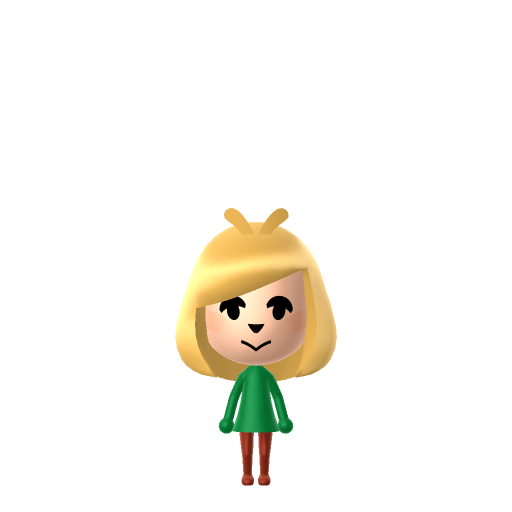
To make a Lyra Mii in Tomodachi Life: Living the Dream, open Mii Maker and build a petite young girl with light-brown hair in low twin-tails, big friendly brown eyes and a small smile, then lean on a red colour scheme for her top and shoes. Her white hat with a red bow and overalls can't be built in Mii Maker — the walkthrough below covers both Switch (LTD) and 3DS.

Use the system Mii Maker, then bring the Mii into Tomodachi Life: Living the Dream.

Body & Build

  1. 1
    Set gender to "Female".
  2. 2
    Set height to 31%.
  3. 3
    Set weight to 39%.

Face Shape & Skin

  1. 4
    Set face type.

Hair

  1. 5
    Set hair style.
    Row 21 · Column 6
  2. 6
    Set hair color in the expanded colors menu.

Eyes

  1. 7
    Set eyes.
    Row 3 · Column 1
  2. 8
    Set eye color in the expanded colors menu.
  3. 9
    Make eyes 2 larger.
  4. 10
    Unsquash the eyes 3 to the right.
  5. 11
    Rotate outer edge of the eyes all the way down, then rotate it 3 ticks back up.
  6. 12
    Move eyes 1 ticks down.

Eyebrows

  1. 13
    Set eyebrows.
    Row 4 · Column 6
  2. 14
    Set eyebrows color in the expanded colors menu.
  3. 15
    Make eyebrows 2 smaller.
  4. 16
    Squash the eyebrows 2 to the left.
  5. 17
    Rotate outer edge of the eyebrows 4 ticks down.
  6. 18
    Move eyebrows 1 ticks up.

Nose

  1. 19
    Make nose 3 smaller
  2. 20
    Move nose 1 ticks down.

Mouth

  1. 21
    Set mouth.
    Row 4 · Column 1
  2. 22
    Set mouth color in the expanded colors menu.
  3. 23
    Make mouth 3 smaller
  4. 24
    Squash the mouth 3 to the left.
  5. 25
    Move mouth 1 ticks down.

Facial Hair

  1. 26
    Make mustache 1 smaller
  2. 27
    Set beard color in the expanded colors menu.

Glasses

  1. 28
    Set glasses color in the expanded colors menu.

Diagrams show where the option sits in the Mii Maker picker (4 columns, scroll to reach later rows). Editor menus differ slightly between regions and console revisions — if an exact option is missing, pick the closest one.

Mii Studio data code

Lyra's full appearance as a Mii Studio data string. Drop it into Mii rendering tools or community Mii editors that accept Studio codes (it's not a console import — for the game itself use the steps above).

0000320601030621020d010702021702090000010000010004000a02006828040002140000010f0e03000a01010a
03 — QR Code
Lyra Mii QR code for the Nintendo 3DS

Scan this Lyra Mii QR code

This is a 3DS-format Mii QR code generated from Lyra's Mii data. On a Nintendo 3DS, open Mii Maker → QR Code / Image Options → Scan QR Code and point the camera at it, then bring the Mii into the original Tomodachi Life. The Switch / Switch 2 has no camera, so it can't scan Mii QR codes — for Tomodachi Life: Living the Dream use the step-by-step instructions above (or the online Mii creator).

Download QR code

Get the Lyra Mii look

Build cheat-sheet

Feature → the move to make in Mii Maker

  1. Hair

    Light auburn/brown hair in low, bunched twin-tails — pick a low pigtail hairstyle and a brown (not black) hair colour for the Lyra Mii silhouette.

  2. Eyes

    Big, friendly light-brown eyes — choose a large rounded eye shape in brown.

  3. Face

    A young, round, cheerful face with light skin — round face shape, lightest natural skin tone, small upturned smile.

  4. Colour scheme

    Red top with a white collar and red shoes — set red as her favourite colour so the in-game outfit leans red.
What Mii Maker can't do for your Lyra Mii

  • Mii Maker can’t

    Her signature poofy white hat with a big red bow

    Closest you can get

    Mii Maker has no hats or hair accessories, so you can't add it — lean on the low brown twin-tails to carry the recognisable Lyra Mii silhouette instead.

  • Mii Maker can’t

    Her blue overalls over a red top

    Closest you can get

    Outfits aren't part of Mii Maker's face editor; set her favourite colour to red and dress the imported Mii in overalls-style clothing in Tomodachi Life if available.

  • Mii Maker can’t

    Her Marill companion always at her side

    Closest you can get

    Miis stand alone, so recreate Marill's vibe with a separate blue Mii neighbour, or just give your Lyra Mii a cheerful catchphrase about it.

Did you know? — Lyra Mii

  1. Lyra's English name comes from the lyre, a stringed instrument; her Japanese name コトネ (Kotone) means "sound of the koto," another stringed instrument — a fitting pair of musical names for a Lyra Mii.

  2. She replaced Kris (the female player character from Pokémon Crystal); per Bulbapedia, designer Takao Unno drew Lyra without referencing Ken Sugimori's original Kris artwork.

  3. If you play as Ethan, Lyra appears as the New Bark Town childhood friend who starts with a Marill and teaches you how to catch Pokémon on Route 29.

  4. Lyra later joined Pokémon Masters EX as a recruitable sync pair, keeping her HeartGold/SoulSilver look.

Lyra Mii on your island

Picture it

A Merrymaker Lyra Mii throws herself into island life the way she bounds around New Bark Town — quick to befriend new residents and cheer them on. Tomodachi Life: Living the Dream grows bonds through proximity and repeated conversations rather than personality scores, so house your Lyra Mii centrally and, if you like, add a little blue Marill-inspired Mii nearby. Just remember LTD writes its own story — your Lyra Mii might become Best Friends (or Sweethearts) with someone from a completely different franchise.

Life on your island

Lyra Mii — FAQ

Can Mii Maker make an accurate Lyra Mii?

Mostly — her young face, brown twin-tails and cheerful smile all reproduce well. What you can't build is her white hat with a red bow and her blue overalls, since Mii Maker has no hats, accessories or outfit editor; the low twin-tails and a red colour scheme carry the Lyra Mii look instead.

What personality should I give a Lyra Mii?

Merrymaker fits her best — set balanced, high Speech + Movement and Thinking + Energy in the panel above. It matches the upbeat, fast-friends energy she shows as an NPC in HeartGold and SoulSilver.

How tall is Lyra?

Bulbapedia lists Lyra at 4'11" (about 150 cm) — petite, so push the Mii height slider well below the middle when you build your Lyra Mii.

Who is Lyra in Pokémon?

Lyra (Japanese: コトネ Kotone) is the female player character of Pokémon HeartGold and SoulSilver. Choose Ethan instead and she becomes your New Bark Town childhood friend who owns a Marill and teaches you to catch Pokémon.

Sources: BulbapediaPokémon WikiBulbapediaCharacter facts are grounded in the source(s) above; Mii-Maker mapping is our own craft guidance.

More Miis like Lyra

Have your own Mii?

Paste a Mii Studio code or upload a Mii QR image into the QR code Mii decoder to get this same step-by-step recreation guide for it.

Want to design your own?

Build a Mii from scratch in the online Mii creator, then bring its code here for rebuild steps.