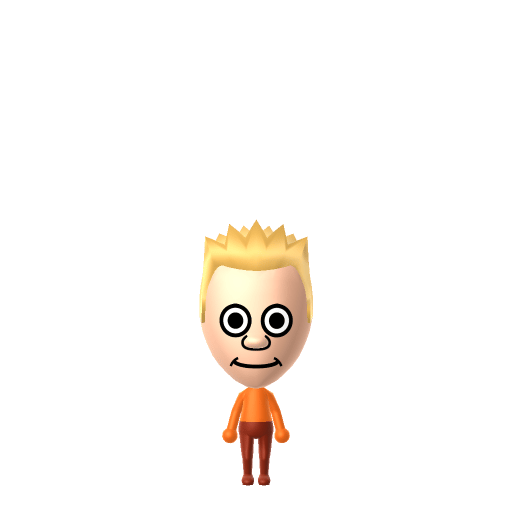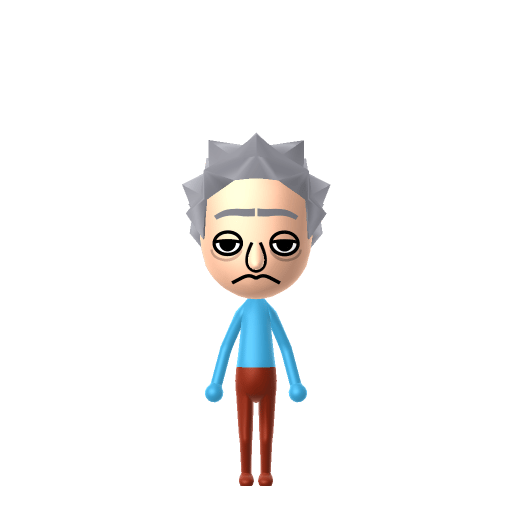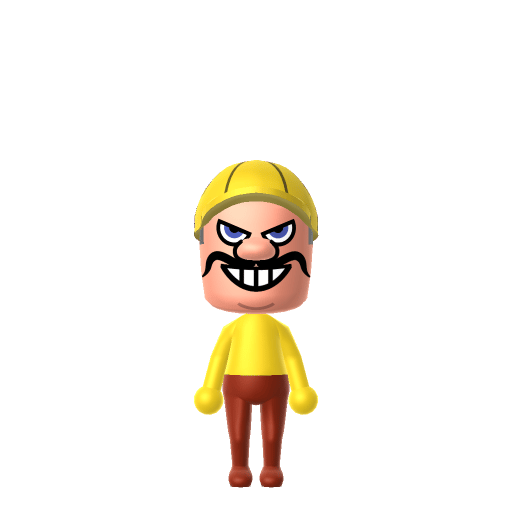
Wario is a character in Nintendo's Mario franchise, designed as an antithesis of Mario. He first appeared as the antagonist in 1992's Super Mario Land 2: 6 Golden Coins, and his name is a portmanteau of Mario and the Japanese word warui ("bad"). He is usually portrayed as a selfish, greedy treasure hunter.

Wario Mii for Tomodachi Life
Mario's greedy rival who loves garlic and treasure.
Wario Mii Quick Facts
Wario Mii — cast at a glance
- Voiced by
- Charles Martinet (1993–2023); Kevin Afghani since 2023
Wario is loud, greedy and always cackling — after importing him into Tomodachi Life: Living the Dream, lower the pitch and crank the tone toward gruff on LTD's voice sliders for that boisterous "Wahaha!"; those sliders are an LTD-exclusive Mii Maker option the Switch system Mii Maker doesn't have.
About the Wario Mii
Recommended personality for your Wario Mii: Maverick
A determined self-starter who removes every obstacle in their path. Highly driven, autonomous, and unstoppable.In Tomodachi Life, set this Mii's sliders so Speech + Movement totals 12–15 and Thinking + Energy totals 0–3. See the full Maverick guide →
Why this fitsWario is canonically loud and brash, pursuing treasure on his own terms with no regard for politeness. That direct, self-driven profile maps to Maverick (high Speech + Movement, low Thinking + Energy).
How to Make a Wario Mii in Tomodachi Life
To make a Wario Mii in Tomodachi Life: Living the Dream, open Mii Maker and build a stocky, heavy frame with a large bulbous nose and a zigzag yellow-blonde mustache, then top him with Wario's signature yellow cap and dress him in purple overalls. The picker-by-picker walkthrough below works for both Nintendo Switch (LTD) and 3DS (original Tomodachi Life).
Use the system Mii Maker, then bring the Mii into Tomodachi Life: Living the Dream.
Body & Build
- 1Set gender to "Male".
- 2Set favorite color to yellow.
- 3Set height to 62%.
- 4Set weight to 100%.
Face Shape & Skin
- 5Set face/skin color.
- 6Set face type.
- 7Set facial features/wrinkles.
Hair
- 8Set hair style.⋯⋯Row 7 · Column 3
- 9Set hair color in the expanded colors menu.
Eyes
- 10Set eyes.⋯⋯Row 8 · Column 2
- 11Set eye color in the expanded colors menu.
- 12Make eyes 1 larger.
- 13Rotate outer edge of the eyes all the way down, then rotate it 5 ticks back up.
- 14Move eyes 2 ticks up.
Eyebrows
- 15Set eyebrows.⋯⋯Row 4 · Column 3
- 16Set eyebrows color in the expanded colors menu.
- 17Make eyebrows 4 larger.
- 18Rotate outer edge of the eyebrows 1 ticks down.
- 19Move eyebrows 2 closer.
- 20Move eyebrows 7 ticks down.
Nose
- 21Set nose.⋯Row 2 · Column 1
- 22Make nose 2 larger.
- 23Move nose 6 ticks up.
Mouth
- 24Set mouth.⋯⋯Row 4 · Column 5
- 25Make mouth 4 larger.
- 26Move mouth 3 ticks up.
Facial Hair
- 27Move mustache 10 ticks up.
Glasses
- 28Make glasses 2 smaller
- 29Move glasses 10 ticks up.
Beauty Mark
- 30Make mole 4 larger.
- 31Move mole 6 ticks to the right.
- 32Move mole 4 ticks down.
Diagrams show where the option sits in the Mii Maker picker (4 columns, scroll to reach later rows). Editor menus differ slightly between regions and console revisions — if an exact option is missing, pick the closest one.
Mii Studio data code
Wario's full appearance as a Mii Studio data string. Drop it into Mii rendering tools or community Mii editors that accept Studio codes (it's not a console import — for the game itself use the steps above).
08007f030c05052b020a03080508160011030005070200080200000800394f080008180313080e0a040000060503
Scan this Wario Mii QR code
This is a 3DS-format Mii QR code generated from Wario's Mii data. On a Nintendo 3DS, open Mii Maker → QR Code / Image Options → Scan QR Code and point the camera at it, then bring the Mii into the original Tomodachi Life. The Switch / Switch 2 has no camera, so it can't scan Mii QR codes — for Tomodachi Life: Living the Dream use the step-by-step instructions above (or the online Mii creator).
Download QR codeGet the Wario Mii look
Build cheat-sheet
Feature → the move to make in Mii Maker
- Nose
A large, pointed, pink bulbous nose is his defining feature — pick the biggest, most prominent nose the editor offers.
- Mustache
A big, pointy, zig-zagging mustache — choose the most angular mustache and lean yellow-blonde if the colour allows.
- Cap
His yellow cap with the indigo "W" (an upside-down M) goes on as an in-game yellow hat, or lean on a yellow colour scheme.
- Build
Stocky and heavyset — push the body slider toward fuller and shorter.
- Outfit
His yellow shirt and purple overalls go on as in-game clothing once he's imported into LTD.
Did you know? — Wario Mii
Wario's name is a portmanteau of "Mario" and the Japanese word warui (悪い), meaning "bad," and his cap "W" is an upside-down "M."
He headlines two of his own franchises — the Wario Land platformers and the WarioWare microgame series, where he owns "WarioWare, Inc."
Eating garlic transforms him into his superhero alter-ego, "Wario-Man," introduced in WarioWare: Touched!
Per the Super Mario Land 2 manual, Wario constantly eats whole cloves of garlic, giving him notoriously smelly breath.
Pair your Wario Mii with
Mario
His childhood rival (not relative) — Wario was designed from the ground up as Mario's greedy opposite.
Waluigi
His partner-in-mischief across Mario spin-offs, the two forming the franchise's antagonist doubles team.
Recreate Mario for the rivalry and Waluigi for the double act — but Tomodachi Life: Living the Dream writes its own story. Friendships grow from proximity and shared time, and romance runs on dating preferences, random crushes and zodiac/birthday compatibility, so the game won't stage the mischief for you; house them close and steer their conversations.
Wario Mii on your island
A Maverick-type Wario is the island's loud, do-it-his-own-way resident — direct, self-interested and impossible to ignore. LTD grows friendships through proximity and repeated conversations rather than personality scores, so house him next to Waluigi for the partner-in-crime energy and near Mario for the rivalry. The twist is that the game ignores canon: your greedy Wario might become a surprisingly devoted Best Friend, or chase a crush that has nothing to do with treasure — the chaos is part of the charm.
Wario Mii — FAQ
Can Mii Maker make an accurate Wario?
Yes — Wario is human-shaped, so the big bulbous nose, zigzag mustache and stocky build all reproduce well. His yellow cap and purple overalls go on as in-game clothing after import into LTD.
Does Wario have a birthday I can set?
No official birthday exists for Wario, so pick whatever date you like in Mii Maker. LTD uses birthdays for zodiac compatibility and celebrations, so it's worth setting one even though it isn't canon.
What personality should I give a Wario Mii?
Maverick fits him best — set high Speech + Movement with low Thinking + Energy in the panel above. It matches his loud, brash, treasure-first, do-it-his-own-way character.
Should I recreate Waluigi too?
Yes — build Waluigi and house him near Wario to rebuild the mischief duo. LTD bonds form from time spent together rather than canon, so keep them close and let their partnership (or unexpected feud) develop in-game.
Sources: WikipediaSuper Mario WikiCharacter facts are grounded in the source(s) above; Mii-Maker mapping is our own craft guidance.
Have your own Mii?
Paste a Mii Studio code or upload a Mii QR image into the QR code Mii decoder to get this same step-by-step recreation guide for it.
Want to design your own?
Build a Mii from scratch in the online Mii creator, then bring its code here for rebuild steps.