All Mii ideas
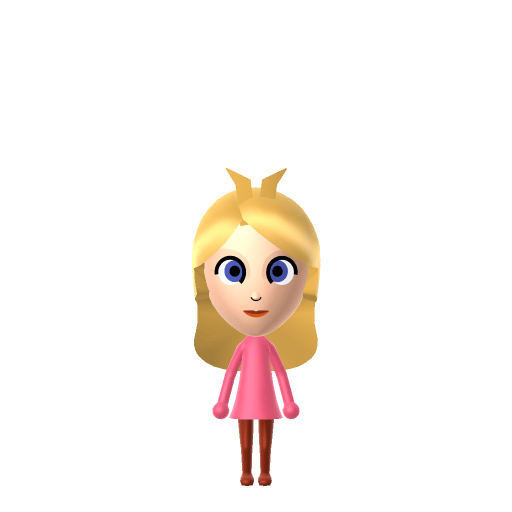
Princess Peach Mii for Tomodachi Life
Video Game Mii Idea

Princess Peach Mii for Tomodachi Life

The princess of the Mushroom Kingdom and a tough competitor.

#nintendo#mario-bros#princess#female

About the Princess Peach Mii

Character File

Princess Peach is the ruler of the Mushroom Kingdom in Nintendo's Mario franchise, introduced in Super Mario Bros. (1985) as Princess Toadstool. Created by Shigeru Miyamoto, she has appeared in the majority of Mario games as the franchise's main female lead.


Princess Peach Mii Quick Facts

Princess Peach Mii — cast at a glance

Voiced by
Samantha Kelly (2007–2024); Courtney Lin since 2025
In Tomodachi Life

Peach is gentle and warm, never sharp — after importing her into Tomodachi Life: Living the Dream, raise the pitch and keep the tone soft on LTD's voice sliders to match her airy delivery; those sliders are an LTD-exclusive Mii Maker option the Switch system Mii Maker doesn't have.

01 — Personality

Recommended personality for your Princess Peach Mii: Sweetie

Deeply empathetic and highly in tune with others' feelings. These Miis prioritize emotional awareness and caretaking above all else.In Tomodachi Life, set this Mii's sliders so Speech + Movement totals 0–3 and Thinking + Energy totals 12–15. See the full Sweetie guide →

Why this fitsPeach is portrayed as gentle and emotionally generous across the games — she writes letters of thanks, bakes cakes for Mario, and cares visibly for the Toads in her kingdom. That softness + low-aggression profile maps to Sweetie (low Speech + Movement, high Thinking + Energy).

02 — How to Make This Mii

How to Make a Princess Peach Mii in Tomodachi Life

To make a Princess Peach Mii in Tomodachi Life: Living the Dream, open Mii Maker and build a slender frame with long blonde hair, large blue eyes, and a gentle smile, then add her gold crown and dress her in the signature pink gown. The picker-by-picker walkthrough below works for both Nintendo Switch (LTD) and 3DS (original Tomodachi Life).

Use the system Mii Maker, then bring the Mii into Tomodachi Life: Living the Dream.

Body & Build

  1. 1
    Set gender to "Female".
  2. 2
    Set favorite color to pink.
  3. 3
    Set height to 52%.
  4. 4
    Set weight to 29%.

Face Shape & Skin

  1. 5
    Set facial features/wrinkles.

Hair

  1. 6
    Set hair style.
    ⋯
    ⋯
    Row 11 · Column 1
  2. 7
    Press the button to flip the hair.
  3. 8
    Set hair color in the expanded colors menu.

Eyes

  1. 9
    Set eyes.
    ⋯
    ⋯
    Row 3 · Column 1
  2. 10
    Set eye color in the expanded colors menu.
  3. 11
    Make eyes 1 larger.
  4. 12
    Rotate outer edge of the eyes all the way down, then rotate it 7 ticks back up.
  5. 13
    Move eyes 2 further apart.
  6. 14
    Move eyes 4 ticks down.

Eyebrows

  1. 15
    Set eyebrows.
    ⋯
    Row 1 · Column 3
  2. 16
    Set eyebrows color in the expanded colors menu.
  3. 17
    Make eyebrows 4 larger.
  4. 18
    Rotate outer edge of the eyebrows 5 ticks up.
  5. 19
    Move eyebrows 7 ticks up.

Nose

  1. 20
    Set nose.
    ⋯
    Row 1 · Column 2
  2. 21
    Make nose 4 smaller
  3. 22
    Move nose 3 ticks down.

Mouth

  1. 23
    Set mouth.
    ⋯
    Row 1 · Column 2
  2. 24
    Make mouth 2 smaller
  3. 25
    Move mouth 1 ticks down.

Facial Hair

  1. 26
    Make mustache 1 smaller
  2. 27
    Move mustache 3 ticks up.
  3. 28
    Set beard color in the expanded colors menu.

Glasses

  1. 29
    Set glasses color in the expanded colors menu.
  2. 30
    Make glasses 1 larger.
  3. 31
    Move glasses 3 ticks up.

Diagrams show where the option sits in the Mii Maker picker (4 columns, scroll to reach later rows). Editor menus differ slightly between regions and console revisions — if an exact option is missing, pick the closest one.

Mii Studio data code

Princess Peach's full appearance as a Mii Studio data string. Drop it into Mii rendering tools or community Mii editors that accept Studio codes (it's not a console import — for the game itself use the steps above).

020025030c070521041003070b080c02030000000807011105000707010e4204000214031302010e030007000a0c
03 — QR Code
Princess Peach Mii QR code for the Nintendo 3DS

Scan this Princess Peach Mii QR code

This is a 3DS-format Mii QR code generated from Princess Peach's Mii data. On a Nintendo 3DS, open Mii Maker → QR Code / Image Options → Scan QR Code and point the camera at it, then bring the Mii into the original Tomodachi Life. The Switch / Switch 2 has no camera, so it can't scan Mii QR codes — for Tomodachi Life: Living the Dream use the step-by-step instructions above (or the online Mii creator).

Download QR code

Get the Princess Peach Mii look

Build cheat-sheet

Feature → the move to make in Mii Maker

  1. Hair

    Long blonde hair with a soft fringe — pick the longest blonde style the editor offers.

  2. Eyes

    Large, friendly blue eyes — choose big round eyes in clear blue.

  3. Crown

    Her gold crown with red and blue gems goes on as an in-game accessory — Mii Maker has no crown part itself.

  4. Expression

    A gentle, warm smile — use a soft happy mouth rather than a wide grin.

  5. Outfit

    Her floor-length pink gown with puffy sleeves and long white gloves goes on as in-game clothing once she's imported into LTD.

Pair your Princess Peach Mii with

In Tomodachi Life

Recreate Mario, Bowser and Toad to stage the whole Mushroom Kingdom triangle — but Tomodachi Life: Living the Dream writes its own story. Romance runs on dating preferences, random crushes and zodiac/birthday compatibility rather than canon, so the game won't pair Peach with Mario for you (and might just as easily spark a crush on Bowser); you set the stage by housing them close and steering their conversations.

Princess Peach Mii on your island

Picture it

A Sweetie-type Peach is one of the easiest residents to love — warm, considerate and quick to think of others. LTD grows friendships through proximity and repeated conversations rather than personality scores, so place her centrally and recreate Mario, Bowser and Toad nearby for the full Mushroom Kingdom dynamic. The fun is that the game won't honour canon: your Peach might fall for Bowser, befriend Toad over everyone else, or end up Sweethearts with a resident from a completely different franchise — the chaos is part of the charm.

Life on your island

Did you know? — Princess Peach Mii

  1. Peach was introduced in the West as "Princess Toadstool" — "Peach" was always her Japanese name.

  2. The first Western use of the name "Peach" was in the English version of Yoshi's Safari (1993).

  3. Her full name is Princess Peach Toadstool, and she rules the Mushroom Kingdom.

  4. For years she and Toad shared a single voice actress — Samantha Kelly voiced both at the same time.

Princess Peach Mii — FAQ

How do I make Peach's crown and gown?

Mii Maker has no crown part, so add her gold crown and pink gown as in-game clothing and accessories after you import her into LTD. The Mii itself carries the long blonde hair, blue eyes and gentle smile.

Does Peach have a birthday I can set?

No official birthday exists for Peach, so pick whatever date you like in Mii Maker. LTD uses birthdays for zodiac compatibility and celebrations, so it's worth setting one even though it isn't canon.

What personality should I give a Princess Peach Mii?

Sweetie fits her best — set low Speech + Movement with high Thinking + Energy in the panel above. It matches her gentle, emotionally generous, thinks-of-others-first character.

Should I recreate Mario, Bowser and Toad too?

Yes — building all three stages the kingdom's central triangle. But LTD bonds form from time spent together rather than canon, so whether Peach ends up with Mario, with Bowser, or with someone else entirely is up to how you play.

Sources: WikipediaSuper Mario WikiCharacter facts are grounded in the source(s) above; Mii-Maker mapping is our own craft guidance.

More Miis like Princess Peach

Have your own Mii?

Paste a Mii Studio code or upload a Mii QR image into the QR code Mii decoder to get this same step-by-step recreation guide for it.

Want to design your own?

Build a Mii from scratch in the online Mii creator, then bring its code here for rebuild steps.