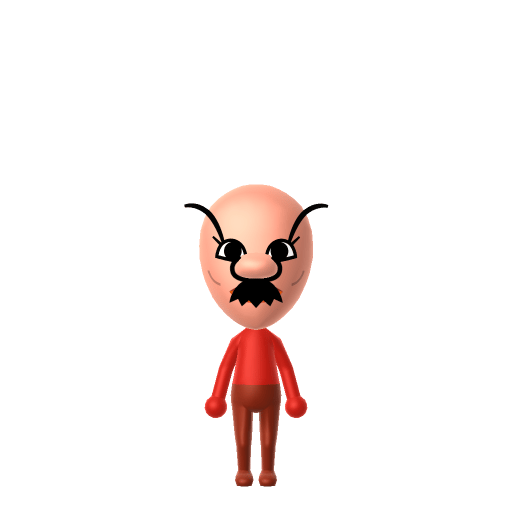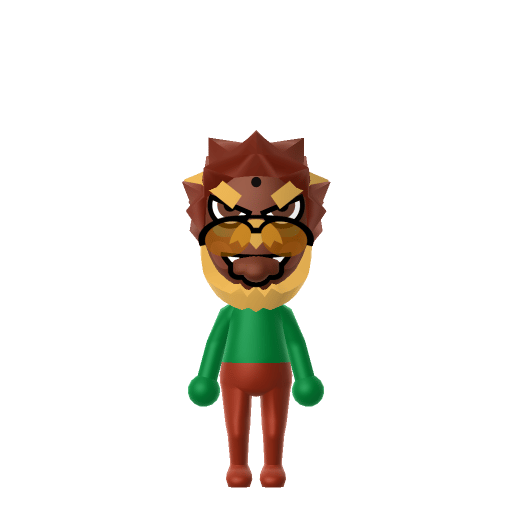
Bowser is the main antagonist of Nintendo's Mario franchise and the leader of the turtle-like Koopa race. Depicted as a fire-breathing monster with a tyrannical personality, his recurring goals are to kidnap Princess Peach and conquer the Mushroom Kingdom.

Bowser Mii for Tomodachi Life
King of the Koopas and Mario's greatest rival.
About the Bowser Mii
Bowser Mii Quick Facts
Bowser Mii — cast at a glance
- Voiced by
- Kenny James (2005–present)
Bowser is a fire-breathing tyrant with a booming roar — after importing him into Tomodachi Life: Living the Dream, drop the pitch as low as it goes and slow the speed on LTD's voice sliders for that menacing growl; those sliders are an LTD-exclusive Mii Maker option the Switch system Mii Maker doesn't have.
Recommended personality for your Bowser Mii: Rogue
Combines sharp intelligence with unshakeable confidence and independence. A lone wolf who plays by their own rules.In Tomodachi Life, set this Mii's sliders so Speech + Movement totals 8–11 and Thinking + Energy totals 0–3. See the full Rogue guide →
Why this fitsBowser actively schemes, leads an army, and pursues his goals with zero apology — high-volume, results-focused, willing to bend rules. That command-and-conquer profile fits Rogue (high Speech + Movement, low Thinking + Energy).
How to Make a Bowser Mii in Tomodachi Life
To make a Bowser Mii in Tomodachi Life: Living the Dream, open Mii Maker and build a heavy, broad frame with spiky red-orange hair, a wide angry brow, and a sharp fanged grin — Mii Maker can't draw his green shell, so the hair, brow, and intimidating jaw carry the look. The picker-by-picker walkthrough below works for both Nintendo Switch (LTD) and 3DS (original Tomodachi Life).
Use the system Mii Maker, then bring the Mii into Tomodachi Life: Living the Dream.
Body & Build
- 1Set gender to "Male".
- 2Set favorite color to green.
- 3Set height to 77%.
- 4Set weight to 100%.
Face Shape & Skin
- 5Set face/skin color.
- 6Set makeup.
Hair
- 7Set hair style.⋯⋯Row 3 · Column 6
- 8Press the button to flip the hair.
- 9Set hair color in the expanded colors menu.
Eyes
- 10Set eyes.⋯⋯Row 8 · Column 2
- 11Set eye color in the expanded colors menu.
- 12Make eyes 3 larger.
- 13Rotate outer edge of the eyes all the way down, then rotate it 5 ticks back up.
- 14Move eyes 2 ticks up.
Eyebrows
- 15Set eyebrows.⋯Row 1 · Column 3
- 16Set eyebrows color in the expanded colors menu.
- 17Make eyebrows 4 larger.
- 18Rotate outer edge of the eyebrows 1 ticks up.
- 19Move eyebrows 3 further apart.
- 20Move eyebrows 3 ticks up.
Nose
- 21Set nose.⋯Row 2 · Column 5
- 22Make nose 4 larger.
- 23Move nose 6 ticks down.
Mouth
- 24Set mouth.⋯⋯Row 4 · Column 5
- 25Make mouth 4 larger.
- 26Move mouth 1 ticks up.
Facial Hair
- 27Set mustache type.⋯Row 1 · Column 2
- 28Make mustache 4 larger.
- 29Move mustache 9 ticks up.
- 30Set beard type.⋯Row 2 · Column 1
- 31Set beard color in the expanded colors menu.
Glasses
- 32Set glasses type.⋯⋯Row 3 · Column 5
- 33Set glasses color in the expanded colors menu.
- 34Move glasses 2 ticks down.
Beauty Mark
- 35Turn mole on.
- 36Make mole 4 larger.
- 37Move mole 6 ticks to the right.
- 38Move mole 20 ticks up.
Diagrams show where the option sits in the Mii Maker picker (4 columns, scroll to reach later rows). Editor menus differ slightly between regions and console revisions — if an exact option is missing, pick the closest one.
Mii Studio data code
Bowser's full appearance as a Mii Studio data string. Drop it into Mii rendering tools or community Mii editors that accept Studio codes (it's not a console import — for the game itself use the steps above).
07037f030a05072b020a030707080c05070506000004001104060c02011f62080108000313080e0c08010108070f
Scan this Bowser Mii QR code
This is a 3DS-format Mii QR code generated from Bowser's Mii data. On a Nintendo 3DS, open Mii Maker → QR Code / Image Options → Scan QR Code and point the camera at it, then bring the Mii into the original Tomodachi Life. The Switch / Switch 2 has no camera, so it can't scan Mii QR codes — for Tomodachi Life: Living the Dream use the step-by-step instructions above (or the online Mii creator).
Download QR codeWhat Mii Maker can't do for your Bowser Mii
- Mii Maker can’t
His spiked green shell
Closest you can getMii Maker has no shell part, so it can't be reproduced. This is an inspired-by, human-form Bowser — the spiky hair and fierce face carry the likeness instead.
- Mii Maker can’t
Horns, snout and turtle muzzle
Closest you can getMiis have human faces only, so the horns and reptilian snout can't be built. Lean on the heavy brow and fanged grin to keep him intimidating.
- Mii Maker can’t
Spiked collar, cuffs and claws
Closest you can getNone of these have Mii Maker equivalents — a dark, heavy in-game outfit after import is the closest you'll get to the armour-plated look.
Get the Bowser Mii look
Build cheat-sheet
Feature → the move to make in Mii Maker
- Hair
His spiky red-orange mane is the most recognisable cue — pick the spikiest hairstyle in the brightest red-orange the palette allows.
- Brow
A heavy, angry, slanted brow — choose the thickest, most downturned eyebrows for a permanent scowl.
- Mouth
A wide, fanged, aggressive grin — use the biggest sharp-toothed or open mouth the editor offers.
- Build
Huge and broad — max the body slider toward heavier and taller.
Pair your Bowser Mii with
Princess Peach
The Mushroom Kingdom ruler he's infatuated with and routinely kidnaps as part of his schemes.
Mario
His arch-nemesis — the hero who foils his every plot to seize Peach and the kingdom.
Recreate Peach and Mario to stage the eternal rivalry — but Tomodachi Life: Living the Dream writes its own story. Friendships grow from proximity and shared time, and romance runs on dating preferences, random crushes and zodiac/birthday compatibility, so the game won't make Bowser the villain (or pair him with Peach) for you; ironically, your scheming Bowser might become the island's gentlest Best Friend.
Did you know? — Bowser Mii
Bowser was originally designed as an ox, and only became a turtle after a colleague said the sketch looked more turtle than ox.
His Japanese name, Kuppa, is named after the Korean dish gukbap — Miyamoto picked it from a list that also included bibimbap and yukhoe.
The English name "Bowser" has no confirmed official origin — Nintendo has never documented who coined it.
His son Bowser Jr. wasn't introduced until 2002's Super Mario Sunshine — 17 years after Bowser's debut.
Bowser Mii on your island
A Rogue-type Bowser is the island's loud, rule-bending force of nature — high-volume, results-focused and unbothered by what anyone thinks. LTD grows bonds through proximity and repeated conversations rather than personality scores, so house him near Peach and Mario to recreate the rivalry, but expect the unexpected: the game might turn its biggest villain into a beloved neighbour, or spark a one-sided crush nobody saw coming. With up to 70 residents, there's room for the whole Koopa-vs-kingdom drama to unfold its own way.
Bowser Mii — FAQ
Can I make Bowser's shell and horns in Mii Maker?
No — Mii Maker has no shell, horn or snout parts, so his turtle anatomy can't be reproduced. This guide builds an inspired-by, human-form Bowser where spiky red-orange hair, a heavy brow and a fanged grin carry the menace.
How do I get his scary look across?
Lean on the face: the spikiest red-orange hair, the thickest downturned eyebrows for a scowl, and the widest fanged grin. Make him big and broad with the body slider, then add a dark, heavy in-game outfit after import.
What personality should I give a Bowser Mii?
Rogue fits him best — set high Speech + Movement with low Thinking + Energy in the panel above. It matches his loud, scheming, conquer-the-kingdom drive.
Should I recreate Peach and Mario too?
Yes — build Peach and Mario to stage the classic rivalry. But LTD bonds form from time spent together rather than canon, so your Bowser might befriend Mario, fall for Peach, or surprise you completely — that unpredictability is half the fun.
Sources: WikipediaCharacter facts are grounded in the source(s) above; Mii-Maker mapping is our own craft guidance.
Have your own Mii?
Paste a Mii Studio code or upload a Mii QR image into the QR code Mii decoder to get this same step-by-step recreation guide for it.
Want to design your own?
Build a Mii from scratch in the online Mii creator, then bring its code here for rebuild steps.